50 Cloud Light Gobo Alpha Pack Vol.04 | 4K Smart Gobo Material System for Blender
 Dilara Tok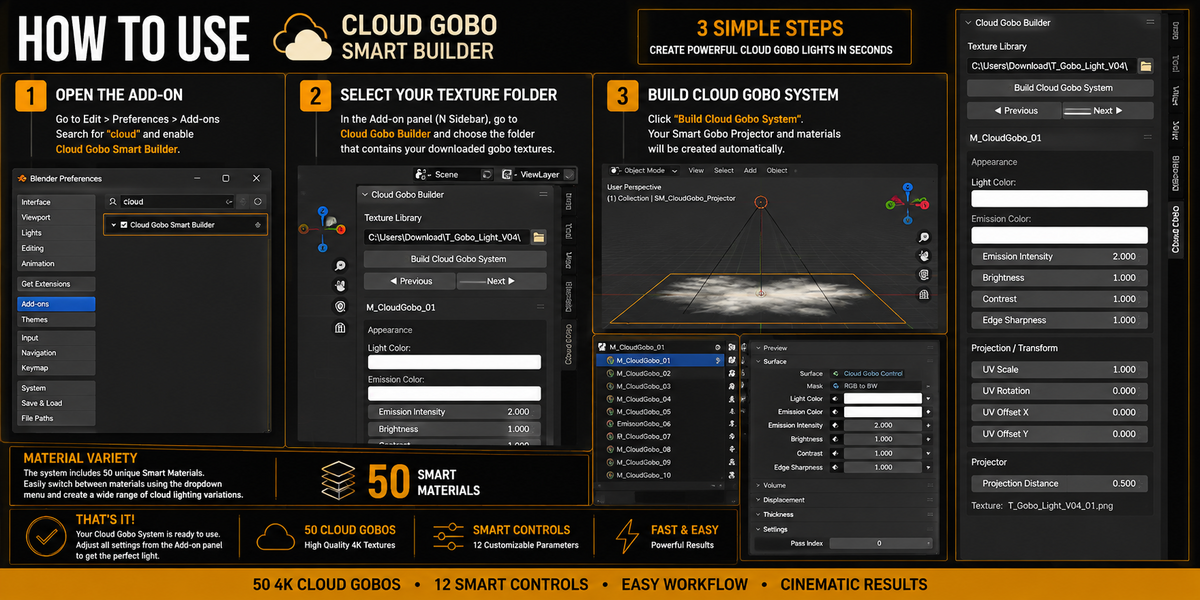


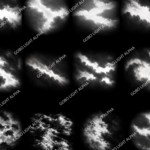
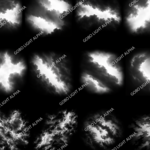
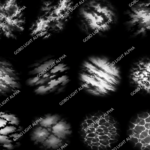
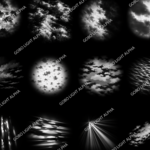
CLOUD GOBO SMART BUILDER
50 Cloud Light Gobo Alpha Pack Vol.04
Smart Gobo Material System for Blender
Thank you for purchasing Cloud Gobo Smart Builder – Vol.04.
This package includes 50 high-resolution 4K Cloud Gobo textures together with a Blender add-on designed to automatically create ready-to-use Cloud Gobo materials and a customizable projection system.
The goal of the tool is simple:
Select your texture folder → Build the system → Start creating atmospheric lighting.
PACKAGE CONTENTS
The package includes:
50 Unique Cloud Gobo Textures
4096 × 4096 px Resolution
Cloud Gobo Smart Builder Add-on
50 Automatically Generated Smart Materials
Smart Gobo Projector
12 Customizable Controls
Ready-to-Use Blender Workflow
INSTALLATION
Step 1 – Install the Add-on
Open Blender and navigate to:
Edit → Preferences → Add-ons
Choose:
Install from Disk
Select the included Cloud Gobo Smart Builder .py file.
After installation, search for:
Cloud Gobo Smart Builder
Enable the add-on using the checkbox.
The installation only needs to be completed once.
OPENING CLOUD GOBO SMART BUILDER
Return to the 3D Viewport.
Press:
N
to open Blender's Sidebar.
Select the:
Cloud Gobo
tab.
The Cloud Gobo Builder interface will appear.
CREATING YOUR GOBO SYSTEM
Step 1 – Select the Texture Library
Inside the Cloud Gobo Builder panel, locate:
Texture Library
Click the folder icon and select the folder containing the included Cloud Gobo textures.
The folder should contain the downloaded 4K gobo image files.
Step 2 – Build the System
Click:
Build Cloud Gobo System
The add-on will automatically process the textures and create the Cloud Gobo setup.
The system automatically generates:
Smart Gobo Projector
Cloud Gobo Materials
Master Shader Setup
Required Nodes
Projection Controls
No manual material setup is required.
SWITCHING BETWEEN GOBOS
The package contains 50 unique Cloud Gobo variations.
Use:
Previous
and
Next
inside the Cloud Gobo Builder panel to quickly cycle between the generated materials.
You can also select the generated materials directly from Blender's Material Properties.
Generated materials are named:
M_CloudGobo_01
M_CloudGobo_02
M_CloudGobo_03
and continue through the complete texture collection.
SMART GOBO CONTROLS
Cloud Gobo Smart Builder provides 12 customizable controls.
These controls allow you to create multiple lighting variations from the same gobo texture.
APPEARANCE
Light Color
Controls the primary color/tint of the gobo.
Use this to create warm sunlight, cool moonlight, colored atmospheric effects, or stylized lighting.
Emission Color
Controls the color of the emission component of the material.
This can be used independently from the main Light Color to create more stylized results.
Emission Intensity
Controls the strength of the emission effect.
Increase the value for brighter and more pronounced results.
Reduce it for softer and more subtle projections.
Brightness
Controls the overall brightness of the gobo pattern.
Use this parameter to quickly adjust the visibility and intensity of the selected texture.
Contrast
Controls the difference between the bright and dark areas of the gobo.
Lower values create softer patterns.
Higher values create stronger separation and more dramatic lighting.
Edge Sharpness
Controls the definition of the gobo pattern.
Lower values produce softer transitions.
Higher values create sharper and more defined details.
TEXTURE
Gobo Texture
Defines the Cloud Gobo texture used by the material.
The Smart Builder automatically assigns the included textures when generating the materials.
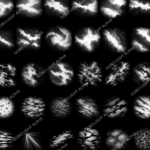
The package includes 50 different 4K gobo textures.
PROJECTION / TRANSFORM
UV Scale
Controls the scale of the gobo pattern.
Increase or decrease this value to change the apparent size of the cloud formation.
UV Rotation
Rotates the gobo pattern.
This allows the same texture to produce significantly different compositions.
UV Offset X
Moves the gobo texture horizontally.
UV Offset Y
Moves the gobo texture vertically.
UV Offset X and Y can be combined to precisely reposition the cloud pattern.
Projection Distance
Controls the distance of the Smart Gobo Projector.
Adjust this value depending on the scale and layout of your scene.
CREATING VARIATIONS
Each gobo can produce many different results.
Try combining:
Different Gobo Textures
Scale
Rotation
Position
Brightness
Contrast
Edge Sharpness
Light Color
Emission Settings
For example, the same texture can be used as a subtle overcast pattern or transformed into a strong cinematic cloud breakup by changing its scale, contrast, brightness, and rotation.
RECOMMENDED USES
Cloud Gobo Smart Builder is designed for:
Environment Art
Cinematic Lighting
Architectural Visualization
Interior Lighting
Exterior Lighting
Forest Environments
Urban Environments
Churches & Cathedrals
Abandoned Environments
Fantasy Scenes
Horror Environments
Post-Apocalyptic Scenes
Concept Art
Atmospheric Lighting
TIPS
Use Scale to Avoid Repetition
Changing UV Scale can dramatically alter the appearance of a gobo and helps prevent recognizable repetition.
Rotate Your Gobos
Even a small amount of rotation can make the same texture feel like a completely different cloud formation.
Adjust Contrast for the Environment
For natural daylight, moderate contrast generally produces softer results.
For dramatic or stylized scenes, increasing contrast can create stronger cloud patterns.
Experiment with Color
Cloud gobos do not have to remain white.
Try subtle warm tones for sunset lighting or cooler tones for night and overcast environments.
Combine Multiple Variations
Different gobo setups can be combined to create more complex atmospheric compositions.
TEXTURE INFORMATION
Number of Textures: 50
Resolution: 4096 × 4096 px
Texture Type: Grayscale Cloud Gobo / Projection Mask
Material Variations: 50
Customizable Controls: 12
Software: Blender
QUICK START
For the fastest setup:
1. Install and enable Cloud Gobo Smart Builder
2. Open the Cloud Gobo panel from the N Sidebar
3. Select the included texture folder
4. Click “Build Cloud Gobo System”
5. Choose your preferred gobo
6. Adjust the Smart Controls
That's it.
Your Cloud Gobo system is ready to use.
IMPORTANT
Keep the original texture files included with the product.
If the texture folder is moved after building the system, Blender may need the new texture location to be specified.
When transferring a Blender project between computers, make sure the required textures are included with the project or packed into the .blend file.
CLOUD GOBO SMART BUILDER – VOL.04
50 4K Cloud Gobos • 50 Smart Materials • 12 Smart Controls • Fast Blender Workflow
Create, customize, and iterate on atmospheric cloud lighting without rebuilding your material setup every time.
Have questions about this product?
Login to message
| Published | about 2 months ago |
| Blender Version | 2.8 - 5.2 |
| Extension Type | N/A |
| Render Engine Used | Cycles, Eevee |
| License | GPL |
Discover more products like this
cloud shadows Lighting cloud gobo procedural material Smart Material light gobo cinematic-lighting blender addon light projection gobo 4k textures Environment Lighting