Addonaudit - Scan .Blend Files For Missing Addon Dependencies
 Salman Naseem


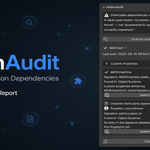
What does AddonAudit actually do?
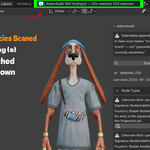
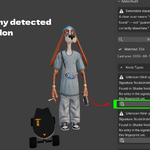
It scans the currently open .blend file's data and reports detectable signs that a third-party addon is required for the file to work correctly: non-core node types, driver calls to non-core functions, addon-namespaced custom properties, and broken Geometry Nodes modifier references.
Does AddonAudit tell me which addon I'm missing?
No, and AddonAudit says so directly in the panel every time. A clean scan means "no known dependency pattern found," not "guaranteed to work on another machine." Some addons leave zero trace in the file itself and cannot be detected by any scanner.
Is a clean scan a guarantee the file will open correctly elsewhere?
No, and AddonAudit says so directly in the panel every time. A clean scan means "no known dependency pattern found," not "guaranteed to work on another machine." Some addons leave zero trace in the file itself and cannot be detected by any scanner.
Does AddonAudit need an internet connection?
No. The signature database ships bundled with the addon and all matching happens offline. Version 1 makes no network calls.
Will AddonAudit install the missing addons for me?
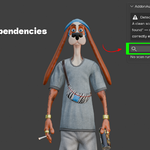
No, and it never will. Auto-installing third-party code based on a heuristic scan is a real trust and security risk. AddonAudit gives you a Search for this addon button that opens a web search so you can find and install it yourself.
What addons does the signature database currently cover?
Naming conventions from Auto-Rig Pro, BoxCutter, Hard Ops, MESHmachine, DECALmachine, Geo-Scatter (Scatter5), Human Generator 3, KIT OPS, Sverchok, Animation Nodes, TexTools, Botaniq, Cablerator, Traffiq, Physical Starlight and Atmosphere, Real Sky, MACHIN3tools, and Rigify (filtered out since it ships with Blender). The database is a single JSON file, so coverage grows without needing an addon update.
Can I add my own addon signatures?
Yes. data/known_signatures.json is a documented plain JSON file. Open a file that uses the addon you want to add, note the raw signature AddonAudit reports as "Unknown," and add an entry with that pattern. No code change or addon update required.
What is the Custom Signature Database preference for?
It lets a studio point AddonAudit at an additional JSON file, in the same format as the bundled database, for in-house or proprietary tools. It's merged with the bundled database automatically at scan time.
Why does AddonAudit flag Rigify separately from everything else?
Rigify ships with every Blender install and only needs to be enabled, not installed. AddonAudit still detects its fingerprints internally, but filters them out of results since they're never a missing dependency.
What does "possible / unconfirmed" mean on a finding?
It means the custom-properties detector, which is inherently a guess-based detector by design, found a naming pattern that looks addon-namespaced but has no confirmed match in the signature database. It's labeled explicitly rather than stated as a confident fact.
Can AddonAudit detect addons that only add menu items or shortcuts?
No. If an addon never writes a custom property, a driver call, a node type, or a node-group reference into the saved file, there's nothing in the file for any scanner to find. This is a hard limit of scanning file content, not a gap on the roadmap.
Can AddonAudit detect addons that only add menu items or shortcuts?
No. If an addon never writes a custom property, a driver call, a node type, or a node-group reference into the saved file, there's nothing in the file for any scanner to find. This is a hard limit of scanning file content, not a gap on the roadmap.
12. Does AddonAudit scan linked libraries too? Yes. Findings from linked data are labeled with the source library's name, so you know whether the dependency belongs to the current file or to the library it came from.
Does AddonAudit scan linked libraries too?
Yes. Findings from linked data are labeled with the source library's name, so you know whether the dependency belongs to the current file or to the library it came from.
Does AddonAudit depend on any other addon?
No. It's fully standalone with no dependency on any other addon or external package.
How do I export a report of my scan results?
Save your file first, then click Export Report. AddonAudit writes a plain .txt file named _addonaudit_report.txt next to your saved .blend, listing every finding by category.
Can I scan a file that isn't saved yet?
The scan itself works on any open file. Exporting a report requires the file to be saved first, since the report is written next to the .blend on disk.
Will AddonAudit slow down my scene or file?
No. It only runs when you click Scan for Addon Dependencies, reads existing data, and makes no changes to your scene.
Does a matched finding tell me which version of the addon I need?
No. A match confirms an addon is likely needed, not which version. Addon behavior and naming conventions can change between versions, so treat a match as a starting point, not a version guarantee.
oes a matched finding tell me which version of the addon I need?
Does a matched finding tell me which version of the addon I need? No. A match confirms an addon is likely needed, not which version. Addon behavior and naming conventions can change between versions, so treat a match as a starting point, not a version guarantee.
Is AddonAudit useful if I'm not part of a studio pipeline?
Yes. Freelancers checking client files, marketplace buyers sanity-checking a purchase, and solo artists archiving old projects all use it the same way a studio does, just without the custom signature database step.
Where does AddonAudit's panel live in Blender?
In the 3D Viewport's N-panel, under an "AddonAudit" tab.
$9
Have questions about this product?
Login to message
| Blender Extension Compatible | Yes |
| Published | about 2 months ago |
| Blender Version | 3.3 - 5.2 |
| Extension Type | Add-on |
| Render Engine Used | Cycles, Eevee |
| License | GPL |

Discover more products like this
Scene pipeline diagnostics Blender Extensions Addon Dependency File Audit qa tool studio pipeline Compatibility Check Render Farm