Advanced Bevel
 Tachyon Studio








It bevels edges with Blender's own bevel, then turns every corner the bevel runs around into a handle you can shape before you confirm. Select edges, press Shift + Alt + B (or pick it from the toolbar), click once, and each corner can take its own depth, spread and vertex count — with the profile's segments, shape and measurement live — and nothing committed until you press Enter.
No. Blender's own is untouched and still on Ctrl + B. This is a separate tool on Shift + Alt + B, and Blender's own also sits on the Shift+Alt+Y menu as Blender Bevel, so you can reach either from one place.
No — the inset, and Edit Corners with it, are their own add-on, Advanced Inset, sold separately. The two install side by side without clashing, and neither needs the other.
3.3 through 5.2, from one package. It installs as a modern extension on 4.2 and newer, and as a classic add-on on 3.3 – 4.1. Two things are declined on 3.3 specifically — see the question about that below.
Yes. There is no native code and nothing platform-specific in it.
3D Viewport sidebar — press N — then the Unreal Tools tab, shared with the other Tachyon Studio add-ons when they are installed. The panel is optional: the tool is on the toolbar (T) right after Blender's Bevel tool, in the Edge menu, and on its own shortcut.
Tachyon Advanced Bevel, so it sits with the other Tachyon Studio tools when you are looking for it.


The bevel's inner edge on each face is a parallel offset of that face's outline. Around a rounded corner every offset direction points at the arc's centre, so the corner tightens as the width grows, lands on a single point when the width reaches its radius, and turns inside out past that.

In Keep Shape a corner keeps its spacing whatever the width. Classic is Blender's own offset, held just short of collapsing.
No. An edge with no corner bevels exactly as Blender's bevel does, vertex for vertex, and a face bevelled only along part of its outline keeps Blender's answer. Even where the editor takes over, a corner stays exactly where Blender put it until you give it a spread or a vertex count.

Each bevelled run is read for its own corners: a vertex that turns sharply is a corner, and a long straight ends whatever corner ran into it. [ and ] move how sharp a turn has to be. That only decides where the handles are — the geometry is Blender's at every setting.
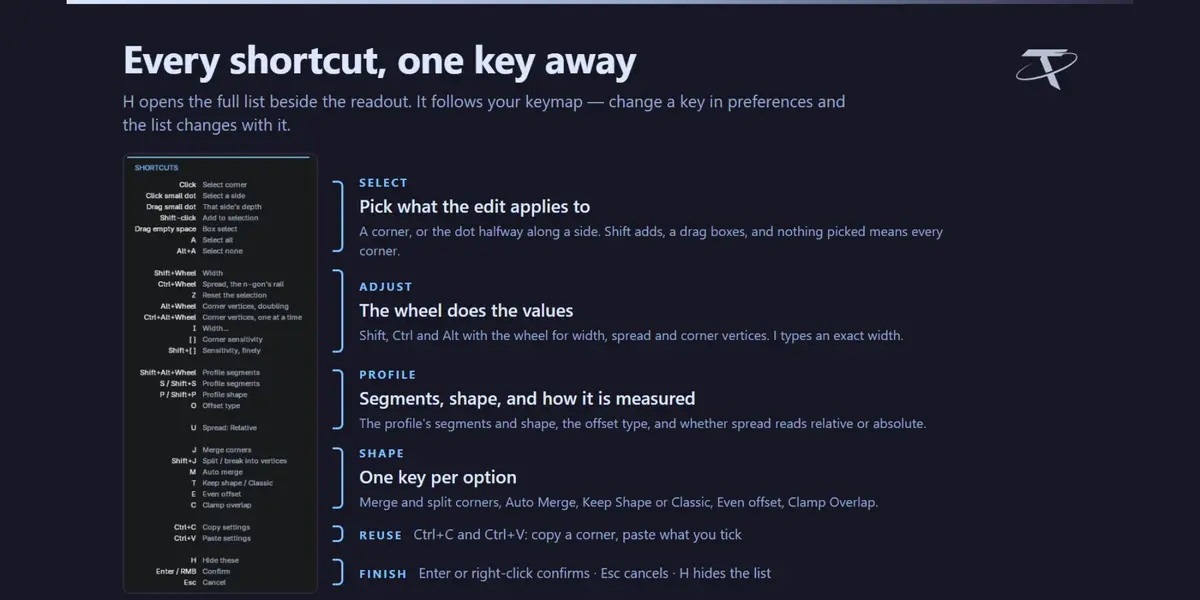
Yes. Shift + J takes a run apart into a corner per vertex, and J merges any of them back into one. Neither moves anything; both are structure. Shaping one corner then hands only that corner to the solver.

S and Shift + S, or Shift + Alt + Wheel, change the profile's segment count — 1 is a chamfer. P and Shift + P change its shape — 0.5 is a circular arc, lower flatter, higher squarer. O cycles how the amount is measured: Offset along the faces, Width of the bevel face, or Depth from the original edge — the same three ways Blender's own bevel offers.
Yes. Every vertex across the bevel — not just the rail on either face — is laid out afresh along the profile between the two rails, so a corner pushed deeper or wider keeps a clean profile rather than bunching its rows.

A rounded corner, yes: Alt + Wheel doubles or halves its vertex count and Ctrl + Alt + Wheel changes it one at a time, with the new vertices on the fitted circle. A single-vertex corner cannot be rounded by the bevel — that is the inset's Edit Corners, in Advanced Inset.

Ctrl + Wheel widens or tightens the corner along the n-gon's own rail, about the point where its straight edges would meet, so the tangent points stay on those edges. Select All deliberately picks that rail and not the neighbouring faces' boundaries on the far side of the strip.
Not yet. Chains and loops of edges work, each with a face on both sides, but three or more bevelled edges meeting at one vertex make a vertex mesh this add-on does not model. It is declined with a message rather than producing something wrong.

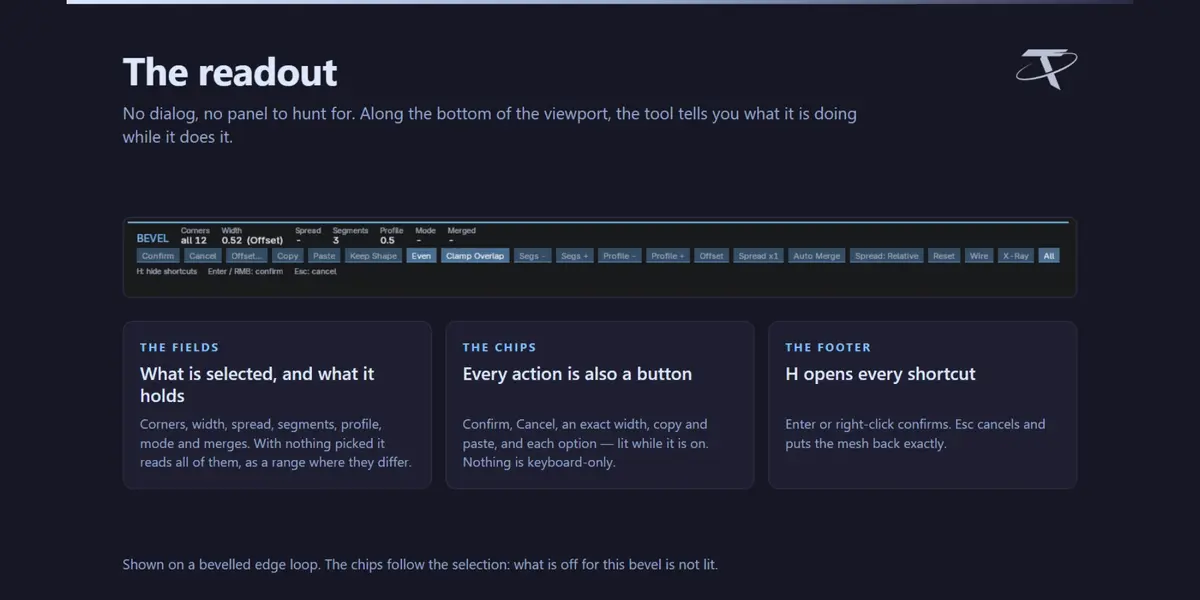
Yes — Ctrl + C opens a list of what the selection carries, including the profile as one row, each with its value beside a tick box. Ctrl + V pastes only what you ticked onto whatever is selected now, and the clipboard carries from one bevel to the next.
Deliberate — the bare wheel is left to Blender, as everywhere else. Shift + Wheel steps the width, Ctrl + Wheel is spread and Alt + Wheel is corner vertices.
Shift+Alt+T is Advanced Inset's menu. Giving each add-on its own key means both can be installed without one shortcut opening two menus. Both are editable in the add-on preferences.
Both of them, in Blender's own keymap editor, reached from the add-on preferences. There is a Restore button if you want the defaults back. The single-letter keys inside the editor are editable there too.
You are on Blender 3.3, where both are declined because that build's bmesh is intermittently fatal at the Python teardown which follows such operator sequences — or the corner is a single vertex, which a bevel cannot round.
Because it would re-run the bevel on geometry that is already bevelled and discard every per-corner edit. Ctrl + Z undoes the whole thing in one step, and bpy.ops.tbv.bevel(thickness=...) still works from a script.
No. It opens no sockets, sends no telemetry and checks no licence. The Documentation and Discord buttons hand a URL to your default browser and nothing more.
Its own preferences, saved by Blender, and a one-line marker in Blender's config folder recording which version last showed its welcome dialog, so a reinstall greets you again. Nothing else, nowhere else.
GPL-3.0-or-later, the same as Blender itself.
No. It is entirely standalone. It shares its sidebar tab with the other Tachyon Studio add-ons when they happen to be installed, and that is the whole of the relationship.
-
$7.49 $9.99
For 1 person (1 seat). Commercial use included.
-
$29.97 $39.96
For a team of up to 6 people (6 seats). Commercial use included.
-
$74.93 $99.90
For a studio of up to 20 people (20 seats). Commercial use included. Need more than 20 seats? Contact us directly.
 Included
Includes 12 months of
- Support from Tachyon Studio
- Product updates
Extend this product’s Support Period +12 months: 50% of product price
Have questions before purchasing?
Login to message