Advanced Vertex Paint

Tachyon Studio in Modeling

Blender 5.3 — 13 November 2026

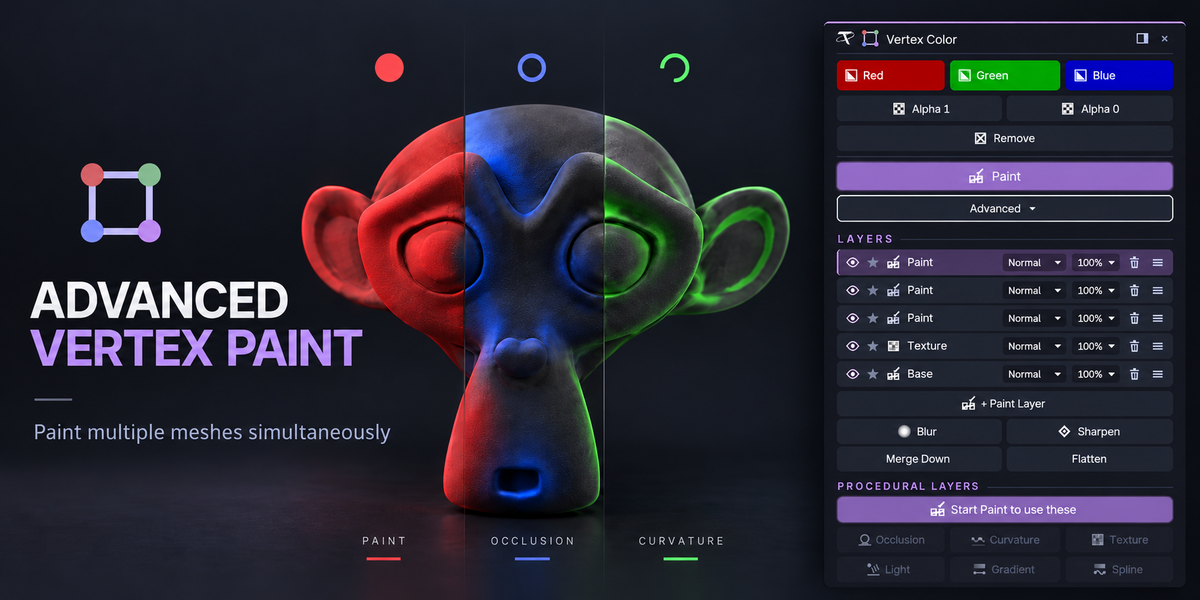
Advanced Vertex Paint Basic now officially supports Blender 3.3 to 5.3. One zip covers them all: an extension on 4.2+, a classic add-on on 3.3 – 4.1.

The add-on is unchanged: this is the same 1.2.0 build, tested on Blender 5.3 as an add-on and as an extension. If 1.2.0 already works for you, there is nothing to reinstall.
CHANGELOG

Advanced Vertex Paint

Every release, newest first

1.2.0 — 18 October 2026

Pick any color you like, not just red, green and blue, and let the card explain itself: rest the pointer on any button to see what it does. Asked for in a review — thank you.

Added

Any color, alpha included. Beside Red, Green and Blue there is now a Custom button that shows your own color, and an eyedropper that opens a color picker: drag the wheel, set the brightness and the Alpha, or click the swatch to type exact values or a hex code. Sixty percent red and forty percent green? Done. Custom fills the selection with it, in Edit Mode or Object Mode, on every mesh at once like the other buttons. Your color is saved with the file.

Pick a color, fill with it

While painting, Custom sets the brush. Change the color in the picker while you paint with it and the brush follows.

Your own two colors in every gradient. Gradient and Spline get Start and End swatches: click one and pick exactly the color for that end of the line, see-through included. Red, Green and Blue switch back to the presets, and Reverse works with both.

Start and End: any two colors, alpha too

Pro: a Custom color for the procedural layers. Occlusion, Curvature, Texture and Light each get a Custom swatch next to their Red, Green and Blue. On a layer its alpha sets how strongly it covers. The color is stored with the layer, so Edit brings it back; layers made before this update reopen on their presets.

Rest on a button: see what it does. Every control on the card now explains itself. Leave the pointer on one for a moment and a box opens beside the card with a sentence and a small looping animation of it happening to a mesh — Fill, Paint, the gradient settings, every layer control and procedural tool, all seventy-six of them. Docked in the sidebar, it opens beside the sidebar.

Explanations beside the card

Getting Started. The first time, the card shows the three steps at the top: select meshes, click a color, or press Paint. The step you are on lights up. Got it hides them for good.

Getting Started on the card

New preferences under Preferences ▸ Add-ons ▸ Advanced Vertex Color ▸ Help: Getting Started (brings the steps back), Explanations (on or off), Animated Drawings (off leaves just the sentence) and Explanation Delay.

Fixed

In-between colors fill exactly. A color that isn't pure red, green or blue now lands as you picked it, in Edit Mode and Object Mode, on byte and float color attributes alike. Pure red, green and blue were never affected.

Nothing else changes: your colors, layers and settings carry over as they are.

GPL-3.0-or-later · Copyright 2026 Tachyon Studio
A Blender add-on. It needs no engine, no external tool and no network access.

Blender 5.3 — 13 November 2026

Advanced Vertex Paint Basic now officially supports Blender 3.3 to 5.3. One zip covers them all: an extension on 4.2+, a classic add-on on 3.3 – 4.1.

The add-on is unchanged: this is the same 1.2.0 build, tested on Blender 5.3 as an add-on and as an extension. If 1.2.0 already works for you, there is nothing to reinstall.
CHANGELOG

Advanced Vertex Paint

Every release, newest first

1.2.0 — 18 October 2026

Pick any color you like, not just red, green and blue, and let the card explain itself: rest the pointer on any button to see what it does. Asked for in a review — thank you.

Added

Any color, alpha included. Beside Red, Green and Blue there is now a Custom button that shows your own color, and an eyedropper that opens a color picker: drag the wheel, set the brightness and the Alpha, or click the swatch to type exact values or a hex code. Sixty percent red and forty percent green? Done. Custom fills the selection with it, in Edit Mode or Object Mode, on every mesh at once like the other buttons. Your color is saved with the file.

Pick a color, fill with it

While painting, Custom sets the brush. Change the color in the picker while you paint with it and the brush follows.

Your own two colors in every gradient. Gradient and Spline get Start and End swatches: click one and pick exactly the color for that end of the line, see-through included. Red, Green and Blue switch back to the presets, and Reverse works with both.

Start and End: any two colors, alpha too

Pro: a Custom color for the procedural layers. Occlusion, Curvature, Texture and Light each get a Custom swatch next to their Red, Green and Blue. On a layer its alpha sets how strongly it covers. The color is stored with the layer, so Edit brings it back; layers made before this update reopen on their presets.

Rest on a button: see what it does. Every control on the card now explains itself. Leave the pointer on one for a moment and a box opens beside the card with a sentence and a small looping animation of it happening to a mesh — Fill, Paint, the gradient settings, every layer control and procedural tool, all seventy-six of them. Docked in the sidebar, it opens beside the sidebar.

Explanations beside the card

Getting Started. The first time, the card shows the three steps at the top: select meshes, click a color, or press Paint. The step you are on lights up. Got it hides them for good.

Getting Started on the card

New preferences under Preferences ▸ Add-ons ▸ Advanced Vertex Color ▸ Help: Getting Started (brings the steps back), Explanations (on or off), Animated Drawings (off leaves just the sentence) and Explanation Delay.

Fixed

In-between colors fill exactly. A color that isn't pure red, green or blue now lands as you picked it, in Edit Mode and Object Mode, on byte and float color attributes alike. Pure red, green and blue were never affected.

Nothing else changes: your colors, layers and settings carry over as they are.

GPL-3.0-or-later · Copyright 2026 Tachyon Studio
A Blender add-on. It needs no engine, no external tool and no network access.

Blender 5.3 — 13 November 2026

Advanced Vertex Paint Basic now officially supports Blender 3.3 to 5.3. One zip covers them all: an extension on 4.2+, a classic add-on on 3.3 – 4.1.

The add-on is unchanged: this is the same 1.2.0 build, tested on Blender 5.3 as an add-on and as an extension. If 1.2.0 already works for you, there is nothing to reinstall.
CHANGELOG

Advanced Vertex Paint

Every release, newest first

1.2.0 — 18 October 2026

Pick any color you like, not just red, green and blue, and let the card explain itself: rest the pointer on any button to see what it does. Asked for in a review — thank you.

Added

Any color, alpha included. Beside Red, Green and Blue there is now a Custom button that shows your own color, and an eyedropper that opens a color picker: drag the wheel, set the brightness and the Alpha, or click the swatch to type exact values or a hex code. Sixty percent red and forty percent green? Done. Custom fills the selection with it, in Edit Mode or Object Mode, on every mesh at once like the other buttons. Your color is saved with the file.

Pick a color, fill with it

While painting, Custom sets the brush. Change the color in the picker while you paint with it and the brush follows.

Your own two colors in every gradient. Gradient and Spline get Start and End swatches: click one and pick exactly the color for that end of the line, see-through included. Red, Green and Blue switch back to the presets, and Reverse works with both.

Start and End: any two colors, alpha too

Pro: a Custom color for the procedural layers. Occlusion, Curvature, Texture and Light each get a Custom swatch next to their Red, Green and Blue. On a layer its alpha sets how strongly it covers. The color is stored with the layer, so Edit brings it back; layers made before this update reopen on their presets.

Rest on a button: see what it does. Every control on the card now explains itself. Leave the pointer on one for a moment and a box opens beside the card with a sentence and a small looping animation of it happening to a mesh — Fill, Paint, the gradient settings, every layer control and procedural tool, all seventy-six of them. Docked in the sidebar, it opens beside the sidebar.

Explanations beside the card

Getting Started. The first time, the card shows the three steps at the top: select meshes, click a color, or press Paint. The step you are on lights up. Got it hides them for good.

Getting Started on the card

New preferences under Preferences ▸ Add-ons ▸ Advanced Vertex Color ▸ Help: Getting Started (brings the steps back), Explanations (on or off), Animated Drawings (off leaves just the sentence) and Explanation Delay.

Fixed

In-between colors fill exactly. A color that isn't pure red, green or blue now lands as you picked it, in Edit Mode and Object Mode, on byte and float color attributes alike. Pure red, green and blue were never affected.

Nothing else changes: your colors, layers and settings carry over as they are.

GPL-3.0-or-later · Copyright 2026 Tachyon Studio
A Blender add-on. It needs no engine, no external tool and no network access.

Blender 5.3 — 13 November 2026

Advanced Vertex Paint Pro now officially supports Blender 3.3 to 5.3. One zip covers them all: an extension on 4.2+, a classic add-on on 3.3 – 4.1.

The add-on is unchanged: this is the same 1.2.0 build, tested on Blender 5.3 as an add-on and as an extension. If 1.2.0 already works for you, there is nothing to reinstall.

CHANGELOG

Advanced Vertex Paint

Every release, newest first

1.2.0 — 18 October 2026

Pick any color you like, not just red, green and blue, and let the card explain itself: rest the pointer on any button to see what it does. Asked for in a review — thank you.

Added

Any color, alpha included. Beside Red, Green and Blue there is now a Custom button that shows your own color, and an eyedropper that opens a color picker: drag the wheel, set the brightness and the Alpha, or click the swatch to type exact values or a hex code. Sixty percent red and forty percent green? Done. Custom fills the selection with it, in Edit Mode or Object Mode, on every mesh at once like the other buttons. Your color is saved with the file.

Pick a color, fill with it

While painting, Custom sets the brush. Change the color in the picker while you paint with it and the brush follows.

Your own two colors in every gradient. Gradient and Spline get Start and End swatches: click one and pick exactly the color for that end of the line, see-through included. Red, Green and Blue switch back to the presets, and Reverse works with both.

Start and End: any two colors, alpha too

Pro: a Custom color for the procedural layers. Occlusion, Curvature, Texture and Light each get a Custom swatch next to their Red, Green and Blue. On a layer its alpha sets how strongly it covers. The color is stored with the layer, so Edit brings it back; layers made before this update reopen on their presets.

Rest on a button: see what it does. Every control on the card now explains itself. Leave the pointer on one for a moment and a box opens beside the card with a sentence and a small looping animation of it happening to a mesh — Fill, Paint, the gradient settings, every layer control and procedural tool, all seventy-six of them. Docked in the sidebar, it opens beside the sidebar.

Explanations beside the card

Getting Started. The first time, the card shows the three steps at the top: select meshes, click a color, or press Paint. The step you are on lights up. Got it hides them for good.

Getting Started on the card

New preferences under Preferences ▸ Add-ons ▸ Advanced Vertex Color ▸ Help: Getting Started (brings the steps back), Explanations (on or off), Animated Drawings (off leaves just the sentence) and Explanation Delay.

Fixed

In-between colors fill exactly. A color that isn't pure red, green or blue now lands as you picked it, in Edit Mode and Object Mode, on byte and float color attributes alike. Pure red, green and blue were never affected.

Nothing else changes: your colors, layers and settings carry over as they are.

GPL-3.0-or-later · Copyright 2026 Tachyon Studio
A Blender add-on. It needs no engine, no external tool and no network access.

Blender 5.3 — 13 November 2026

Advanced Vertex Paint Pro now officially supports Blender 3.3 to 5.3. One zip covers them all: an extension on 4.2+, a classic add-on on 3.3 – 4.1.

The add-on is unchanged: this is the same 1.2.0 build, tested on Blender 5.3 as an add-on and as an extension. If 1.2.0 already works for you, there is nothing to reinstall.

CHANGELOG

Advanced Vertex Paint

Every release, newest first

1.2.0 — 18 October 2026

Pick any color you like, not just red, green and blue, and let the card explain itself: rest the pointer on any button to see what it does. Asked for in a review — thank you.

Added

Any color, alpha included. Beside Red, Green and Blue there is now a Custom button that shows your own color, and an eyedropper that opens a color picker: drag the wheel, set the brightness and the Alpha, or click the swatch to type exact values or a hex code. Sixty percent red and forty percent green? Done. Custom fills the selection with it, in Edit Mode or Object Mode, on every mesh at once like the other buttons. Your color is saved with the file.

Pick a color, fill with it

While painting, Custom sets the brush. Change the color in the picker while you paint with it and the brush follows.

Your own two colors in every gradient. Gradient and Spline get Start and End swatches: click one and pick exactly the color for that end of the line, see-through included. Red, Green and Blue switch back to the presets, and Reverse works with both.

Start and End: any two colors, alpha too

Pro: a Custom color for the procedural layers. Occlusion, Curvature, Texture and Light each get a Custom swatch next to their Red, Green and Blue. On a layer its alpha sets how strongly it covers. The color is stored with the layer, so Edit brings it back; layers made before this update reopen on their presets.

Rest on a button: see what it does. Every control on the card now explains itself. Leave the pointer on one for a moment and a box opens beside the card with a sentence and a small looping animation of it happening to a mesh — Fill, Paint, the gradient settings, every layer control and procedural tool, all seventy-six of them. Docked in the sidebar, it opens beside the sidebar.

Explanations beside the card

Getting Started. The first time, the card shows the three steps at the top: select meshes, click a color, or press Paint. The step you are on lights up. Got it hides them for good.

Getting Started on the card

New preferences under Preferences ▸ Add-ons ▸ Advanced Vertex Color ▸ Help: Getting Started (brings the steps back), Explanations (on or off), Animated Drawings (off leaves just the sentence) and Explanation Delay.

Fixed

In-between colors fill exactly. A color that isn't pure red, green or blue now lands as you picked it, in Edit Mode and Object Mode, on byte and float color attributes alike. Pure red, green and blue were never affected.

Nothing else changes: your colors, layers and settings carry over as they are.

GPL-3.0-or-later · Copyright 2026 Tachyon Studio
A Blender add-on. It needs no engine, no external tool and no network access.

Blender 5.3 — 13 November 2026

Advanced Vertex Paint Pro now officially supports Blender 3.3 to 5.3. One zip covers them all: an extension on 4.2+, a classic add-on on 3.3 – 4.1.

The add-on is unchanged: this is the same 1.2.0 build, tested on Blender 5.3 as an add-on and as an extension. If 1.2.0 already works for you, there is nothing to reinstall.

CHANGELOG

Advanced Vertex Paint

Every release, newest first

1.2.0 — 18 October 2026

Pick any color you like, not just red, green and blue, and let the card explain itself: rest the pointer on any button to see what it does. Asked for in a review — thank you.

Added

Any color, alpha included. Beside Red, Green and Blue there is now a Custom button that shows your own color, and an eyedropper that opens a color picker: drag the wheel, set the brightness and the Alpha, or click the swatch to type exact values or a hex code. Sixty percent red and forty percent green? Done. Custom fills the selection with it, in Edit Mode or Object Mode, on every mesh at once like the other buttons. Your color is saved with the file.

Pick a color, fill with it

While painting, Custom sets the brush. Change the color in the picker while you paint with it and the brush follows.

Your own two colors in every gradient. Gradient and Spline get Start and End swatches: click one and pick exactly the color for that end of the line, see-through included. Red, Green and Blue switch back to the presets, and Reverse works with both.

Start and End: any two colors, alpha too

Pro: a Custom color for the procedural layers. Occlusion, Curvature, Texture and Light each get a Custom swatch next to their Red, Green and Blue. On a layer its alpha sets how strongly it covers. The color is stored with the layer, so Edit brings it back; layers made before this update reopen on their presets.

Rest on a button: see what it does. Every control on the card now explains itself. Leave the pointer on one for a moment and a box opens beside the card with a sentence and a small looping animation of it happening to a mesh — Fill, Paint, the gradient settings, every layer control and procedural tool, all seventy-six of them. Docked in the sidebar, it opens beside the sidebar.

Explanations beside the card

Getting Started. The first time, the card shows the three steps at the top: select meshes, click a color, or press Paint. The step you are on lights up. Got it hides them for good.

Getting Started on the card

New preferences under Preferences ▸ Add-ons ▸ Advanced Vertex Color ▸ Help: Getting Started (brings the steps back), Explanations (on or off), Animated Drawings (off leaves just the sentence) and Explanation Delay.

Fixed

In-between colors fill exactly. A color that isn't pure red, green or blue now lands as you picked it, in Edit Mode and Object Mode, on byte and float color attributes alike. Pure red, green and blue were never affected.

Nothing else changes: your colors, layers and settings carry over as they are.

GPL-3.0-or-later · Copyright 2026 Tachyon Studio
A Blender add-on. It needs no engine, no external tool and no network access.
  • Basic edition: fill, alpha, multi-object Paint, Gradient and Spline. For 1 person (1 seat). Commercial use included.

    $6.99
  • Basic edition: fill, alpha, multi-object Paint, Gradient and Spline. For a team of up to 6 people (6 seats). Commercial use included.

    $13.99
  • Basic edition: fill, alpha, multi-object Paint, Gradient and Spline. For a studio of up to 20 people (20 seats). Commercial use included. Need more than 20 seats? Contact us directly.

    $41.99
  • Pro edition: everything in Basic, plus layers and procedural layers (occlusion, curvature, texture, light). For 1 person (1 seat). Commercial use included.

    $16.99
  • Pro edition: everything in Basic, plus layers and procedural layers (occlusion, curvature, texture, light). For a team of up to 6 people (6 seats). Commercial use included.

    $33.99
  • Pro edition: everything in Basic, plus layers and procedural layers (occlusion, curvature, texture, light). For a studio of up to 20 people (20 seats). Commercial use included. Need more than 20 seats? Contact us directly.

    $101.94
$6.99

Support Period Included

Includes 12 months of

Extend this product’s Support Period +12 months: 50% of product price

Have questions before purchasing?
Login to message

Details
Blender Extension Compatible Yes
Rating
1 ratings
Published about 2 months ago
Blender Version 3.3 - 5.3
Extension Type Add-on
License GPL