Affinity Bridge
 Tachyon Studio



What does the Affinity Photo bridge do?
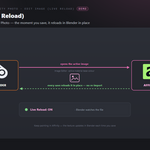
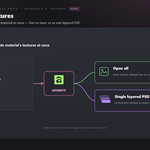
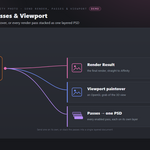
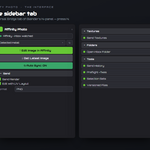
It sends images and renders from Blender to Affinity Photo and pulls your edits back. Edit Image opens the active image in Affinity and watches the file — the moment you save there, Blender reloads it automatically. You can also send the render, a viewport paintover, render passes or a whole material's textures, and pull new files back through a shared folder.
Do I need an Affinity plugin?
No. Affinity has no plugin API, so this is a purely file-based bridge — there's nothing to install on the Affinity side. Blender opens the file in Affinity and watches it; when you save, Blender picks up the change. To bring new files the other way, save or export into the bridge folder.
How do the live-reload edits work?
Click Edit Image (or Send Textures / Send Render) and Blender starts watching that file. Paint in Affinity, press Save over the same file, and Blender reloads the image in place — no re-import. Stop Watching Edits ends the watch, and the viewport overlay shows how many files are being watched.
How do I get files back from Affinity into Blender?
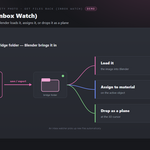
Save or export from Affinity into the bridge folder (Open Inbox Folder shows where it is), then click Get Latest from Affinity — or turn on Watch Inbox and it auto-imports. The On Get setting decides what happens next: load the image, assign it to the active material's base colour, or drop it as a plane at the 3D cursor.
Can it work with layers and PSD files?
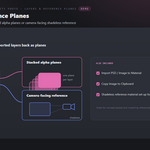
Yes. Send Render Passes and the As PSD options build a layered PSD (one layer per pass or texture) that Affinity opens directly. You can also import a folder of exported layers as stacked alpha planes — or as camera-facing reference — and Import PSD / Image to Material wires a flattened PSD straight into a material.
Can it paint height or normal maps?
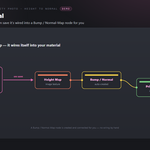
Yes. Edit as Height, Return as Normal opens the active image to paint a height/bump map; when you save, the bridge wires it into the material through a Bump / Normal-Map node automatically and sets its colour space correctly.
Can I paint against my UVs?
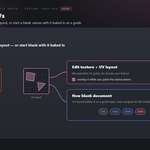
Yes. Edit with UV Layout opens the active texture together with the selected mesh's exported UV layout so you can see the seams. New Texture with UV Guide creates a fresh document at 512–4096 px with the UV layout as a guide layer and assigns it to the material.
Which Affinity versions work?
Affinity Photo v1 or v2, and the new unified Affinity (2025). The bridge auto-detects installs under Program Files\Affinity, or you can point it at the executable by hand in preferences.
Does it keep versions of my edits?
If you want. The On Save setting is either Reload In Place (update the image with every save) or Keep Versions (each save is copied to name_v001, _v002, … and loaded as a new image). The shared Version Exchange Files option keeps copies of sent files too.
What are the shared Universal Bridge tools?
A Tools panel shared across the whole line: a command palette, send history with re-send, preflight checks (unapplied transforms, missing UVs/materials, n-gons, non-manifold edges) with safe fixes, a naming helper (low / high / LOD / UCX / socket), selection sets, versioned files and batch send.
Does it change my Blender scene?
No — it's non-destructive. Only the edited image comes back onto your existing data; the shared tools add an optional backup and versioning if you want them.
Which Blender versions are supported?
Blender 3.3 through 5.2. On 4.2+ it installs as a modern Extension; on 3.3–4.1 as a classic add-on. Windows.
Can I use it for commercial work?
Yes. Like all Blender add-ons it's licensed under the GPL, so you can use it in any commercial project. Affinity Photo is Affinity Photo is required and sold separately. You need your own licensed copy from Serif. No Affinity Photo licence is included with this product - it is the Blender-side bridge only, and is not affiliated with, endorsed by, or a reseller of Serif.
Does it work on macOS or Linux?
Currently Windows only.
Do I need Affinity Photo, and is a licence included?
You need your own Affinity Photo - it is sold separately by Serif and is not included with this product. This add-on is the Blender side of the bridge only, and is not affiliated with, endorsed by, or a reseller of the vendor. It is also Windows only: macOS and Linux are not supported.
Can I change the icons, or turn them off?
Discover more products like this
live reload affinity photo height to normal paintover render-passes UV layout Affinity layered PSD image editing texture pipeline bridge