AI Texture Enhancer - Local 4x Upscale for Blender Materials
 blenderustad



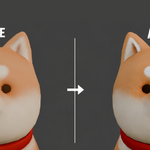
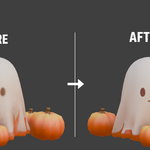

AI Texture Enhancer
Version 1.0.4
Compatible with Blender 4.2+ on Windows, macOS, and Linux
Requirements
Blender: 4.2.0 or newer
Platform: Windows, macOS, Linux
GPU: Optional (CPU is fully supported)
Internet: Required only during the initial dependency installation
Installation
1. Install the Add-on
In Blender, go to:
Edit → Preferences → Add-ons → Install
Select texture_enhancer_addon.zip, install it, then enable the add-on.
2. Install AI Dependencies
Open the AI Texture tab in the 3D Viewport sidebar (N).
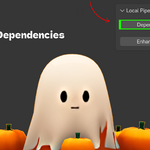
Click Install AI Dependencies.
Blender may become temporarily unresponsive while downloading and installing the required packages (PyTorch, NumPy, ONNX Runtime, etc.). This is expected and only needs to be done once.
When installation is complete, the button changes to Dependencies Installed (green), and the AI service will automatically start whenever Blender launches.
How to Use
1. Select Objects
Choose one or more mesh objects whose textures you want to enhance.
Objects without image textures (lights, cameras, curves, procedural-only materials, etc.) are skipped automatically.
2. Enhance Textures
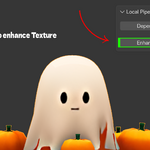
Open the AI Texture panel and click Enhance via StdIO Pipe.
The add-on will:
Find every Image Texture node on the selected objects
Upscale each unique texture using Real-ESRGAN
Update the materials to use the enhanced textures
3. Save Your Blend File
Enhanced textures are saved as new image datablocks named:
original_name_grey
The images are packed into your .blend file, while the original texture files remain untouched.
If you see an "AI process not running" error, click "Install AI Dependencies" again to restart the background service.
What the Add-on Processes
✅ Image Texture nodes
✅ Multiple selected objects
✅ Shared textures (processed only once)
✅ Alpha / transparency textures
❌ Procedural textures
❌ Non-mesh objects
FAQ
Do I need administrator privileges?
No. All required packages are installed into the add-on's local dependencies folder. Nothing is installed into your system Python.
I get an "AI process not running" error.
Click Install AI Dependencies again to restart the background service.
If the issue persists, disable and re-enable the add-on from Preferences → Add-ons.
Can I change the suffix added to enhanced texture names?
Yes.
The default suffix is _grey, but you can change it in Blender's Python Console:
bpy.context.scene.texture_grey_suffix = "_4K"
Does it work on macOS and Linux?
Yes.
The add-on is fully cross-platform.
Windows & Linux: CPU and CUDA GPU acceleration are supported.
macOS: Runs on CPU only (Apple Silicon MPS is not currently supported by ONNX Runtime).
Have questions about this product?
Login to message
| Blender Extension Compatible | Yes |
| Published | 3 months ago |
| Blender Version | |
| Extension Type | Add-on |
| Render Engine Used | Blender-Internal, Blender-Game-Engine, Cycles, Eevee |
| License | GPL |

Discover more products like this
AI image upscale Blender addon Blender texture upscale addon Real-ESRGAN Blender no internet texture upscale Blender AI texture enhancer Blender