Animation Library Export & Import Clips
 za studio


ANIMATION LIBRARY MANAGER PRO (FOR BLENDER 5.0+)
INTRODUCTION
Animation Library Manager is a powerful, professional-grade Blender addon designed to streamline the workflow of animators by providing a centralized repository for animation actions. Developed by Zekeriya AYAN, this tool allows you to export, manage, and re-import complex animations with a single click, supporting advanced features like bone mirroring and real-time previews.
KEY FEATURES
1. CENTRALIZED ANIMATION REPOSITORY
One-Click Export: Save your selected object’s animation actions directly into a dedicated library folder.
Automatic Cataloging: Each animation is stored as a
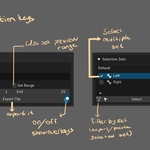
.blendfile containing both the action and an empty object for reference, ensuring data integrity.Video and Json data : Videos are mp4 format. Bone selection set is Json data. All kind of data file is in the same library fold
2. INTEGRATED N-PANEL INTERFACE
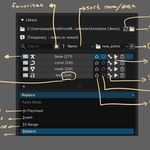
Seamless Integration: Located conveniently in the View3D > Sidebar > Animation tab (under the "Anim Lib" category).
Real-time Library Browsing: Browse your entire animation collection without leaving the viewport.
Refresh Capability: Instantly update the library view to see newly added or modified animation files.
3. ADVANCED IMPORT & BLENDING
Smart Animation Loading: Automatically applies the selected library action to your active rig or object.
Pose Mode Compatibility: Specifically optimized for rigs in Pose Mode, ensuring all bones are correctly targeted.
Data Validation: Automatically checks if the target object has the necessary animation data structures before importing.
4. INTEGRATED BONE MIRRORING SYSTEM
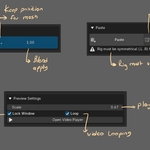
Dynamic Mirroring: Built-in support for mirroring bone names (e.g., .L to .R, _L to _R, Left to Right).
Symmetry Support: Intelligent path remapping for animations, allowing you to flip or mirror movements across symmetrical rigs.
INSTALLATION GUIDE
1. FILE PLACEMENT
Copy the animation_library_addon.py file to your Blender addons directory:
Windows:
%AppData%\Blender Foundation\Blender\5.0\scripts\addons\macOS:
/Users/[YourUsername]/Library/Application Support/Blender/5.0/scripts/addons/Linux:
~/.config/blender/5.0/scripts/addons/
2. ACTIVATION
Open Blender.
Go to Edit > Preferences > Add-ons.
Search for "Animation Library".
Check the box to enable the addon.
USAGE INSTRUCTIONS
EXPORTING ANIMATIONS
Select the object or rig containing the action you wish to save.
Navigate to the Anim Lib tab in the N-Panel.
Enter a name for your animation.
Click Export Action. The addon will create a standalone file in your library folder.
IMPORTING ANIMATIONS
Select the target rig and enter Pose Mode.
Select an animation from the library list.
Click Import Action. The animation will be automatically applied to your character.
TECHNICAL SPECIFICATIONS
Blender Version: 3.2.0 up to 5.0.0 (Optimized for 5.0+).
File Structure: Utilizes
.blendfile instances for each animation to preserve all keyframe data.Keymap Support: Includes built-in keymap registration for specialized pie menus (Alt+1).
Safety Features: Includes automatic path sanitization to prevent invalid file names.
TROUBLESHOOTING
Empty Library: Ensure your library path is correctly set in the Add-on Preferences or the Scene settings.
Import Errors: Verify that the target object is selected and that it has an active animation data block.
Permission Issues: Run Blender as an administrator if the addon cannot write files to the library folder.
LICENSE & SUPPORT
This addon is distributed under the GPL-2.0-or-later license. For customer support or custom feature requests, please contact the author, Zekeriya AYAN.
Have questions about this product?
Login to message
| Blender Extension Compatible | Yes |
| Sales | 30+ |
| Published | 6 months ago |
| Blender Version | 3.6 - 5.2 |
| Extension Type | Add-on |
| Render Engine Used | Blender-Internal |
| License | GPL |