Procedural Anime Eye Shader Pack For Blender: 20 Customizable & Animated Presets
Rasheed's Edit in Organic


Will these work on my own character's eyes?
Usually yes, but there is one condition worth knowing before you buy. The shaders are procedural, but they are driven by UV coordinates — the eye is drawn into a specific place in UV space. On a mesh with no UV map the shader will not appear at all, and on an eye that is unwrapped differently the iris will sit off-centre. That is why the pack includes the UV-mapped "Anime Eye Ball" mesh the shaders are authored against: use it, or unwrap your own eye to match it.
How many of the twenty actually animate?
Eight of the twenty: Crimson Flare, Steel Spiral, Lilac Hypnosis, Pastel Vortex, Glacier Blue, Fox Eye, Snake Eye and Wolf Eye. They are seamless loops — press play and the iris moves, with no keyframes for you to set and nothing to rig. In the Original 10 Eyes version, one of the ten animates (Crimson Flare). Every other parameter in every shader is keyframable if you want to animate it yourself.
Do I need Blender 5.2 for this?
No. The pack works in Blender 4.5 through 5.2. Blender 5.2 is only needed for the remote asset library, where you add Superhive as a Remote Asset Repository and your purchase appears inside Blender automatically. On 4.5 and above you can download the library and point Preferences > File Paths > Asset Libraries at the folder, or simply use File > Append to bring the material in from the .blend. It will not open in versions below 4.5.
What is the difference between the three versions?
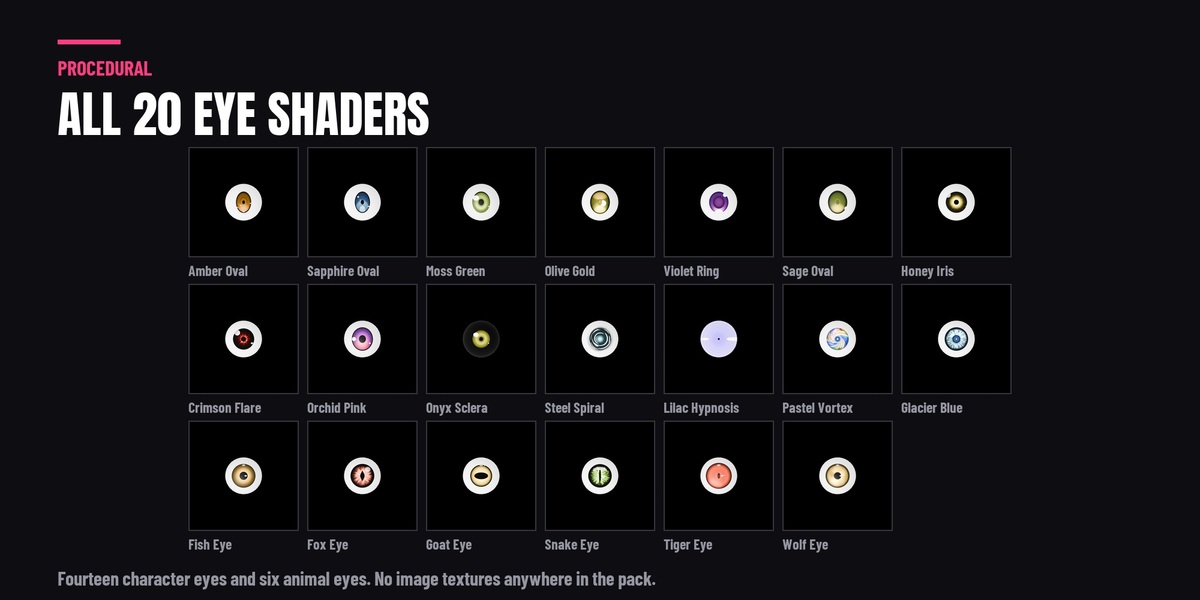
Trial ($3) — one eye shader plus the UV-mapped eye mesh, so you can test the workflow and the render quality on your own character first. Original 10 Eyes ($15) — the ten original character eyes plus the mesh; one of the ten animates. Full Version ($25) — all twenty: fourteen character eyes and six animal eyes (snake, fox, wolf, tiger, goat and fish), plus the mesh, with eight of the twenty animating. Everything in a smaller tier is also in the Full Version.
Can I use these in Unity, Unreal or on a VTuber avatar?
Not directly. These are Blender node materials, and procedural node shaders cannot be exported to a game engine or to a VRChat / VRoid avatar. What does work is baking: set the look up in Blender, make sure the iris mesh is unwrapped, then use Render > Bake to write it to an image texture and use that in your engine. Rendering a VTuber character inside Blender is of course fine.
Do they work in both Cycles and EEVEE?
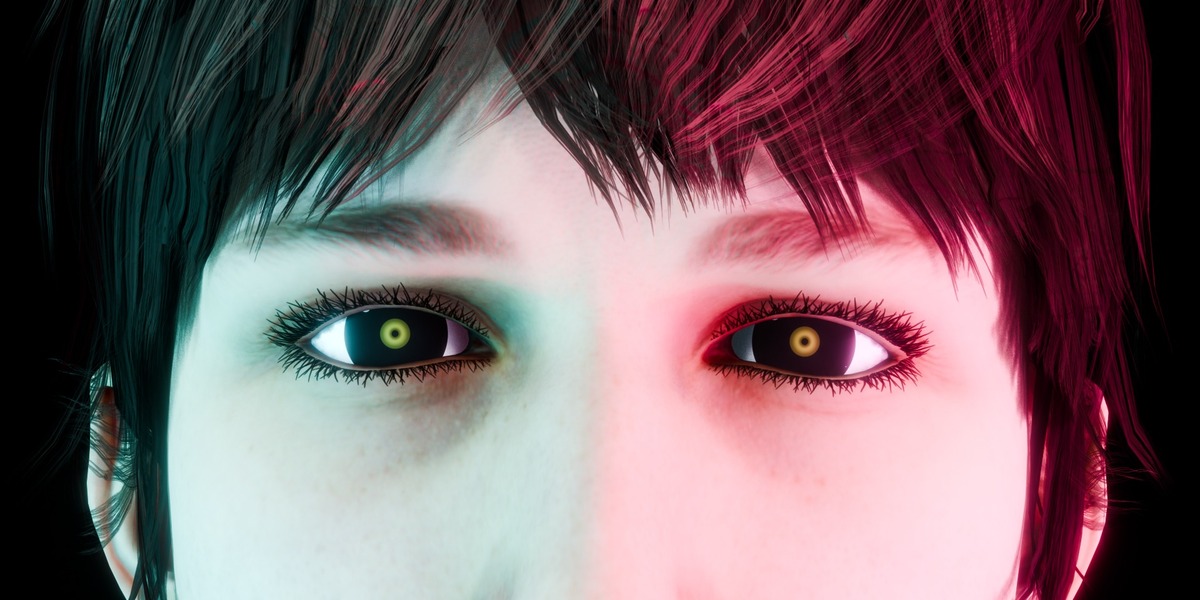
Yes. All twenty have been rendered and checked in both Cycles and EEVEE from a fresh scene. There are no image textures anywhere in the pack, so there is nothing to relink and no resolution limit — the eyes stay sharp in extreme close-up.
Can I use these in commercial work?
Yes — use them in your own commercial renders, animations, films and client work. The only thing not permitted is reselling or redistributing the shaders themselves, on their own or as part of another asset pack.
  • One eye shader plus the UV-mapped eye mesh, so you can check the workflow and the render quality on your own character before buying the pack.

    $3
  • The ten original character eyes, from natural to dramatic, plus the UV-mapped eye mesh they are authored against. One of the ten animates on its own with no keyframes to set. Everything here is also in the Full Version.

    $15
  • All 20 eye shaders: fourteen character eyes and six animal eyes - snake, fox, wolf, tiger, goat and fish - plus the UV-mapped eye mesh. Eight of the twenty animate on their own with no keyframes to set.

    $25
$3

Have questions about this product?
Login to message

Includes an Asset Library with select variants

34 drag-and-drop assets for Blender’s Asset Browser.

Browse included assets
Details
Published 5 months ago
Blender Version 4.5 - 5.2
Render Engine Used Cycles, Eevee
Misc Data Uvs-Unwrapped, Animated
License GPL