 little dog creations


🛠️ Asset Attendant — Blender Addon for Game-Ready Exports
Asset Attendant is a powerful Blender addon designed to clean, sort, rename, and export game assets with ease. Whether you're preparing for Unity, Unreal, or a custom engine, Asset Attendant helps you stay organized and efficient.
✅ Key Features
-
Batch Naming & Grouping
-
Label objects using prefix/name lists
-
Auto-group and align objects by X, Y, or Z axis
-
Move and rename mesh data in bulk
-
Clean file of unused materials, textures, UVs, and empty collections
-
-
Export Tools
-
Export FBX or GLTF per collection or per object
-
Automatically create folders for FBX and texture files
-
Save the
.blendfile into a dedicated export folder -
Option to generate a technical detail report including poly count, texture info, animations, and more
-
-
Game Engine Helpers
-
Unity support: origin to base, rotate 180°, Z-padding
-
Auto-adjust UVs for texture atlases or material switching
-
Flip normals for face orientation cleanup
-
-
Smart Material Handling
-
Rename materials using image texture names
-
Find & replace material slots across selected meshes
-
Populate material lists from selection and auto-clean duplicates
-
-
Advanced Asset Duplication
-
Duplicate objects with UV offsets for texture atlases
-
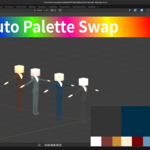
Swap secondary materials automatically during duplication
-
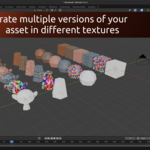
Create complex variations using lists of materials or UV layouts
-
-
Customizable Panel UI
-
Organize your workflow with toggles for Naming, Sorting, Exporting, and Asset Creation
-
Built-in utilities like face recalculation, prefix tools, and custom input fields
-
🧪 Known Limitations
-
“Create Completed Assets” may not work correctly on rigged meshes.
-
Some experimental Unity features are untested — save your work frequently.
-
Package acceptance for Unity Asset Store not guaranteed; use tools at your discretion.
This addon is ideal for:
-
Indie devs prepping asset packs
-
Artists exporting large collections
-
Studios needing structured naming and folders
-
Anyone tired of repetitive export workflows
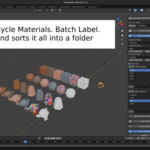
This is it in action when it comes to Bach labelling and creating assets