Asset Attendant
 little dog creations


📦 Asset Attendant for Blender
The fastest way to clean, organize, and export your game assets — especially for Unity workflows.
Perfect for creators who want to batch-label, rename, and prepare complex assets in seconds.
🧰 What is Asset Attendant?
Asset Attendant is a productivity addon for Blender designed to help artists and game developers clean, sort, name, and export 3D assets with automation in mind. It focuses on speed, consistency, and compatibility with engines like Unity and Godot.
Whether you're preparing assets for a marketplace, setting up modular kits, or managing hundreds of props — Asset Attendant saves you hours of manual cleanup.
✨ Key Features
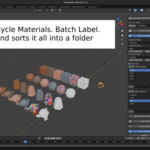
🏷️ Batch Labeling System
-
Automatically rename multiple objects based on:
-
Prefixes (e.g., "wall", "crate", "pillar")
-
Name templates (e.g., "01", "Mid", "End")
-
Collection name
-
-
Drag-and-drop reorder lists and create naming templates quickly.
-
Move objects to new collections with a single click.
🧩 Complicated Asset Creator (with UV offset system)
-
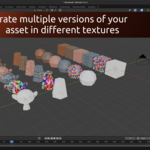
Automatically duplicate selected objects and offset their UVs for texture atlas workflows.
-
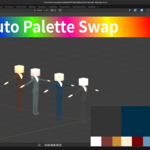
Replace the second material of each duplicate from a list.
-
Useful for:
-
Texture sheet reuse
-
Palette swapping
-
Variant prefab creation
-
-
Works with either flat atlas materials, custom material lists, or both.
📦 Smart Export Tools
-
Export assets as FBX or GLB (GLTF).
-
Choose between per-object or per-collection export.
-
Automatically organizes export folders and textures.
-
Optional technical report generation:
-
Polygon counts
-
Material and texture summaries
-
UV and rigging details
-
🧹 Cleanup and Sort Tools
-
Clean orphan data and remove unused materials, UV maps, and textures.
-
Auto-align objects on X/Y/Z axes.
-
Sort and distribute meshes spatially.
-
Flip normals, recalculate outside faces, and unify transforms for export.
🎯 Unity-Ready Pivot Tools
-
Automatically move pivot to base or center.
-
Rotate meshes 180° for Unity import.
-
Apply transforms and export-ready cleanup in one go.
🧪 Experimental Features
-
"Create Completed Assets" feature is not currently tested on rigged meshes. Rigged object support is a future roadmap goal.
💡 Who is this for?
-
Indie game developers preparing large packs of modular assets.
-
Artists exporting for Unity or Godot.
-
Teams needing clean, consistent naming and export practices.
-
Blender power users who want to skip repetitive cleanup tasks.
✅ Requirements
-
Blender 4.3+
-
Works best on saved
.blendfiles (as it creates folders relative to your file location)
📁 Output Structure Example
📝 Tips & Notes
-
Always save your .blend before using export or texture functions.
-
If using batch labeling, prepare your prefix and name templates in the UI panel first.
-
Atlas-based duplication works best when all objects share a base material.
Have questions about this product?
Login to message
| Published | over 1 year ago |
| Blender Version | 4.3 - 4.4 |
| Extension Type | N/A |
| Render Engine Used | Cycles, Eevee |
| License | GPL |
Discover more products like this
unity godot asset management 3D game development Import & Export productivity