 Achat
Achat



GETTING STARTED
1. Open the N-panel in the 3D viewport and find the Audio Trigger tab.
2. Add an input with the plus buttons above the input list. Choose BPM or Audio.
3. For an audio input, browse to a file and click Analyze Audio. A progress bar runs while it processes, then the waveform opens.
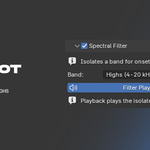
4. Open Spectral Filter and pick a band: Lows, Mids, or Highs. Turn on Filter Playback to hear only that band.
5. Set the Threshold and Min Gap. The waveform shows the threshold line, so you can see which hits fire.
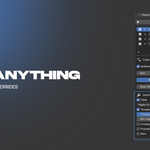
6. Right-click any property in Blender and choose Use in Audio Trigger. Set the Min and Max in the Mappings panel.
7. Scrub the timeline with Live Preview on to check the motion.
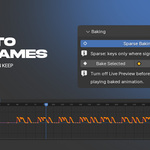
8. Select the objects you want to keyframe and press Bake Selected.
SHAPING THE RESPONSE
- Attack and Release ramp the value up and down around each hit.
- Probability thins the hits out for a looser feel. Seed keeps the pattern repeatable.
- Velocity scales each hit by the audio level at that moment.
WORKING WITH MANY OBJECTS
- To copy a reaction as-is, select the targets and use the duplicate icon on the mapping.
- To spread it across an array, set up one mapping, select the objects, and use Copy from Active with Offset. Each copy is delayed by the frame or beat offset you set.
- Pin several mappings to edit their controls together, and use Selected Objects Only to hide the rest.
TIPS
- Turn Live Preview off before playing baked animation, or the live handler keeps overwriting the values.
- Auto-Detect BPM reads the original file and ignores the filter and threshold.
- Deleting an object removes its mappings automatically.
CHANGELOG
CHANGELOG
1.0.7
- Groups now work by color. Click a mapping's color swatch and it joins the group wearing that color; clear the color and it leaves, keeping the settings it had. The first mapping to take a color starts the group.
- The separate Join Group menu is gone. One swatch in the row does the whole job.
- The number beside the group name still shows how many mappings share that color, and still takes the active mapping out when you click it.
1.0.6
- Mapping settings now show on the current frame as you change them. Min, Max, the offsets, and every override used to need a frame step before anything moved.
- Removing a mapping puts its property back to the value it had before the mapping drove it, instead of leaving it frozen mid-pulse. The same applies when you remove a whole input.
- The velocity override no longer needs a second click. Turning it on switches velocity on, and the extra checkbox is now labelled Enabled, for the case where you want one mapping to ignore velocity.
- A velocity override now draws its floor on the waveform, the way the filter and threshold overrides already did. Group overrides show there too.
1.0.5
- Mapping groups. Select the objects, make a group, and every mapping in it shares one set of settings. Tune any member and the whole group follows, live. There is no leader, so removing one member leaves the rest alone.
- A group shares the range and every override. Each member keeps its own target and its own timing offset, so a group can still form a wave.
- Spread staggers a group in list order to build that wave, and re-running it with a different step re-times the same wave instead of making new mappings. A step of 0 returns them to unison.
- The number beside the group name is the member count. Click it to take one mapping out of the group; it keeps the settings it had.
- Group tools, Spread, and Copy Settings now live in a menu next to the mapping list, where Blender keeps list actions.
- Pinning several mappings no longer stacks a settings block for each one. A group is the way to edit many at once.
1.0.4
- Fixed mappings that drive a material or world shader value not baking to keyframes. They reacted in the viewport but Bake produced nothing, because shader values live on the node tree rather than on the material itself.
- Bake now reports which mappings it could not bake instead of leaving them out silently.
1.0.3
- Copy Settings from Active Mapping: copy the min/max, offsets, and overrides onto other existing mappings without changing what they target. It can reach the pinned mappings, the ones on selected objects, the ones sharing a color tag, or every mapping in the input.
- Color tags on mappings, so you can group them, filter the list by color, and copy settings to a whole group at once.
- Mappings can be reordered with the arrow buttons next to the list.
- Velocity can now be overridden per mapping, so one object can react to how loud each hit is while another ignores it.
- Timeline markers have a density control, from one marker every four beats up to four per beat.
- Set Range to Audio Length sets the scene frame range to the length of the loaded file, honoring Start (s).
- Input Settings is simpler: Sync Range to Scene is a single toggle, and Start, End, and Signal Offset only appear when you turn it off.
- Removed the copy 1:1 button on a mapping. Copy from Active with Offset does the same thing with the offset set to 0.
- Fixed copied mappings sometimes carrying the wrong settings.
- Fixed Set Range to Audio Length leaving the playback strip trimmed to the old range.
- Timeline markers are limited to one per frame, so a high tempo with a fine division no longer floods the timeline.
1.0.1
- Mappings that drive a light or a material now highlight in the list when the object using them is selected. Selected Objects Only filters them correctly too.
- Fixed the Analyze stage hanging when the input was switched to BPM while a file was still processing.
- Create Timeline Markers now places markers on the beat, using the tempo detected in the file, instead of one marker on every detected hit.
1.0.0
- First release.
-
$22
Everything in Lite, plus react to a real track. Load audio, detect the beats Filter to Lows, Mids, or Highs Threshold, velocity, waveform Auto-Detect BPM Per-mapping overrides
-
$1
Drive any property from a BPM beat, then bake it. BPM inputs + metronome Right-click to map, set min/max Attack, release, probability Cascade across many objects Bake to keyframes No audio input. That's the full version.
 Included
Includes 12 months of
- Support from Achat
- Product updates
Extend this product’s Support Period +12 months: 50% of product price
Have questions before purchasing?
Login to message
| Blender Extension Compatible | Yes |
| Sales | 20+ |
| Published | about 2 months ago |
| Blender Version | 4.2 - 5.1 |
| Extension Type | Add-on |
| Render Engine Used | Arnold, Blender-Internal, Blender-Game-Engine, Cycles, Eevee, Freestyle, Luxrender, Mental-Ray, Octane, Vray, Yafaray |
| License | GPL |
Discover more products like this
rhythm audio-reactive audio visualization motion graphics beat music visualizer animation beat sync audio Music sound bpm