Autosave for Blender - Backup Engine
 Prospero Utilities



Backup Engine Documentation
One-Click Activation
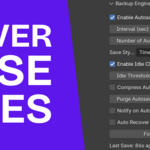
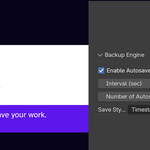
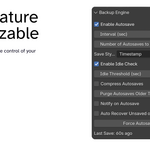
Backup Engine is designed to stay out of your way. Once installed, simply Enable Autosave using the checkbox in the Backup Engine Sidebar. No need to open Edit → Preferences every time you want to turn the addon on or off.
Configurable Backup Interval
Choose how frequently Backup Engine creates a new backup of your project.
Whether you prefer backups every 30 seconds while working on a complex simulation or every 10 minutes during lighter editing sessions, the interval is entirely up to you.
Version History
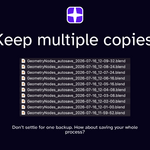
Backup Engine keeps multiple versions of your project instead of continually overwriting the same file.
Configure the maximum number of backup versions to retain. Once the limit is reached, the oldest backups are automatically removed, giving you a rolling history of your work without filling your storage drive.
Custom Filename Formats
Choose how backup files are named.
Available naming schemes include:
- Sequential numbering
Autosave_001.blendAutosave_002.blend
- Date and time
Autosave_2026-07-16_10-15.blend
This makes it easy to organize backups according to your preferred workflow.
Idle Check
Backup Engine only creates backups when Blender is idle.
Rather than interrupting a render, simulation, or other long-running task, the addon waits until Blender has been inactive for the specified amount of time before creating a backup.
This helps ensure that automatic backups never interfere with your work.
Automatic Compression
To reduce storage requirements, Backup Engine can automatically compress backup files after they are created.
Compressed backups occupy significantly less disk space while remaining available for future recovery. If a compressed backup is restored, Backup Engine automatically prepares it for use.
Automatic Cleanup
Backup Engine offers multiple ways to keep your backup folder organized.
In addition to limiting the total number of backup versions, you can automatically remove backups older than a specified number of days.
This helps prevent outdated backups from accumulating over time.
Backup Notifications
Enable optional notifications to receive a small confirmation whenever a backup is successfully created.
Notifications are intentionally unobtrusive and appear briefly without interrupting your workflow.
Automatic Recovery
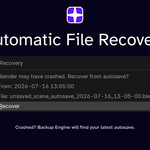
If Blender closes unexpectedly, Backup Engine can detect your most recent backup the next time Blender starts.
A recovery dialog is displayed automatically, allowing you to restore your latest backup without searching through backup folders manually.
Force Autosave
Need an extra level of safety before attempting something risky?
Click Force Autosave to create an immediate backup regardless of the normal backup interval.
This is especially useful before:
- Running simulations
- Starting long renders
- Installing new addons
- Performing major scene edits
- Executing scripts
Backup Status
The Backup Engine Sidebar keeps you informed by displaying useful status information, including:
- Time of the last successful backup
- Time remaining until the next scheduled backup
- Total number of stored backup versions
This allows you to verify at a glance that your project is being protected.
Have questions about this product?
Login to message
| Blender Extension Compatible | Yes |
| Published | 3 months ago |
| Blender Version | 4.2 - 5.2 |
| Extension Type | Add-on |
| Render Engine Used | Blender-Internal, Cycles, Eevee |
| License | GPL |