Can I suggest new features?
Does this replace Blender's built-in autosave?
No. This addon is designed to improve and extend Blender's saving workflow by providing additional control over automatic saves, backup management, and recovery options. It complements Blender's existing functionality rather than replacing it.
Does this replace Blender's built-in autosave?
No. This addon is designed to improve and extend Blender's saving workflow by providing additional control over automatic saves, backup management, and recovery options. It complements Blender's existing functionality rather than replacing it.
Is my project data collected?
Can I limit how many backups are kept?
Yes. You can specify the maximum number of backup files to retain. Older backups can be removed automatically to prevent unnecessary disk usage.
Can I suggest new features?
Absolutely. Feedback and feature requests are always welcome.
Is my project data collected?
No. The addon does not collect, transmit, or analyze the contents of your Blender projects.
Does it require an internet connection?
No. The addon works entirely offline after installation.
Does it upload my files anywhere?
No. All saves and backups are stored locally on your computer. The addon does not upload project files or collect your work.
Does this work with linked libraries and assets?
Yes. The addon saves your Blender project just like a normal save operation. Linked assets continue to behave according to Blender's standard file management.
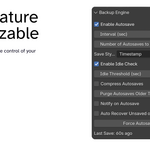
Can I choose how often autosave runs?
Yes. The autosave interval is fully configurable, allowing you to balance protection and performance according to your workflow.
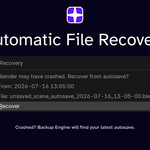
What happens if Blender crashes?
If a recent autosave or backup exists, you can restore your project from one of the saved versions and continue working with minimal data loss.
Will this overwrite my existing .blend file?
That depends on your settings. You can configure the addon to create versioned backups instead of overwriting your working file, allowing you to restore earlier revisions if needed.
Does it support incremental versioning?
Yes. Instead of repeatedly overwriting the same file, the addon can automatically create sequential backup versions so you always have a history of your work.
Does it work while rendering?
This depends on your configuration. You can choose whether autosaves should occur during rendering or wait until rendering has completed.
Will this slow down Blender?
The impact is generally minimal. Save operations still require writing data to disk, so very large projects may briefly use additional disk activity during autosave.
Can I suggest new features?
Absolutely. Feedback and feature requests are always welcome.
Will this overwrite my existing .blend file?
That depends on your settings. You can configure the addon to create versioned backups instead of overwriting your working file, allowing you to restore earlier revisions if needed.
Does it work with large Blender projects?
Yes. The addon works with projects of any size, although larger files naturally take longer to save depending on your hardware and storage device.
Can I disable autosave temporarily?
Yes. Autosaving can be paused or disabled through the addon settings whenever you need complete manual control.
Will this overwrite my existing .blend file?
That depends on your settings. You can configure the addon to create versioned backups instead of overwriting your working file, allowing you to restore earlier revisions if needed.
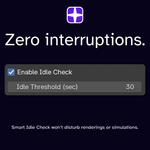
Does the addon interrupt my workflow?
No. The addon is designed to save quietly in the background whenever possible so you can continue working without unnecessary interruptions.
Can I restore an older version of my project?
Yes. If versioned backups are enabled, you can browse available backups and restore an earlier version whenever needed.
Does this work with linked libraries and assets?
Yes. The addon saves your Blender project just like a normal save operation. Linked assets continue to behave according to Blender's standard file management.
Does it work while rendering?
This depends on your configuration. You can choose whether autosaves should occur during rendering or wait until rendering has completed.
Can I disable autosave temporarily?
Yes. Autosaving can be paused or disabled through the addon settings whenever you need complete manual control.
Does it work with large Blender projects?
Yes. The addon works with projects of any size, although larger files naturally take longer to save depending on your hardware and storage device.
Can I choose how often autosave runs?
Yes. The autosave interval is fully configurable, allowing you to balance protection and performance according to your workflow.
Can I limit how many backups are kept?
Yes. You can specify the maximum number of backup files to retain. Older backups can be removed automatically to prevent unnecessary disk usage.
Does it upload my files anywhere?
No. All saves and backups are stored locally on your computer. The addon does not upload project files or collect your work.
Can I restore an older version of my project?
Yes. If versioned backups are enabled, you can browse available backups and restore an earlier version whenever needed.
Can I limit how many backups are kept?
Yes. You can specify the maximum number of backup files to retain. Older backups can be removed automatically to prevent unnecessary disk usage.
Will this slow down Blender?
The impact is generally minimal. Save operations still require writing data to disk, so very large projects may briefly use additional disk activity during autosave.
What happens if Blender crashes?
If a recent autosave or backup exists, you can restore your project from one of the saved versions and continue working with minimal data loss.
Can I suggest new features?
Absolutely. Feedback and feature requests are always welcome.
Does it require an internet connection?
No. The addon works entirely offline after installation.
Does the addon interrupt my workflow?
No. The addon is designed to save quietly in the background whenever possible so you can continue working without unnecessary interruptions.
Does it support incremental versioning?
Yes. Instead of repeatedly overwriting the same file, the addon can automatically create sequential backup versions so you always have a history of your work.
Can I limit how many backups are kept?
Yes. You can specify the maximum number of backup files to retain. Older backups can be removed automatically to prevent unnecessary disk usage.
Is my project data collected?
No. The addon does not collect, transmit, or analyze the contents of your Blender projects.
Does it require an internet connection?
No. The addon works entirely offline after installation.
Does this work with linked libraries and assets?
Yes. The addon saves your Blender project just like a normal save operation. Linked assets continue to behave according to Blender's standard file management.
Can I restore an older version of my project?
Yes. If versioned backups are enabled, you can browse available backups and restore an earlier version whenever needed.
Can I restore an older version of my project?
Yes. If versioned backups are enabled, you can browse available backups and restore an earlier version whenever needed.
Can I choose how often autosave runs?
Yes. The autosave interval is fully configurable, allowing you to balance protection and performance according to your workflow.
What happens if Blender crashes?
If a recent autosave or backup exists, you can restore your project from one of the saved versions and continue working with minimal data loss.
Can I disable autosave temporarily?
Yes. Autosaving can be paused or disabled through the addon settings whenever you need complete manual control.
Can I restore an older version of my project?
Yes. If versioned backups are enabled, you can browse available backups and restore an earlier version whenever needed.
Does it work with large Blender projects?
Yes. The addon works with projects of any size, although larger files naturally take longer to save depending on your hardware and storage device.
Does it support incremental versioning?
Yes. Instead of repeatedly overwriting the same file, the addon can automatically create sequential backup versions so you always have a history of your work.
Does it work while rendering?
This depends on your configuration. You can choose whether autosaves should occur during rendering or wait until rendering has completed.
Does the addon interrupt my workflow?
No. The addon is designed to save quietly in the background whenever possible so you can continue working without unnecessary interruptions.
Will this slow down Blender?
The impact is generally minimal. Save operations still require writing data to disk, so very large projects may briefly use additional disk activity during autosave.
Is my project data collected?
No. The addon does not collect, transmit, or analyze the contents of your Blender projects.
Can I suggest new features?
Absolutely. Feedback and feature requests are always welcome.
Does it upload my files anywhere?
No. All saves and backups are stored locally on your computer. The addon does not upload project files or collect your work.
Does it work with large Blender projects?
Yes. The addon works with projects of any size, although larger files naturally take longer to save depending on your hardware and storage device.
Does the addon interrupt my workflow?
No. The addon is designed to save quietly in the background whenever possible so you can continue working without unnecessary interruptions.
Can I choose how often autosave runs?
Yes. The autosave interval is fully configurable, allowing you to balance protection and performance according to your workflow.
Does the addon interrupt my workflow?
No. The addon is designed to save quietly in the background whenever possible so you can continue working without unnecessary interruptions.
Does this work with linked libraries and assets?
Yes. The addon saves your Blender project just like a normal save operation. Linked assets continue to behave according to Blender's standard file management.
Does the addon interrupt my workflow?
No. The addon is designed to save quietly in the background whenever possible so you can continue working without unnecessary interruptions.
Does it work while rendering?
This depends on your configuration. You can choose whether autosaves should occur during rendering or wait until rendering has completed.
Does it upload my files anywhere?
No. All saves and backups are stored locally on your computer. The addon does not upload project files or collect your work.
Can I suggest new features?
Absolutely. Feedback and feature requests are always welcome.
Will this slow down Blender?
The impact is generally minimal. Save operations still require writing data to disk, so very large projects may briefly use additional disk activity during autosave.
What happens if Blender crashes?
If a recent autosave or backup exists, you can restore your project from one of the saved versions and continue working with minimal data loss.
Is my project data collected?
No. The addon does not collect, transmit, or analyze the contents of your Blender projects.
Does it support incremental versioning?
Yes. Instead of repeatedly overwriting the same file, the addon can automatically create sequential backup versions so you always have a history of your work.
Does it require an internet connection?
No. The addon works entirely offline after installation.
Can I disable autosave temporarily?
Yes. Autosaving can be paused or disabled through the addon settings whenever you need complete manual control.
Can I disable autosave temporarily?
Yes. Autosaving can be paused or disabled through the addon settings whenever you need complete manual control.
Can I suggest new features?
Absolutely. Feedback and feature requests are always welcome.
Can I disable autosave temporarily?
Yes. Autosaving can be paused or disabled through the addon settings whenever you need complete manual control.
Can I disable autosave temporarily?
Yes. Autosaving can be paused or disabled through the addon settings whenever you need complete manual control.
Does it work with large Blender projects?
Yes. The addon works with projects of any size, although larger files naturally take longer to save depending on your hardware and storage device.
Will this slow down Blender?
The impact is generally minimal. Save operations still require writing data to disk, so very large projects may briefly use additional disk activity during autosave.
Does it work while rendering?
This depends on your configuration. You can choose whether autosaves should occur during rendering or wait until rendering has completed.
Does it support incremental versioning?
Yes. Instead of repeatedly overwriting the same file, the addon can automatically create sequential backup versions so you always have a history of your work.
What happens if Blender crashes?
If a recent autosave or backup exists, you can restore your project from one of the saved versions and continue working with minimal data loss.
Can I choose how often autosave runs?
Yes. The autosave interval is fully configurable, allowing you to balance protection and performance according to your workflow.
Does this work with linked libraries and assets?
Yes. The addon saves your Blender project just like a normal save operation. Linked assets continue to behave according to Blender's standard file management.
Does it upload my files anywhere?
No. All saves and backups are stored locally on your computer. The addon does not upload project files or collect your work.
Does it require an internet connection?
No. The addon works entirely offline after installation.
Is my project data collected?
No. The addon does not collect, transmit, or analyze the contents of your Blender projects.
What happens if Blender crashes?
If a recent autosave or backup exists, you can restore your project from one of the saved versions and continue working with minimal data loss.
Does it work while rendering?
This depends on your configuration. You can choose whether autosaves should occur during rendering or wait until rendering has completed.
Can I suggest new features?
Absolutely. Feedback and feature requests are always welcome.
Does it work with large Blender projects?
Yes. The addon works with projects of any size, although larger files naturally take longer to save depending on your hardware and storage device.
Is my project data collected?
No. The addon does not collect, transmit, or analyze the contents of your Blender projects.
Does it require an internet connection?
No. The addon works entirely offline after installation.
Does it upload my files anywhere?
No. All saves and backups are stored locally on your computer. The addon does not upload project files or collect your work.
Does it work with large Blender projects?
Yes. The addon works with projects of any size, although larger files naturally take longer to save depending on your hardware and storage device.
Does this work with linked libraries and assets?
Yes. The addon saves your Blender project just like a normal save operation. Linked assets continue to behave according to Blender's standard file management.
Can I choose how often autosave runs?
Yes. The autosave interval is fully configurable, allowing you to balance protection and performance according to your workflow.
Does it work with large Blender projects?
Yes. The addon works with projects of any size, although larger files naturally take longer to save depending on your hardware and storage device.
Will this slow down Blender?
The impact is generally minimal. Save operations still require writing data to disk, so very large projects may briefly use additional disk activity during autosave.
Does it support incremental versioning?
Yes. Instead of repeatedly overwriting the same file, the addon can automatically create sequential backup versions so you always have a history of your work.
Can I choose how often autosave runs?
Yes. The autosave interval is fully configurable, allowing you to balance protection and performance according to your workflow.
What happens if Blender crashes?
If a recent autosave or backup exists, you can restore your project from one of the saved versions and continue working with minimal data loss.
Will this slow down Blender?
The impact is generally minimal. Save operations still require writing data to disk, so very large projects may briefly use additional disk activity during autosave.
Does this work with linked libraries and assets?
Yes. The addon saves your Blender project just like a normal save operation. Linked assets continue to behave according to Blender's standard file management.
Does it upload my files anywhere?
No. All saves and backups are stored locally on your computer. The addon does not upload project files or collect your work.
Will this slow down Blender?
The impact is generally minimal. Save operations still require writing data to disk, so very large projects may briefly use additional disk activity during autosave.
Does it require an internet connection?
No. The addon works entirely offline after installation.
Is my project data collected?
No. The addon does not collect, transmit, or analyze the contents of your Blender projects.
Can I suggest new features?
Absolutely. Feedback and feature requests are always welcome.
Will this slow down Blender?
The impact is generally minimal. Save operations still require writing data to disk, so very large projects may briefly use additional disk activity during autosave.
Does it work while rendering?
This depends on your configuration. You can choose whether autosaves should occur during rendering or wait until rendering has completed.
Does it support incremental versioning?
Yes. Instead of repeatedly overwriting the same file, the addon can automatically create sequential backup versions so you always have a history of your work.
Does this work with linked libraries and assets?
Yes. The addon saves your Blender project just like a normal save operation. Linked assets continue to behave according to Blender's standard file management.
Does it work while rendering?
This depends on your configuration. You can choose whether autosaves should occur during rendering or wait until rendering has completed.
Can I suggest new features?
Absolutely. Feedback and feature requests are always welcome.
Does it support incremental versioning?
Yes. Instead of repeatedly overwriting the same file, the addon can automatically create sequential backup versions so you always have a history of your work.
Does it upload my files anywhere?
No. All saves and backups are stored locally on your computer. The addon does not upload project files or collect your work.
Does it require an internet connection?
No. The addon works entirely offline after installation.
What happens if Blender crashes?
If a recent autosave or backup exists, you can restore your project from one of the saved versions and continue working with minimal data loss.
Does it work while rendering?
This depends on your configuration. You can choose whether autosaves should occur during rendering or wait until rendering has completed.
Can I choose how often autosave runs?
Yes. The autosave interval is fully configurable, allowing you to balance protection and performance according to your workflow.
Is my project data collected?
No. The addon does not collect, transmit, or analyze the contents of your Blender projects.
Does it work while rendering?
This depends on your configuration. You can choose whether autosaves should occur during rendering or wait until rendering has completed.
Does it support incremental versioning?
Yes. Instead of repeatedly overwriting the same file, the addon can automatically create sequential backup versions so you always have a history of your work.
Does it require an internet connection?
No. The addon works entirely offline after installation.
Can I suggest new features?
Absolutely. Feedback and feature requests are always welcome.
Does it upload my files anywhere?
No. All saves and backups are stored locally on your computer. The addon does not upload project files or collect your work.
Does this work with linked libraries and assets?
Yes. The addon saves your Blender project just like a normal save operation. Linked assets continue to behave according to Blender's standard file management.
Does it support incremental versioning?
Yes. Instead of repeatedly overwriting the same file, the addon can automatically create sequential backup versions so you always have a history of your work.
Is my project data collected?
No. The addon does not collect, transmit, or analyze the contents of your Blender projects.
Can I choose how often autosave runs?
Yes. The autosave interval is fully configurable, allowing you to balance protection and performance according to your workflow.
What happens if Blender crashes?
If a recent autosave or backup exists, you can restore your project from one of the saved versions and continue working with minimal data loss.
Does it support incremental versioning?
Yes. Instead of repeatedly overwriting the same file, the addon can automatically create sequential backup versions so you always have a history of your work.
What happens if Blender crashes?
If a recent autosave or backup exists, you can restore your project from one of the saved versions and continue working with minimal data loss.
What happens if Blender crashes?
If a recent autosave or backup exists, you can restore your project from one of the saved versions and continue working with minimal data loss.
Is my project data collected?
No. The addon does not collect, transmit, or analyze the contents of your Blender projects.
Does it require an internet connection?
No. The addon works entirely offline after installation.
Does this work with linked libraries and assets?
Yes. The addon saves your Blender project just like a normal save operation. Linked assets continue to behave according to Blender's standard file management.
Can I choose how often autosave runs?
Yes. The autosave interval is fully configurable, allowing you to balance protection and performance according to your workflow.
Does it upload my files anywhere?
No. All saves and backups are stored locally on your computer. The addon does not upload project files or collect your work.
Can I suggest new features?
Absolutely. Feedback and feature requests are always welcome.
What happens if Blender crashes?
If a recent autosave or backup exists, you can restore your project from one of the saved versions and continue working with minimal data loss.
Can I choose how often autosave runs?
Yes. The autosave interval is fully configurable, allowing you to balance protection and performance according to your workflow.
Can I choose how often autosave runs?
Yes. The autosave interval is fully configurable, allowing you to balance protection and performance according to your workflow.
Does it require an internet connection?
No. The addon works entirely offline after installation.
Can I suggest new features?
Absolutely. Feedback and feature requests are always welcome.
Does it upload my files anywhere?
No. All saves and backups are stored locally on your computer. The addon does not upload project files or collect your work.
Does this work with linked libraries and assets?
Yes. The addon saves your Blender project just like a normal save operation. Linked assets continue to behave according to Blender's standard file management.
Can I choose how often autosave runs?
Yes. The autosave interval is fully configurable, allowing you to balance protection and performance according to your workflow.
Is my project data collected?
No. The addon does not collect, transmit, or analyze the contents of your Blender projects.
Does this work with linked libraries and assets?
Yes. The addon saves your Blender project just like a normal save operation. Linked assets continue to behave according to Blender's standard file management.
Can I suggest new features?
Absolutely. Feedback and feature requests are always welcome.
Is my project data collected?
No. The addon does not collect, transmit, or analyze the contents of your Blender projects.
Does it require an internet connection?
No. The addon works entirely offline after installation.
Does it upload my files anywhere?
No. All saves and backups are stored locally on your computer. The addon does not upload project files or collect your work.
Does this work with linked libraries and assets?
Yes. The addon saves your Blender project just like a normal save operation. Linked assets continue to behave according to Blender's standard file management.
Does this work with linked libraries and assets?
Yes. The addon saves your Blender project just like a normal save operation. Linked assets continue to behave according to Blender's standard file management.
Does it upload my files anywhere?
No. All saves and backups are stored locally on your computer. The addon does not upload project files or collect your work.
Is my project data collected?
No. The addon does not collect, transmit, or analyze the contents of your Blender projects.
Does it upload my files anywhere?
No. All saves and backups are stored locally on your computer. The addon does not upload project files or collect your work.
Does it upload my files anywhere?
No. All saves and backups are stored locally on your computer. The addon does not upload project files or collect your work.
Does it require an internet connection?
No. The addon works entirely offline after installation.
Can I suggest new features?
Absolutely. Feedback and feature requests are always welcome.
Can I suggest new features?
Absolutely. Feedback and feature requests are always welcome.
Does it require an internet connection?
No. The addon works entirely offline after installation.
Does it require an internet connection?
No. The addon works entirely offline after installation.
Is my project data collected?
No. The addon does not collect, transmit, or analyze the contents of your Blender projects.
Does it require an internet connection?
No. The addon works entirely offline after installation.
Is my project data collected?
No. The addon does not collect, transmit, or analyze the contents of your Blender projects.
Is my project data collected?
No. The addon does not collect, transmit, or analyze the contents of your Blender projects.
Can I suggest new features?
Absolutely. Feedback and feature requests are always welcome.
Is my project data collected?
No. The addon does not collect, transmit, or analyze the contents of your Blender projects.
Can I suggest new features?
Absolutely. Feedback and feature requests are always welcome.
Can I suggest new features?
Absolutely. Feedback and feature requests are always welcome.
Can I suggest new features?
Absolutely. Feedback and feature requests are always welcome.
 Prospero Utilities