Jerahmy Pocott
over 4 years ago
You're welcome! Baking in Blender without any addons.. Can't recommend if you value your sanity ;)
This item has an average rating of 5 from 26 ratings by the community.
Purchase this item to leave a review!
Wow, I'm super happy.
I've been trying Add-ons, various channel packing tools and other scripts for three days to speed up my workflow, without success: either a tool is missing or the Add-on has weaknesses.
So I was very hesitant to try Bake Wrangler because I have already lost enough time. But considering the price, I thought it would be silly not to try.
Three minutes!
It took only 3 minutes following the introduction video to produce all the textures needed for the Unity HDRP/Lit Shader.
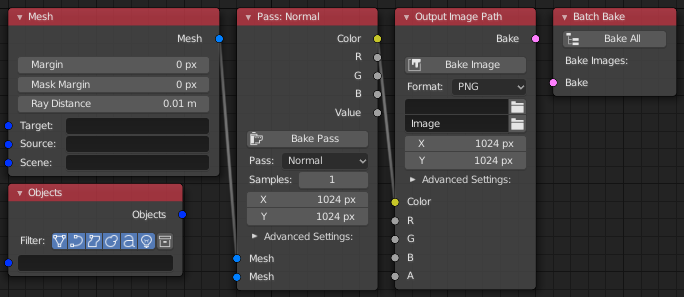
All the options I needed are there: Channel Map, Bake to Target, Cage, GPU, Render Up-Sampling, Color Space, Depth, PBR & Cycle Pass, special "Wrangler" Pass, Global Settings AND Specific Settings, just what I needed to output the Normal Map in the right format (16-bits, Non-Color, RGB) and the other maps in a more adequate format (8-bits, sRGB, RGBA) at the same time.
And on top of that, I still have a lot of operators and new nodes to explore to improve my workflow even more, which is great.
I usually don't like nodal, but here everything is clearly accessible, well organized and it's pretty easy to find your way around.
My only regret: not having tried this tool three days earlier.
Many thanks to its creator.
ahhh haha looks like I'm not the only one who has trouble baking in blender 3.x :'D Thanks to this I also can finally bake the crap out of my blend files :'D THANK YOU SO MUCH!!!! I've just set up so many cliffs and rocks in quite high poly and couldn't bake certain maps, especially not cross-baking over multiple uv maps or objects.. Now it all works perfectly again!!! Can't thank you enough for this :)
Jerahmy Pocott
over 4 years ago
You're welcome! Baking in Blender without any addons.. Can't recommend if you value your sanity ;)
Very useful timesaving addon.
Finally I can bake displacement map (height map) in Blender 3.1.
The textures are perfect, the retopoly model in low poly (target) appears identical to the one sculpted in high poly (source).
Thank you!
Is there a way to create vector displacement maps?
Jerahmy Pocott
over 4 years ago
Vector displacement isn't really possible currently except for very simple things where you can align the details on the Z axis. It might possibly be doable via GLSL, but would be a big project for someone to figure it out and also make it fast enough.
Makes baking super simple, and great support!
Best/most versatile bake tool for Blender I have found. The node setup is intuitive and the documentation is good. The channel packing is especially useful and more robust compared to others, too.
this is great add on.
perfect for me.
3 words: I love you :)
been using it for a long time! really good addon 10/10 though i did have a slight issue with baking when i had my world settings selected in the "pass" node and with rendering device set to as GPU the output comes as a black full image. but it works on CPU though i wonder why,
Jerahmy Pocott
over 5 years ago
GPU baking in Blender can be a bit temperamental. In all the cases I've had reported, the problem is with the GPU settings (Eg. Optix doesn't work for many people).
it is easy to use, powerful, and pretty cool.
I would recommend it for any Blender user.
Jerahmy Pocott
over 5 years ago
Thanks! I hope to continue to make this product an indispensable tool for baking in Blender.
Have questions about this product?
Login to message
| Blender Extension Compatible | Yes |
| Sales | 800+ |
| Rating |
26 ratings
|
| Dev Fund Contributor | |
| Published | about 6 years ago |
| Blender Version | 4.2 - 5.1 |
| Extension Type | Add-on |
| License | GPL |