Bakeflow
 NoiseBee


BakeFlow Documentation
BakeFlow streamlines Blender’s native Cycles baking workflow.It helps you generate multiple material maps, save them automaticallyand create clean baked duplicates without changing the original objects.
Requirements
- Blender 4.2 or newer.
- A mesh object with a UV map.
- A node-based material using Principled BSDF.
- A writable local output folder.
BakeFlow has been tested with Blender 5.2. No external dependencies are required.
Installation
- Open Blender.
- Go to Edit → Preferences → Add-ons.
- Click the menu button and choose Install from Disk.
- Select the
bakeflow1.0.0.zipfile without extracting it. - Enable the BakeFlow add-on.
Opening BakeFlow
- Open a 3D Viewport.
- Press
Nto open the Sidebar. - Select the BakeFlow tab.
Basic workflow
- Select one or more mesh objects.
- Choose a preset or configure the settings manually.
- Select the output folder.
- Choose the required maps.
- Press Bake Selected Objects.
- Check the bake report and open the output folder.
Presets
Presets provide quick settings for common workflows:
- 512px: fast previews and tests.
- 1K: general-purpose assets.
- 2K: detailed assets.
- 4K: high-resolution production assets.
Use Apply to apply the selected preset to the current settings.
Output folder
Choose a local folder where BakeFlow can create the generated images.Avoid temporary, cloud-only or read-only folders. The add-on saves the generatedmaps using the object name and map type.
Available maps
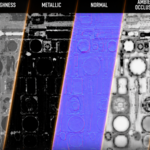
- Base Color: baked surface color.
- Roughness: surface roughness values.
- Normal: tangent-space normal information.
- Ambient Occlusion: contact and cavity shading.
- Metallic: metallic values.
- Height: grayscale height information.
- Alpha: transparency information when supported by the material.
- Emission: emitted material color.
glTF / ORM workflow
The glTF / ORM preset is designed for real-time and game workflows.It can generate the standard maps and pack Ambient Occlusion, Roughnessand Metallic into one ORM texture.
The ORM channels are:
- Red: Ambient Occlusion.
- Green: Roughness.
- Blue: Metallic.
Use Pack ORM Now to create an ORM image from existing fileswithout repeating the bake.
Important options
Selected to Active:use this for high-poly to low-poly baking. Select both objects and make thelow-poly object active last.
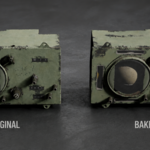
Create Baked Duplicate:creates a separate object with a new baked material while preserving the original.
Match Original Values:copies compatible Principled BSDF values such as IOR, Coat and Transmission.
Connect Baked Maps:automatically connects generated images to the corresponding material inputs.
Smart UV if Missing:creates a UV map and runs Smart UV Project when the selected mesh has no UV map.
Skip Existing Files:keeps existing images and prevents them from being overwritten.
Margin:extends pixels around UV islands to reduce visible seams and texture bleeding.
Preview and export
Preview Last Texture displays the latest generated texture inside Blender.
Open Last Texture opens the latest image with the operating system’sdefault image viewer.
Export Selected as GLB exports the selected objects as a portable GLBasset using the baked materials.
Resolution and baking time
Higher resolutions create more detailed textures but require more time, memoryand processing power. 2K and 4K bakes can take considerably longer than 512pxor 1K, especially with complex models or many selected maps.
Baking time depends on the scene, selected maps, object complexity and computer hardware.
Original materials and render engine
BakeFlow temporarily prepares the bake targets and uses Blender’s native Cycles baker.After the operation, the original material nodes and render engine settings are restored.
Troubleshooting
“Select at least one mesh object”:make sure at least one mesh object is selected in Object Mode.
Missing or pink textures:check that the output folder exists and is writable. Prefer a local folder.
ORM packing failed:make sure AO, Roughness and Metallic files exist in the same output folder.
Blank or incorrect maps:check the UV map, selected map options and the bake report shown in the panel.
High-poly bake problems:enable Selected to Active and adjust the ray distance or cage settings.
License
BakeFlow is released under the GPL-3.0-or-later license.
Future updates are planned with additional workflow improvements and export options.
Join the BakeFlow Community
Need help, want to share your results or suggest a feature?Join the BakeFlow Discord community.
 Included
Includes 12 months of
- Support from NoiseBee
- Product updates
Extend this product’s Support Period +12 months: 50% of product price
Have questions before purchasing?
Login to message
| Blender Extension Compatible | Yes |
| Published | about 2 months ago |
| Blender Version | 4.2 - 5.2 |
| Extension Type | Add-on |
| Render Engine Used | Cycles, Eevee |
| License | GPL |
Discover more products like this
normal map gltf texture-baking orm game assets texture maps PBR material-baking blender addon uv mapping