Cogumelo Softworks
over 9 years ago
Hi 10rafa. We answered your issue inbox. We would be glad to help you.
This item has an average rating of 4 from 51 ratings by the community.
Purchase this item to leave a review!
I tried many times, but doesn't work for me, im using blender 2.78c
Cogumelo Softworks
over 9 years ago
Hi 10rafa. We answered your issue inbox. We would be glad to help you.
Buying this add-on is a waste of money. The simple question is, does the add-in do what it was designed to do? I tested the BakeTool add-in in Blender 3.6.7 to burn a normal map for a simple cube with bevel .... and the result of burning a normal map is a normal with a solid color. It just doesn't work. For the same cube object with the same UV, Blender's built-in burning tool works fine. I bought the add-in on Dec. 27, 2022, and I noticed that the add-in either works poorly or doesn't work, and the time to update the add-in to a new Blender version is long. It doesn't make sense to base a workflow on such an unreliable solution.
Simply was not able to get it to run, stuck at 0% all the time. Very buggy. Shame, because it seems the devs are very responsive and the tool has a lot of good features but it just does not work.
Cogumelo Softworks
over 3 years ago
Hi Anthony. This is covered in our docs. Did you even read it? https://cogumelosoftworks.com/baketooldocs/troubleshooting/
Also if you yet want any help please contact us inbox, we will be glad to help
PLEASE READ
I never give bad reviews, so trust in this one.
If you are looking for a baking tool, though this can bake it's likely not what you want. Get "Simply Bake" it does everything you'd want out of a baking tool.
BakeTool on the other hand runs into many errors,
-randomly it just won't work.
-the different bake modes conflict with each other, so you can't just leave stuff set up in one mode and then use the other.
-it won't bake image texture layouts out of the box, you have to add a UV Map node to the vector of every image you use.
-it doesn't name your output the type of map they are such as Normal, Diffuse, Roughness
-and the High to low poly bake just was a hassle more than need be.
BAD SUPPORT
The "Simply Bake" dev will get back to you even if it's just to complement him.
BakeTool on the other hand literally just sent me a link to their troubleshooting page that I already saw and then ghosted me. (and if they reply to this review saying they got back me its because I left this review)
And I understand it's not great to talk about other products on a product page, but these two tools aim to do the same thing, and if it were me I wish someone told me which one to buy first.
Cogumelo Softworks
about 4 years ago
Hi Michael.
We prompted a reply to your first message but see that we don't provide support during weekends, we have a life too. After that, you said that your problem was already fixed so we trust you about that. Please feel free to contact us anytime for any other doubts.
I'm with Pete here
I also could not get it to work on 2.91, 2.92, 2.93
tried contacting the creator of the product for help but no luck
hope it is not too late for a refund
Paul
Cogumelo Softworks
almost 5 years ago
Hi Paul. The latest version is fully compatible with blender 2.93. We answered you inbox.
Could not get it to run on 2.8, 2.92, 2.93. Save your money.
Cogumelo Softworks
almost 5 years ago
Hi Pete. Please contact us inbox for any doubt about how to use or install it
Would like to say it works but it truly doesn't, It only bakes when it decides too and even then it jacks up the UV and nothing lines up, I'm super disappointed in this.
Cogumelo Softworks
over 5 years ago
Hi Micah. We answered you in the Inbox Messa System. One patch will be released this week. Best regards.
Seems like its working like a charm so far. I had to restart blender once in order to get iw working. <3
Never finishes, no errors, just gets stuck. Even with a simple plane and cube. Tested in: 2.8, 2.81 and 2.82a
Cogumelo Softworks
over 6 years ago
HI Stefan. Contact us inbox for support. We will be glad to help you.
Hi. I bought BakeTool few weeks ago. I found that this add-on took much longer time to bake a texture than the blender's default method does. And sometime, the operation makes Blender "Not Responding", and I don't know what was running behind, and what I was waiting for. I baked all my texture manually, using Blender's default method at the end.
Can this problem be solved? FYI, I am using Blender 2.79.
Cogumelo Softworks
almost 9 years ago
Hi wshiab
Please contact us in Inbox Support. We will be happy to help you. Sure there's something quite wrong with your configuration. I think that it could be too large textures (8~16K) or too much samples but we can take a look closer about your scene.
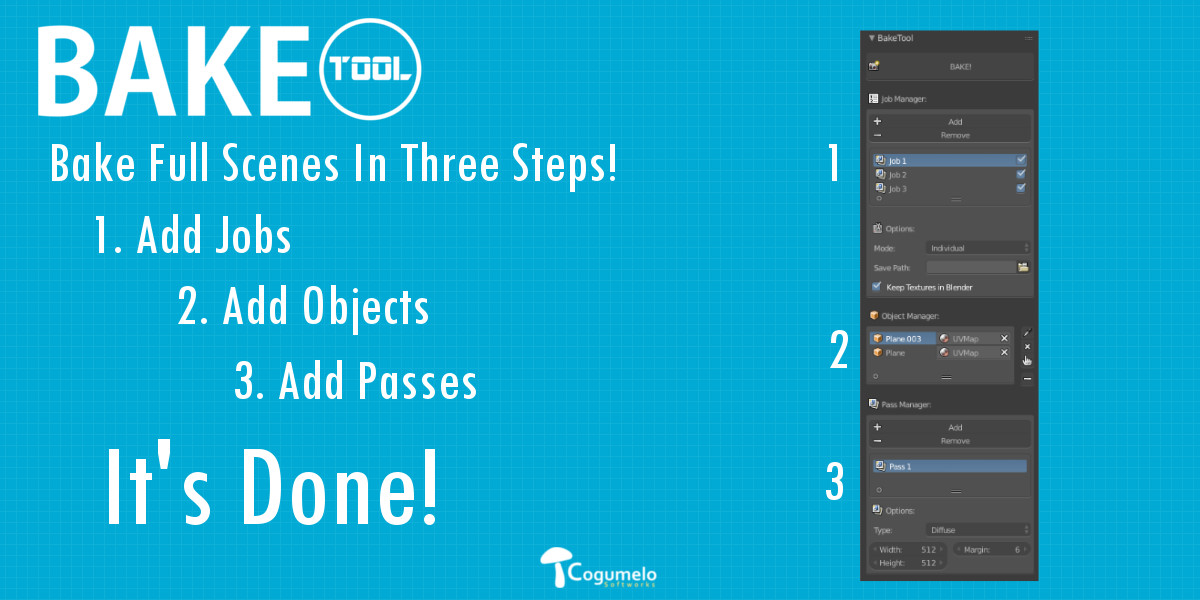
About it be slower than blender's bake it's impossible since we use it. We don't implement a new bake system just a easier workflow to use it.
Bye!
Have questions about this product?
Login to message
| Sales | 3800+ |
| Rating |
51 ratings
|
| Dev Fund Contributor | |
| Published | about 12 years ago |
| Blender Version | 4.3 - 5.0 |
| License | GPL |
bfcm19 PBR fall18 Blender Add-on Cycles Bake summer23 summer21 grass bfcm17 spring19 bfcm21 spring20 loveblender summer20 tree spring22 dev-fund PBR Bake spring24 winter24 uv anniversary spring18 bcon22 UVUnwrap spring21 bfcm18 bake scripts Cycles free cyber16 Bake PBR bcon19 bfcm22 summer22 bfcm20