Blender Batch Exporter For Game Engines
 Crea Tu Mundo


Overview
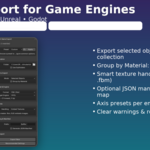
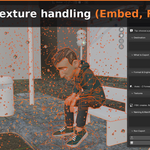
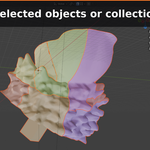
Batch Export for Game Engines is a Blender add-on that exports multiple meshes in one go with engine-ready settings. Clean, sectioned UI, engine presets (Unity/Unreal/Godot), and smart texture handling: Embed, Files, or FBM.
Requirements
-
Blender 4.3+ (Windows/macOS/Linux)
-
Targets: Unity (FBX), Unreal Engine (FBX), Godot (GLB)
Installation
-
Download the ZIP.
-
Blender → Edit ▸ Preferences ▸ Add-ons ▸ Install…
-
Select the ZIP (do not extract) and enable Batch Export for Game Engines.
-
Open 3D Viewport ▸ Sidebar (N) ▸ Export.
Quick Start
-
Select your meshes (or use the active collection).
-
(Optional) Choose a Preset and click Apply.
-
Set Destination (enable Use Subfolders for
/modelsand/textures). -
Pick Format & Engine (FBX/GLB + Unity/Unreal/Godot).
-
Choose Textures handling: Embed, Files, or FBM.
-
Add Prefix/Suffix if needed and click Export Now.
Options
-
Use Subfolders – writes models to
/models/and textures (Files mode) to/textures/. -
Group by Material (Advanced) – exports one file per material (can duplicate multi-material meshes).
-
Naming & Manifest – optional JSON manifest with exported files and materials.
-
Per-object export by default: one file per mesh (multi-material safe).
Texture Handling
-
Embed: FBX writes
{file}.fbm/; GLB embeds images. -
Files: copies textures once to
/textures(no extra.fbm). -
FBM (FBX only): guarantees
{file}.fbm/with used textures.
Troubleshooting
-
Nothing exported → select meshes or ensure the active collection has meshes.
-
Expecting FBM → use FBM mode with FBX format.
-
Duplicate textures → use Files (the add-on prevents
.fbmduplication). -
GLB + FBM → FBM doesn’t apply to GLB; images stay embedded.
License
GPL-3.0-or-later.
Support
Have questions about this product?
Login to message
| Published | about 1 year ago |
| Blender Version | 4.0 - 4.5 |
| Extension Type | N/A |
| Render Engine Used | Cycles |
| License | GPL |
Discover more products like this
fbm folders fbx exporter embed textures Blender Add-on Exporter automation unity Unreal Engine batch-export game development Asset Pipeline godot