Bool Manager
 Techqon core



Bool Manager — Documentation
Bool Manager is a Blender addon designed to simplify and organize boolean operations through an intuitive, visual, and efficient interface.
Installation
-
Download the
.zipfile from Superhive or techqon-core.com -
In Blender, go to Edit > Preferences > Add-ons > Install
-
Select the
.zipfile and activate Bool Manager -
You’ll find it in the N panel under the tab Bool Manager
Panel Overview
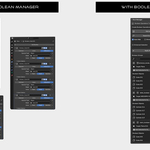
Bool Manager adds a new panel with two main sections:
Boolean Operations Tool
-
Add as Boolean: Adds selected objects as cutters and lets you choose a target
-
Search for Bool Objects: Filter existing boolean objects in the scene
-
Global Settings:
-
Auto Hide: Hides boolean objects after applying
-
Show as Wire: Displays boolean objects as wireframe
-
Exact Mode: Uses Blender's exact boolean solver
-
Basic Workflow
-
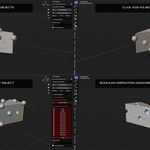
Select one or more objects to use as cutters
-
Click Add as Boolean
-
Click on an object in the viewport to assign it as the target
-
The operation is automatically applied and grouped
Boolean Groups
Bool Manager organizes operations into groups for clarity and control.
Group Interface:
-
Target: The object being cut
-
Boolean Objects: The cutters used in the operation
-
Icons:
-
Toggle visibility of cutters
-
Toggle wireframe display
-
Toggle between Fast and Exact mode
-
Group Actions:
-
Rename group: Click the group name
-
Add Selected to Group: Add new cutters to the current group
-
Add Selected as Target: Change or add target objects
Global Settings Explained
| Option | Description |
|---|---|
| Auto Hide | Automatically hides cutters after operation |
| Show as Wire | Makes cutters easier to see |
| Exact Mode | More precise boolean calculation (slower) |
Tips & Best Practices
-
Boolean objects are automatically deselected during target selection
-
You can add multiple targets or multiple cutters per group
-
Use Fast Mode for quick previews, and Exact Mode for final accuracy
-
You can disable Auto Hide if you want to keep cutters visible
-
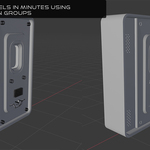
Works great for hard surface modeling, sci-fi assets, and modular environments
Example Use Case
-
Create a base mesh (e.g. a sci-fi crate)
-
Add multiple spheres/cylinders as boolean cutters
-
Use Add as Boolean to target the base
-
Group your operations for better control
-
Tweak visibility, wireframe and precision modes as needed
Shortcuts
There are no keymap shortcuts by default. All actions are performed through the Bool Manager panel.
Compatibility
-
Blender 3.5+
-
Compatible with all object types that support the boolean modifier
-
Works alongside other modifiers and workflows
Have questions about this product?
Login to message
| Blender Extension Compatible | Yes |
| Sales | 20+ |
| Published | about 1 year ago |
| Blender Version | 4.2 - 4.5 |
| Extension Type | Add-on |
| Render Engine Used | Cycles, Eevee |
| License | GPL |
Discover more products like this
hard surface Mesh Cutter sci-fi modeling modeling non-destructive workflow fast modeling Boolean operations blender addon exact boolean group managment boolean modeling