 Coby Randal Media

The Ultimate Tool for Smooth, Professional Camera Movements in Blender
Flies like a drone, stabilizes like a gimbal, and follows with a smooth delay with adjustable automatic procedural smooth-in and smooth-out finesse. Yes, that means a slow parent / damped motion system, enabling you to get SUPER smooth shots, FAST! Even if you're motion input is rough and turbulent. It's fun to play with, and designed to give you the smoothest and best looking camera moves with the least amount of effort. CFP is a robust, intuitive camera rig with a convenient add-on sidebar button panel specially designed to streamline complex operations. Camera Flow Pro is ready for your production. You can do it all in real time auto key recording, manual keyframes, or even set your character / vehicle as the target of Camera Flow Pro to auto follow and auto track + focus.
Do you also need snappy speeds and some camera shake? Glitched out cuts to various camera angles? Turbulent movements? We got that too! Need perfectly seamlessly looping and highly customizable camera shake? A camera crane or track for dynamic changes in perspective that film directors have used for decades? Do you want near effortless easing effects where the camera follows fast but lands incredibly slowly? Adjustably? Say hello to Camera Flow Pro. It's like a virtual camera man that helps you get the sweet shots you want, showing you exactly what you're going to get in real time.
Benefits / Uses:
- Smooth and gorgeous camera motions, FAST!
- What you see in live preview is what you get in the final baked to keyframes render. For even more assurance, a toggle / Cache Cam feature has been added.
- Non-destructive workflow allows you to preview in rig, and bake a copy of the camera for render with smart auto naming.
- One-button tracking/aiming at objects with adjustable following speed and smoothness. Toggle this on and off, and even key frame it.
- One-button following of objects with adjustable following speed and smoothness.
- One-button Turnaround feature provides seamless 360 orbits around an object and auto updates based on your scene frames.
- Seamlessly looping procedural camera shake for added visual interest.
- Effortless delay / flow smoothing effects and dynamic experimental camera perspectives.
- Procedural camera shake can be stretched into full motion paths with various parameters, including seamless looping.
- One-button camera baking to keyframes for export to other software OR rendering in Blender. Bake also includes Depth of Field Empty object and smart naming.
Features:
✅ All-in-one add-on - Simple and accessible control system.
✅ Easy rig import - Append the Camera Flow Pro rig at the push of a button.
✅ Customizable panel layout - Collapse, reorganize, and resize panels to suit your workflow.
✅ Detailed tool-tips - Stay on track with thorough descriptions for each button and every setting.
✅ Adjustable real-time delay - Super smooth or snappy follows/pans with real-time flow delay presets.
✅ Advanced control options - For artistic and experimental shots.
✅ Slider mode - with various seamless easing options; excellent for social media animations and creating interesting shots.
✅ Auto Focus mode gives you real-time smooth / adjustable delayed auto focusing on objects in a specific collection.
✅ Camera whip mode - the classic behavior of the difference between the anchor and the flow object is now optional!
✅ Barrel Roll - Do it! Seamless or not, it's up to you.
✅ Auto Turnaround - Seamless and smooth, this is incredibly convenient.
✅ Dutch tilt options. Just rotate the camera.
✅ Match the camera settings of another camera with a convenient multi-function button (Frame).
✅ FPV framing options. Setting up your perfect shot is easier than ever. Walk mode and Fly Mode buttons appear, allowing you to record and bake a camera in this mode.
✅ Hitchhike objects to follow the camera at the click of a button. Moving them as smooth as the camera moves.
✅ Bake Selected gives you copy bake powers to quickly populate your scene with hitchhikers or even rigid body physics objects.
✅ Switch between up to 9 objects of interest or where the camera is located with point-to-point smoothness.
✅ Drone effect options like flying loop-de-loops and barrel rolls.
✅ Switch between 3 types of Track-To constraints at the click of a slider.
✅ Various animatable position and tracking offsets for even more artistic control.
✅ Depth of field tracks the same target empty that the Track-To does, with the same real-time adjustable delay / smoothing.
Feature Highlights:
Animations Using Camera Flow Pro:
Flow Presets:
- Simple Flow - When standard smoothing is all you need.
- Snappy Flow - Quick but still smooth.
- Luxe Flow - Creamy and lush, this extravagant motion curve provides both excitement and cushion.
✅ Luxe Flow Controls (Advanced) - When you need extra control parameters + extra presets like:
- Classic
- Slow Mo Moment
- Magnetic
- Splice Drift
- Skippy
- Speed Splice
- Rope Slack Follow
- Internet lag
Panel Button Functions:
Framing & Composition
- FrameInstantly frame and focus the entire CFP rig on selected object(s), the 3D Cursor, or match a selected camera’s view and camera settings • Keeps relative anchor/controller offsets (except when framing a camera).• Ctrl+Click – Use 3D Cursor as camera anchor height.• Ctrl+Alt+Click – Reset level framing.• Nothing selected → offsets entire rig to cursor.• Camera selected → clears anchor & tracking controller locations.
- FPV FrameUnlocks the camera from the rig and locks it to the current 3D viewport perspective (great for free flying). Auto-frames selected objects. Activates Fly Mode and Walk Mode (Standard Blender navigation locked to the active camera.). You can record and bake camera movement directly in this mode.
- FocusSets Anchor Track-To / DoF focus to the nearest surface in the center of the view (or 3D Cursor distance if nothing selected).• Alt+Click – Focus on object origin or cursor.• Ctrl+Click – Move Anchor Cam Loc.• Shift+Click – Move Root.• Alt+Shift+Click – Move Root only (keeps rig in place).
- AimPoints the rig’s Z-axis at selected object(s) or 3D Cursor.• Alt+Click – Aim + adjust focus.• Shift+Click – Aim while preserving Anchor Cam Loc offset.
- To CursorMoves selected objects (especially Anchor/Flow objects) to the 3D Cursor — works correctly even with rotated/scaled parents.Various modifier keys move only specific parts of the rig.
- Custom Frame Options• Center – Center, Upper/Lower Half, Third, Fourth, Fifth, Top, Bottom.• Frame – Frame using bounding-box height divisions.
Relations (Quick Constraint Toggles)
Instant on/off toggles with useful modifiers (Alt, Ctrl, Shift, etc.):
- Track
- Parent
- A Track (Anchor Track-To)
- Surface Focus
- A Parent (Anchor Cam Loc)
- Root Follow
All toggles support visibility keyframing, clearing keyframes, and “disable but keep transform” options.
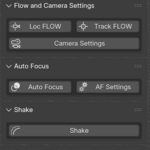
Flow & Camera Settings
- Cam Flow / Track Flow → Open Location and Track-To property panels. Switch smoothing presets or change to slider mode, or enable camera whip.
- Camera Settings → Open camera data panel. Alt+Click resets CFP_Camera to defaults.
Auto Focus
- Toggle Auto Focus on/off (choose target collection in Settings).
- AF Settings panel for full control.
Shake
- Toggle camera shake for preview and render.
- Shake Settings panel.
- Randomize – Randomize the camera shake noise w factor. Alt+Click: randomize the noise w and more sub factors (best seen in the CUSTOM preset mode). Ctrl+Click: randomize the sub factors and Shake Preset. Enabling Normalize in the Shake Panel can help show the movement better or give new options.
Cache & Bake
- Cache Cam – Quick bake/unbake toggle for scrubbing and final render.
- Bake Cam – Bake CFP_Camera + DoF target to keyframed copies. Options for reverse bake, still frames, etc. Auto smart names your baked copies based on your scene name, frames, and CFP toggles like Turnaround, Shake, etc.
- Bake Selected – Duplicate and bake the selected object(s) to visual keyframes (based on the scene start and end frames), and keep the original object selected (useful for multiple bakes quickly). Alt+Click: duplicate and bake, then select the baked object. Ctrl+Click: bake the original to keyframes and keep it selected. Will NOT bake the CFP rig itself. This also works for rigid body objects, but is not accurate for more than one object at a time, though it can work for some quick effects where objects are fine to overlap.
Turnaround & Barrel Roll
- Turnaround – Seamless orbiting around the Root object. Use Delta Transforms + different Euler orders for tilted orbits.
- Barrel Roll – Camera rolls around the Flow Track-To object with its own multiplier.
Trackers & Hitchhike
- Add Tracker – Adds an Empty at cursor, parented to selection (or free). Options for location-only tracking and world alignment.
- Hitch to Camera / Hitch to Selected – Instantly parent any object to the camera or another object with full/partial follow and same rich modifier-key options as constraint toggles.
Resets
- Reset Rig – Delete keyframes, untoggle buttons, or fully reset transforms.
- Root Reset Rig – Completely delete the Camera Flow Pro collection (and anything inside of it) and re-adds it brand new. Does not delete Trackers or Baked cameras unless you hold Ctrl+Alt+Click for a total factory reset.
Add-on Preferences
- Show/Hide Advanced Options (on by default).
- Swap Flow button order to match Relations panel logic.
Before You Buy:
-
Limitations:
- CFP is built on top of geometry nodes simulations, so timeline scrubbing must be done only after you have toggled "Cache Cam".
- To accurately preview your scene, you must playback the animation from the first keyframe you set for CFP (or just use Cache Cam), (or your first scene frame if using any of the Relations constraints). See above.
- If you're on a laptop and use a trackpad mouse with Blender's "Emulate 3 Button Mouse" feature enabled, this prevents certain alt-key button functions from being accessible. I am currently looking into solutions for this.
-
Compatibility:
- Built for Blender 4.2 - 4.5 LTS and supported until July 2027.
- You can save in an older version of blender and open in a newer, but not the other way around.
- Multiple CFP rigs can operate simultaneously in the same .blend but are not supported and not recommended. Use bake instead to set up multiple cameras.
- You can one-button bake as many cameras as you want.
-
Important Notes:
- Camera shake is procedural, not physics-based. This has its advantages and disadvantages.
- Bake to keyframes before rendering to avoid errors. There's a button for that: "Bake CFP Cam".
- Installation is super easy, all-in-one add-on.
