 Polyworks




Cloth NeXt 2.7.5
New
- Added a Learning Center button in the preferences with direct access to the Cloth NeXt documentation.
- Lumen is now the default solver.
- Enabled the New Look interface by default.
Improvements
- Updated Quick Add labels:
- Softbody → SBD
- Collider → COLL
- Cable/Rod → CABLE
- Renamed Restshape to Shrink for Cloth and Softbody.
- Removed Velune from the list of newly offered solvers.
Fixes
- Fixed duplicated icons in the Pinning interface.
- Fixed Pinning error messages incorrectly appearing on other objects.
- Improved Pinning state isolation between objects.

Cloth NeXt™ 2.7.0 — Arc NeXt™
Cloth NeXt™ 2.7.0 introduces Arc NeXt™, a faster and more intuitive way to set up simulation objects directly from the floating toolbar. This release also improves UI feedback and completes the transition to Superhive-managed updates.
New: Arc NeXt™
Setting up simulation objects just got much faster.
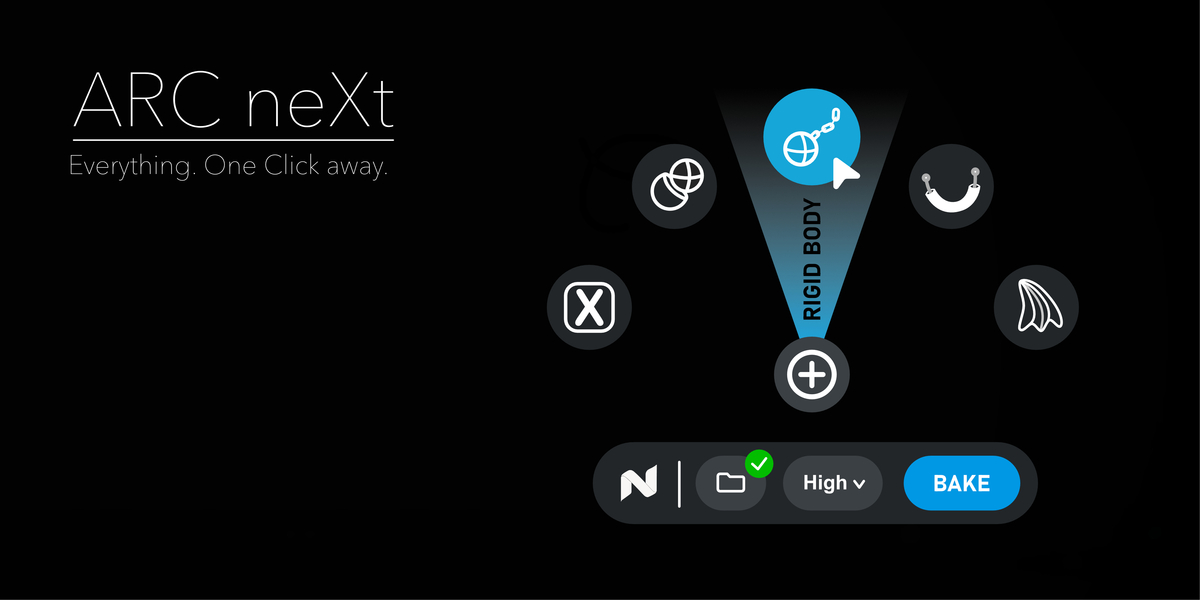
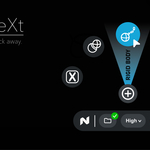
A new Add button now floats above the simulation toolbar. Hold and drag to instantly assign one of five available roles:
Cloth
Cable / Rope
Rigid Body
Soft Body
Collider
Arc NeXt™ uses a compact radial interface designed to keep object setup fast without adding more permanent UI.
The currently selected role is highlighted with a blue radial sector and clearly labeled before assignment.
Smart interaction
Arc NeXt™ automatically respects the active object type.
Incompatible roles remain visible but are disabled, helping you immediately see which simulation types are available for the selected object.
Assignments continue to affect the active object only, even when multiple objects are selected.
The complete assignment is treated as a single Blender action and can be reverted with one Undo.
Easy cancellation
Nothing is assigned until the gesture is completed.
You can cancel Arc NeXt™ by:
moving back into the center
moving outside the radial area
pressing Esc
right-clicking
Short accidental clicks also leave the scene unchanged.
Adaptive layout
Arc NeXt™ automatically adapts when the toolbar is close to a viewport edge.
The radial menu can rotate or scale to remain accessible in smaller viewport regions while keeping role ordering and interaction consistent.
Improved Toolbar Feedback
Status messages, warnings and errors no longer compete for space inside the floating toolbar.
Messages now appear beside the Bake button, keeping the main toolbar cleaner while making important feedback easier to read.
Arc NeXt™ also follows the existing toolbar visibility state, including hiding correctly when the interface is collapsed with F6.
Superhive Update Integration
Cloth NeXt™'s update workflow has been simplified.
The previous:
Update Channel selector
Stable / Beta / Dev switching
Developer acknowledgement controls
have been removed from the normal Preferences interface.
Customer updates are now handled through Superhive's native Blender Extension Repository.
Preferences instead show two simple status indicators:
Superhive connected
Confirms that the official Superhive repository is available in Blender.
Purchase validated
Confirms that Cloth NeXt™ is available through the locally cached repository data.
These indicators are informational only. Cloth NeXt™ does not introduce its own authentication system or access your Superhive credentials.
Distribution Changes
Version 2.6.0 remains the final legacy GitHub Beta migration release.
Starting with 2.7.0, normal customer releases are distributed through Superhive.
Existing legacy repositories and installations remain intact, so the migration does not rewrite or invalidate previous Cloth NeXt™ releases.
Private releases after 2.6.0 now use a unified release repository instead of the previous public channel structure.
Cloth NeXt 2.7.5
New
- Added a Learning Center button in the preferences with direct access to the Cloth NeXt documentation.
- Lumen is now the default solver.
- Enabled the New Look interface by default.
Improvements
- Updated Quick Add labels:
- Softbody → SBD
- Collider → COLL
- Cable/Rod → CABLE
- Renamed Restshape to Shrink for Cloth and Softbody.
- Removed Velune from the list of newly offered solvers.
Fixes
- Fixed duplicated icons in the Pinning interface.
- Fixed Pinning error messages incorrectly appearing on other objects.
- Improved Pinning state isolation between objects.
Cloth NeXt™ Commercial 2.7.0 — Arc NeXt™
Cloth NeXt™ Commercial 2.7.0 introduces Arc NeXt™, a new radial assignment workflow designed to reduce setup time and keep simulation preparation directly inside the viewport.
The release also improves toolbar feedback and transitions commercial installations to the new Superhive-based update infrastructure.
Arc NeXt™
Arc NeXt™ provides a faster way to assign simulation roles without leaving the viewport.
A new Add control is positioned above the floating simulation toolbar. Hold and drag to select one of the available simulation roles:
Cloth
Cable / Rope
Rigid Body
Soft Body
Collider
The selected role is displayed through a highlighted radial sector before the assignment is committed.
This allows common simulation setup operations to be performed with a single gesture instead of navigating through additional panels or menus.
Context-aware assignment
Arc NeXt™ evaluates the active object before presenting an assignment.
Roles that are incompatible with the selected object type remain visible but cannot be selected.
Assignments continue to operate on the active object only, allowing Arc NeXt™ to integrate cleanly into scenes containing larger or mixed selections.
Each completed Arc NeXt™ assignment is handled as a single Blender operation and can be reverted with one Undo.
Non-destructive interaction
No scene changes are made until an Arc NeXt™ gesture is completed.
The operation can be cancelled by:
returning the cursor to the center
moving outside the active radial area
pressing Esc
right-clicking
Short clicks do not modify the scene.
Adaptive viewport layout
Arc NeXt™ automatically adjusts its orientation when positioned near viewport boundaries.
Where necessary, the interface can rotate or scale to remain usable in restricted viewport regions while preserving role positions and interaction behavior.
Improved Simulation Toolbar
Simulation feedback has been reorganized to keep the floating toolbar compact.
Status information, warnings and errors are now displayed beside the Bake control instead of inside the main toolbar.
This provides more space for the primary simulation controls while keeping important feedback visible during production work.
Arc NeXt™ follows the existing toolbar visibility system and is hidden together with the simulation interface when using F6.
Superhive Update Integration
Cloth NeXt™ Commercial now uses Superhive's native Blender Extension Repository for customer updates.
The previous release-channel controls have therefore been removed from the standard Preferences interface, including:
Update Channel selection
Stable / Beta / Dev switching
Developer channel acknowledgement
Commercial installations instead use the repository associated with the installed product.
Preferences now provide two informational states:
Superhive connected
Indicates that the official Superhive repository is configured and enabled in Blender.
Purchase validated
Indicates that Cloth NeXt™ is available through Blender's locally cached repository data.
These checks use Blender's existing repository information. Cloth NeXt™ does not introduce a separate authentication system or access stored Superhive credentials.
Distribution
Cloth NeXt™ 2.6.0 remains the final release distributed through the previous GitHub Beta migration channel.
Starting with Cloth NeXt™ Commercial 2.7.0, customer releases are distributed through Superhive.
Existing installations and legacy repositories remain functional and are not modified as part of the migration.
Validation
Arc NeXt™ has been validated across role assignment, cancellation, viewport scaling, edge positioning, repeated interaction and Blender lifecycle scenarios.
The Cloth NeXt™ 2.7.0 test suite passed 1,825 tests, with an additional focused Arc NeXt™ validation run covering 32 dedicated cases.
Discover more products like this
cloth simulation GPU cloth cloth collision cloth solver physics addon cloth-physics