Collection Organizer
 Doctor Legion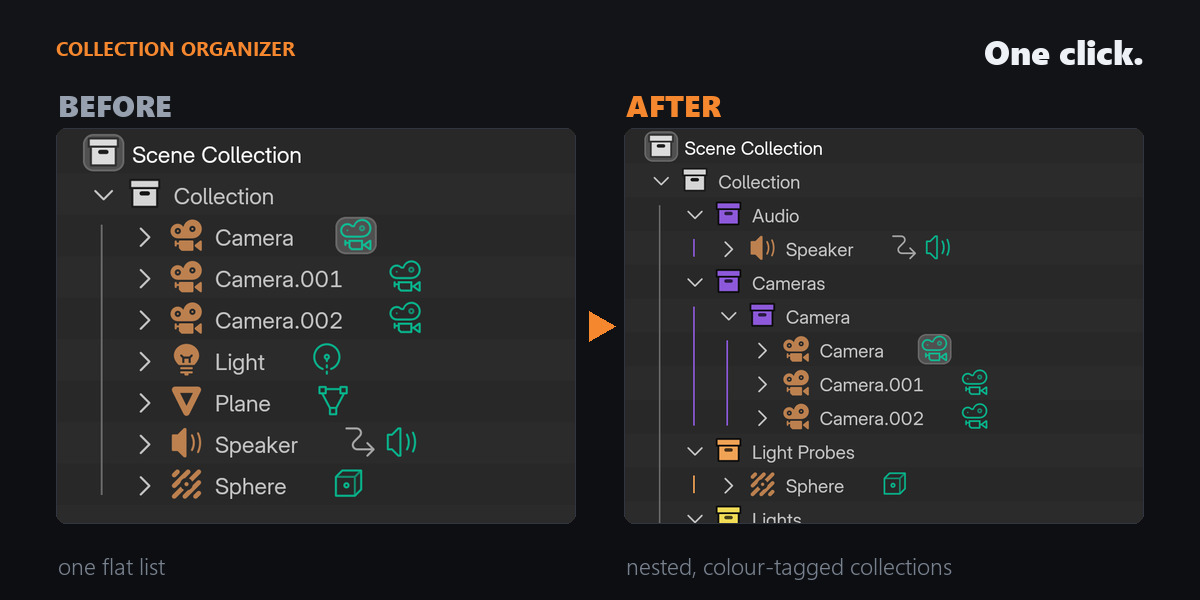




A: Nothing is ever deleted. Organizing only moves objects between collections and creates new ones — your objects, meshes, materials, modifiers and existing collections are never removed.
Every run is reversible three ways:
- Revert restores the previous layout exactly, touching only the objects that actually moved. It works up to 20 runs deep in a session.
- Ctrl+Z works normally.
- Organize a single collection instead of the whole scene (right-click it in the Outliner) and the rest of your scene is untouched.
In AI mode, if the request fails for any reason — no connection, expired session, usage limit — your scene is left exactly as it was and you get a message explaining why. It never silently reorganizes things a different way. Names the AI doesn't classify stay right where they are rather than being dumped into a catch-all. And re-running on an already-organized scene is safe: the result is idempotent, so the layout doesn't drift.
Have questions about this product?
Login to message
| Blender Extension Compatible | Yes |
| Dev Fund Contributor | |
| Published | 3 months ago |
| Blender Version | 4.2 - 5.2 |
| Extension Type | Add-on |
| Render Engine Used | Cycles, Eevee |
| License | Mit |
Discover more products like this
scene organization productivity Workflow cleanup asset management chatgpt ai automation organize collection colors collections outliner