Cursor Manager – 3D Cursor History, Saved Positions & Quick Reset for Blender
 RealDevCode



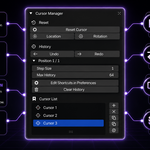
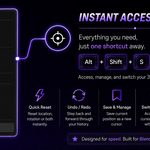
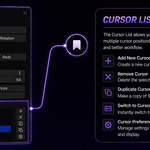
Keep track of your 3D Cursor history, save useful positions, and quickly return to them when needed.
Installation
- Open Blender.
- Go to Edit → Preferences.
- Open the Add-ons section.
- Install the Cursor Manager ZIP file.
- Enable the addon.
Once enabled, Cursor Manager can be accessed from the 3D Viewport.
Where To Find It
The main Cursor Manager interface is available from the 3D Viewport Sidebar.
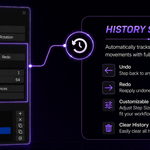
Cursor History
- Move the 3D Cursor as you normally would.
- Cursor movements are added to the history automatically.
- Use the history controls to move through previous cursor positions.
History settings can be used to control the history step size and maximum number of history entries.
Stored Cursors
- Place the 3D Cursor where you want it.
- Save the current cursor position.
- Give the stored cursor a name.
- Select the stored cursor whenever you want to return to that position.
Stored cursor positions can be managed from the Cursor Manager interface.
Manage Stored Cursors
RenameGive a stored cursor a clear name so it is easier to identify later. |
DuplicateCreate a copy of an existing stored cursor. |
UpdateUpdate a stored cursor with the current cursor position and rotation. |
DeleteRemove a stored cursor position you no longer need. |
Set a Custom Shortcut
- Open Cursor Manager in the 3D Viewport.
- Open the History section.
- Click Edit Shortcuts in Preferences.
- Find the Cursor Manager command in Blender's Keymap settings.
- Set the keyboard shortcut you want to use.
You can choose your own shortcut for quickly accessing Cursor Manager.
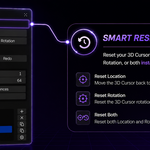
Reset the Cursor
Reset LocationReset the 3D Cursor location when you need a clean starting point. |
Reset RotationReset the 3D Cursor rotation independently. |
Reset BothReset both the cursor location and rotation together. | |
Basic Workflow
|
01
MoveMove the 3D Cursor. |
02
SaveStore a useful position. |
03
BrowseUse the cursor history. |
04
ReturnGo back to a saved position. |
Compatibility
Blender 4.2 - 5.2
Have questions about this product?
Login to message
| Blender Extension Compatible | Yes |
| Dev Fund Contributor | |
| Published | about 2 months ago |
| Blender Version | 4.2 - 5.2 |
| Extension Type | Add-on |
| Render Engine Used | Cycles, Eevee |
| License | GPL |
Discover more products like this
cursor-history cursor-memory blender tools productivity blender addon Modeling tools 3d modeling cursor-manager Blender Workflow cursor navigation tools 3d-cursor