 Skava
Skava
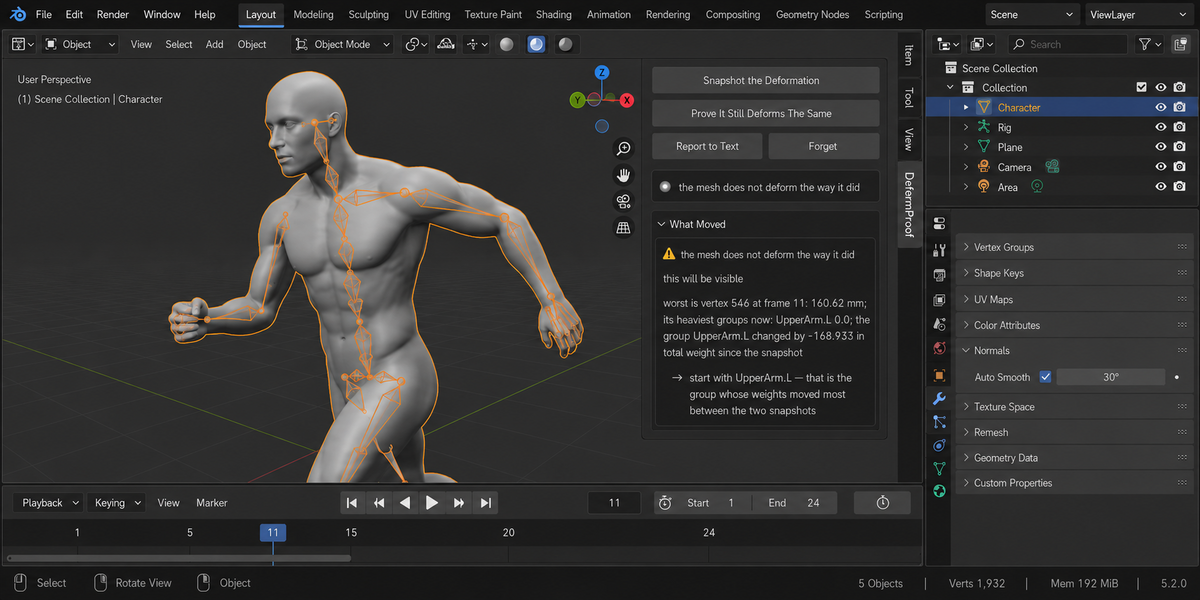

DeformProof — Documentation (v1.2.0)
Requires Blender 4.2 or newer. Tested on 4.2, 5.1 and 5.2.
Installing
Download the zip and leave it zipped. In Blender open Edit, then Preferences, then Add-ons, click the arrow button in the top right corner of that window, choose Install from Disk and pick the zip. Tick the checkbox next to the add-on name. Press N in the 3D Viewport and the DeformProof tab appears in the sidebar.
The order of work
Select the skinned mesh. Press Snapshot the Deformation before you touch the weights. Do your work — by hand, by transfer, by automatic weights, by an add-on. Press Prove It Still Deforms The Same. That is the whole tool.
Snapshot the Deformation
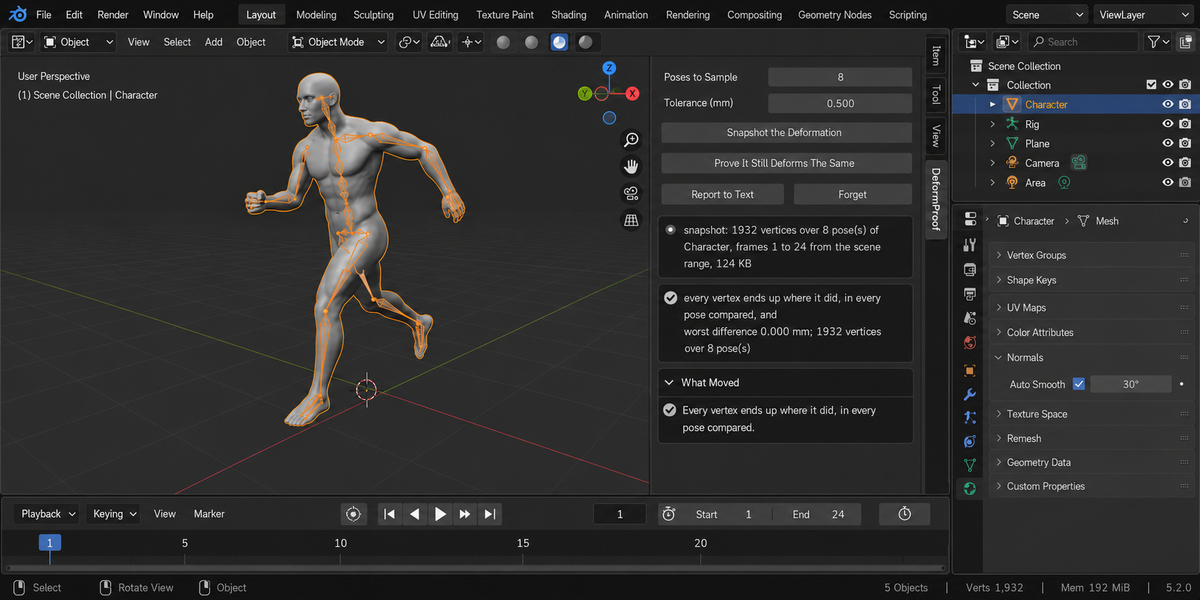
Steps through a sample of frames and records where every vertex of the evaluated mesh ends up — the mesh after the armature and every other modifier, which is what the viewer sees and what an exporter writes.
It also records the shape of the setup: the vertex and face counts, the names of the weight groups, the total weight in each group, the modifier stack and the number of shape keys. That second half is what lets the comparison tell a weight change from a topology change afterwards.
Poses to Sample decides how many frames across the range are measured. Without an armature there is no pose to read and the frames are sampled evenly instead, which the panel says. On a very long range the search for distinct poses steps through the frames rather than reading every one — a 5 000 frame shot takes 0.44 seconds — and the panel says that as well. The default of eight catches the extremes and the middle and costs about a hundred kilobytes for a two-thousand-vertex character; a dense character at seven and a half thousand vertices comes to 747 KB. The snapshot lives in a text block called DeformProof Snapshot inside your file, so it survives saving and reopening, and one button deletes it.
The frame range comes from the scene, or from the preview range if you have one set — the same place Blender's own Bake Action takes it. The panel says which one was used.
Prove It Still Deforms The Same
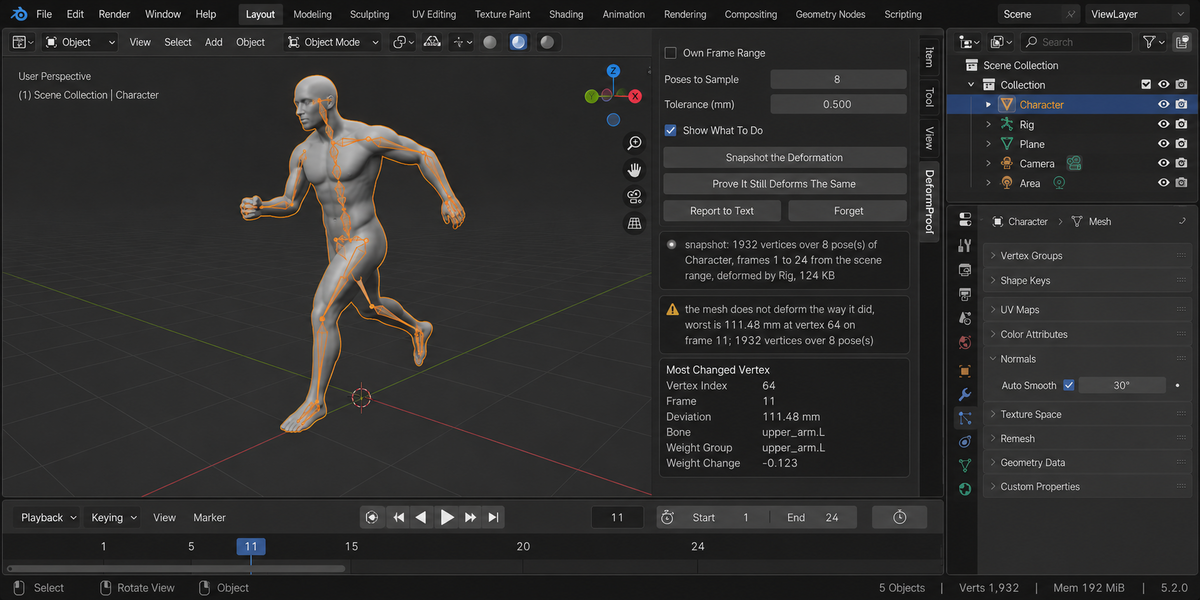
Measures the same poses again and compares them vertex by vertex. You get the worst difference in millimetres, the vertex it happened to, the pose it happened in, and the weight group most likely behind it.
Tolerance decides what counts as a change. The default of half a millimetre sits far above numerical noise — a repeated measurement with nothing touched comes to exactly 0.000 mm — and far below anything a real weight edit produces.
Why the deformation and not the weights
Because weights are not what anyone sees, and comparing them raises alarms that mean nothing. Multiply every weight on a vertex by the same number and the skin does not move: bone contributions are normalised. A weight comparison calls that a change on every vertex you touched. This add-on measures the mesh, reports 0.000 mm, and is right.
Putting the weights back
The snapshot can remember the weights themselves, not only where thedeformation ended up. That costs about a tenth more space, measured, and buyssomething Blender does not offer: an undo that survives saving and closing thefile. Reopen a file next week, decide the weight painting went the wrong way,and put it back.
The proof is the same measurement in both directions: the deformation thathad drifted 615.134 mm came back to 0.0000 mm, and the weights matched thesnapshot to nine decimal places.
A weight group made after the snapshot is not somebody else's work if itdeforms the mesh — that case is handled, because a group named after adeforming bone survived the restore in an earlier version and left the skin788.328 mm out of place under a green report.
When it refuses
- The vertex count changed. Vertices are compared by index, and after a topology change the indices do not mean the same thing. Take a new snapshot.
- You are in Edit Mode. There the evaluated mesh is not what the viewer sees.
- The snapshot would be too large. The message says how large it would have been, what a single pose weighs, and the number of poses that would fit — or, if even one pose will not fit, it says that instead of giving you advice that cannot work.
- The mesh is not being deformed at all. Switched off in the viewport, in a switched-off collection, armature modifier disabled, or no vertex groups: Blender leaves such a mesh undeformed, every pose of it is identical, and a snapshot would prove nothing. The reason is named. If the reason is none of those, it is caught by measurement: an armature taking different poses over a mesh that does not move by a single unit is a mesh that is not following it.
What it names without refusing
A weight group that disappeared or appeared since the snapshot; a modifier stack that is not what it was; a face count that changed while the vertex count did not. Each of those can move the deformation for a reason that has nothing to do with your weights, so each is said out loud rather than folded into the number.
Report to Text and Forget
Report to Text writes the whole report into a text block called DeformProof Report inside your file. Forget deletes the snapshot and empties the report; your mesh is not touched.
Changelog
v1.0.0 — first release.
Checking a whole folder
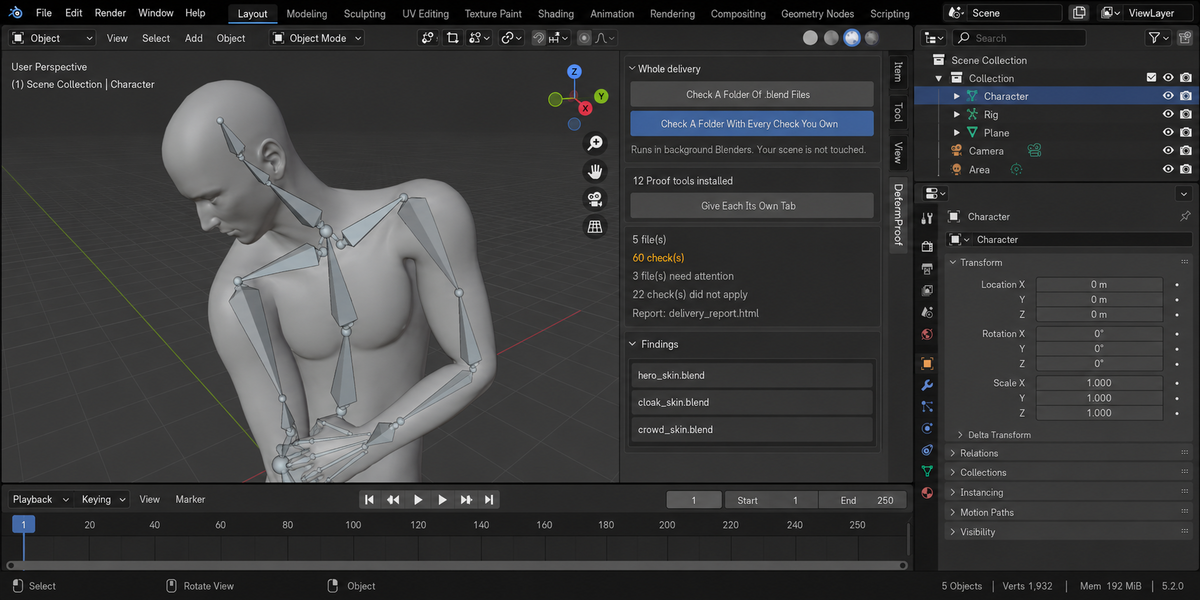
The sidebar has a Whole Delivery panel. It has two buttons.
Check A Folder Of .blend Files runs this product over every.blend in the folder you pick. Check A Folder With Every Check YouOwn runs every tool from this line that you have installed, over thesame files, in one pass — one report, one verdict.
Each file is opened in its own background Blender. Your open scene is nevertouched: not opened over, not saved, not modified in any way. This is also why afile that will not open costs you only that file — the rest of the delivery isstill checked. Press Escape to stop; nothing partial is written, because areport covering half a delivery is a report nobody should trust.
When it finishes you get an HTML report next to the folder. It is one filewith nothing loaded from the internet, so it can be attached to an email, put inthe delivery folder, or opened years later on a machine that has never seen thisadd-on.
Running it from a pipeline
The same check runs headless, with no interface and no person, and finisheswith a code your build system can read: one code for clean, another whensomething blocking was found, and a third when a file could not be checked atall. Those last two are deliberately different. A check that did not run has notpassed, and a gate that treats silence as success will one day wave through thedelivery it existed to stop. The exact command line is in the add-onpreferences.
Comparing against last week
Any run can be saved as a baseline. A later run then reports what changed:which numbers moved and in which direction, which findings are new, and whichones you have fixed since. Direction matters and is not guessed — eachmeasurement carries its own sense of which way is worse, so rising coveragereads as better and rising drift reads as worse.
Signing a file off
When a file is clean you can sign it off. The record lives inside the .blenditself, not in a folder next to it, so it travels with the file: open it nextmonth and it tells you when it was checked, by which version, and how it cameout. If the file is saved after that, the record says plainly that it is out ofdate — a sign-off that survives an edit it never saw would be worse than nosign-off at all.
One tab instead of twelve
Every tool in this line can put its panel under a single shared sidebar tabinstead of its own. One button does it for all of them at once, and each panelarrives collapsed, so twelve tools cost you one tab and no scrolling. Yourchoice is remembered, and a tool that you later use on its own can be given itsown tab back the same way.
What is deliberately not claimed
A check that could not run is reported as exactly that, never as a pass. If atool from this line is not installed, or is an older version that predates thecombined run, the report names it in a list of checks that did not take part,so the gap is visible rather than quietly absent.
Have questions about this product?
Login to message
| Published | 12 days ago |
| Blender Version | 4.2 - 5.2 |
| Extension Type | N/A |
| Render Engine Used | Cycles, Eevee |
| License | GPL |