Dimension Tools
 ParametrStudio


Does this work with imperial units?
Partly. The dimension value is multiplied by a Unit Scale input, so you can
display decimal inches (39.37) or decimal feet (3.2808) and choose the number
of decimals. Feet-and-inches notation with fractions, like 5'-6 1/2", is not
supported, and there is no unit symbol. Graphic sizes (text, ticks, gaps) are
set in paper millimetres regardless of the drawing units.
The text is too small or too large. What do I set?
Set the modifier's Scale to your drawing scale (1:50 → 50, 1:100 → 100). Text mm, Tick mm and the other size inputs are in paper millimeters — 2.5 mm text at Scale 100 prints exactly 2.5 mm at 1:100.
Why don't my dimensions show in a front or side view?
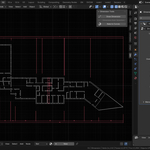
DimCraft is built for floor plans. Dimensions are flat geometry in the XY plane at Z = 0, viewed from the top. Elevation and 3D dimensioning are not supported.
Can I change a dimension after placing it?
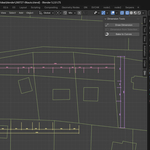
Yes. Control points are ordinary mesh vertices. Enter Edit Mode on the dimension object and move, add or delete vertices — the chain re-sorts and recomputes automatically. Style parameters are on the modifier.
Discover more products like this
geometry nodes annotation parametric architecture Technical drawing cad measure dimensioning ArchViz dimension floor plan drafting