Recursive Subdivision Modifier
 DKNS DSGN







Hello!
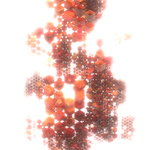
This is a grid-based recursive subdivision generator made by DKNS DSGN.
I have been a long-time admirer of Joe 'Raw&Rendered' Camacho's work in C4D and I have spent considerable time trying to achieve something similar in Blender.
Please, do check out his website! https://www.rawandrendered.com/
Please note that this is a vertex-count-heavy effect, don't crash your computer!
There are 3 steps to using this generator.
1Create an object such as a plane or a cube and add the 'DKNS_RecursiveCubus_01' modifier to it.(By default, you just need to make a copy of the 'Cubus_GN' object in the 'ART' collection, or just play with the modifier on the 'Cubus_GN' object already provided in the scene.)
2] You will then need to add your shapes to the 'INSTANCES HERE' collection, or whichever collection you specify under 'Collections' tab in the modifier. If you want to create a biased distribution (i.e. one or more shapes will occur more frequently), just add multiple copies of the desired object there (e.g. two cubes and one sphere will be instanced at a ratio of 2:1). Keep in mind that this will end up being real geometry, so watch your vertex count (and use Vulkan).
3] Adjust the modifier settings to your liking:
- There are 3 levels you can use to randomize and shade your geometry with:
-GRID: A volumetric cube divided by the face count before any subdivision takes place. In a grid of 3 base faces and 3 layers (3x3x3), this amounts to 27 volume cubes.
-CELL: I call 'cells' the product of a subdivision that modifies the grid geometry vertically, i.e. a column of shapes inside a grid element.
-OBJECT: a random value for each instanced object.
First, set up your geometry in the 'Geometry' tab. The number of grid planes to be subdivided, how far apart they will be in the Z axis, how large the initial grid is, how many times you want the recursion to run, how many subdivisions occur per step, and tweak the chance to subdivide (this is sensitive, careful). These settings will determine how much geometry there will be. There is also an instanced objects scale slider and rotation randomization toggle with angle snapping.
Second, there is the deletion algorithm. Depending on the selected modes (they are cumulative), this will randomly remove some - or all - of the instanced objects.
Third, the wireframe. By default, to avoid overloading your computer, it is turned off. You can have the wireframe appear on the instanced shapes, on the deleted ones, or both. You can also delete the resulting wires randomly (based on instanced shapes' mesh islands) and add a few FX like triangulation. There is also a setting for the wireframe geometry resolution.
The modifier also comes with pre-assigned materials. You can get up to 5 randomly selected materials for your geometry and one for the wireframe + caps. Please note that in Blender 4.5 point clouds still don't work with geometry-nodes-assigned materials. :"( Thus the point cloud caps will not follow the aformentioned shading principles. They will also only render in Cycles. You can add custom caps by adding objects to 'CUSTOM CAPS HERE' collection which will sidestep these issues. Beware, these will be realized instances, as is the rest of the geometry, so be careful when using higher iteration counts.
Finally, you can open the 'Seeds' tab and see what the modifier gives you. Spin the wheel!
In my experience, such renders are very much dependent on the quality of your shading, so do spend time on your materials! :)
I have provided a value randomizer node for the Shading Editor and an 'mat_rnd_val' attribute that will provide the random values necessary for it to work. In Shading Editor, add an 'Attribute' node set to 'Geometry' and use the 'Fac' output. Plug that into 'InputRndGrayscale' in the 'DKNS_HSL_Randomizer' node, or use it to drive your own FX. There is also a position mapping randomizer 'mat_rnd_pos' (per mesh island). You can also use it to get true per-island randomization inside your shading tree. Check out the pre-made demo materials to understand how these are applied.
Thank you for trying out the modifier out and I hope you will make some fun renders with it!
Adam 'DKNS DSGN' Simek
P.S. Feel free to explore the modifier itself and adjust it to your needs. Just don't resell it. :))
P.P.S. I would also appreciate you sharing your results with me. :)
Have questions about this product?
Login to message
| Sales | 10+ |
| Rating | 1 ratings |
| Published | 12 months ago |
| Blender Version | 4.3 - 5.0 |
| Render Engine Used | Cycles, Eevee |
| License | Royalty Free |
Discover more products like this
advanced geometry nodes subdivision DKNS cube generator abstract Recursive