 3DMAGIC


One click. Clean UVs.
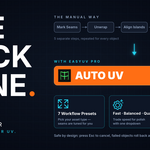
EasyUV Pro is a Blender add-on that unwraps difficult, dense and heavy meshes automatically. Select your mesh, choose what you are unwrapping, press AUTO UV, and EasyUV Pro analyzes the model, plans the seams, unwraps, optimizes, packs and validates the result for you. No manual seam marking needed for most meshes.
Every result is measured: stretch, angular distortion, texel density consistency, overlap and packing efficiency are combined into a 0–100 quality score, so you can see how good the layout is instead of guessing.
Why you will like it
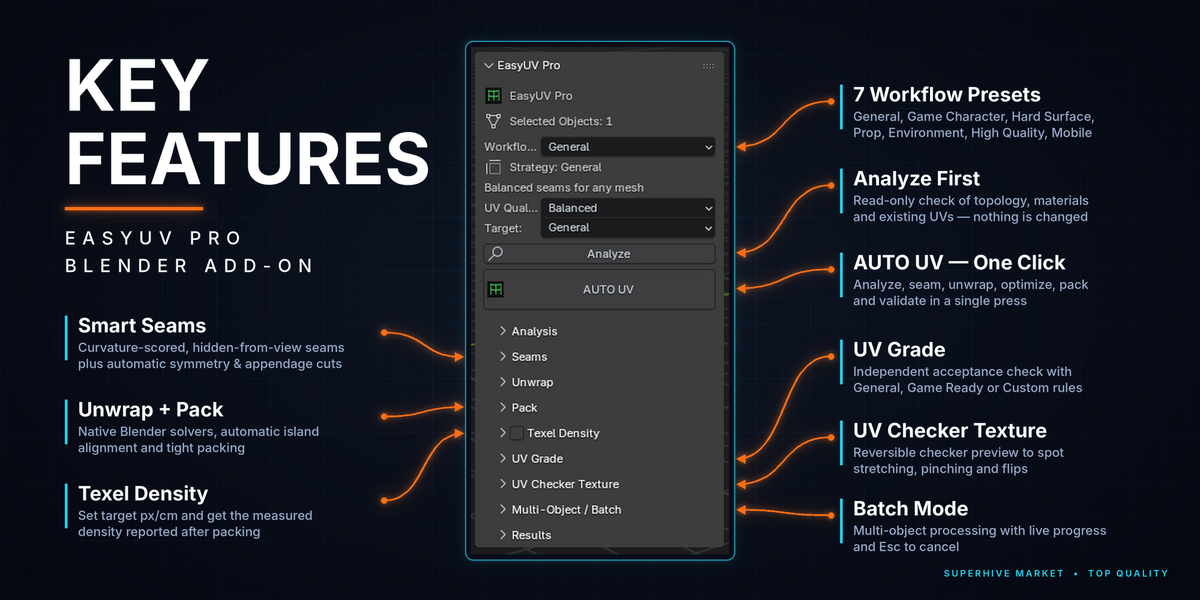
- Simple panel: pick the object type, pick a quality, press AUTO UV. Everything else is folded away under Advanced.
- Smart seams: every edge is scored by angle, curvature, materials, concavity, visibility and symmetry, not by a single angle threshold.
- Symmetry and limb detection: automatic symmetry cut along the centerline, plus clean cuts where limbs, handles or wings join a body.
- Self-optimizing: Balanced and Quality modes try alternative seam densities and solvers and keep the best measured result.
- Island alignment: similar islands (for example plank UVs) are rotated to a shared orientation so directional textures line up.
- Fast / Balanced / Quality modes with a live progress bar and Esc to cancel.
- 100% offline: no cloud AI, no telemetry, no license server, no account, no network access.

7 profiles, each cuts the model differently
A profile is not just a set of sliders. Each one selects a different seam strategy:
- General: balanced defaults for most assets.
- Character: seams on strong creases routed through hidden places, one cut per limb, mirrored halves.
- Hard Surface: panels, weapons and machinery, with flat panels split at about 30° and up and straight islands.
- Prop: fewer, larger islands, creases first.
- Environment: big islands and minimal seam length for fast, stable layouts.
- Max Quality: more cuts for the lowest distortion.
- Mobile: the fewest islands that still stay clean.
If a result comes out badly stretched or overlapping, EasyUV Pro automatically re-cuts with finer seams and keeps the better layout.
How it works
- Select one or more mesh objects.
- Choose what you are unwrapping (General, Character, Hard Surface, Prop, Environment, Max Quality or Mobile) and a quality (Fast, Balanced or Quality).
- Press AUTO UV. A new UV layer named EasyUV is created and packed, and a result card shows the quality score, islands, packing, stretch and overlap.
- Check it with the one-click UV Checker texture and the Seam Preview, both reversible.

Built for real production
- Multi-object modes: Per Object, Shared Space or Material Group packing. Process All runs the whole selection and one failed object does not stop the others.
- Texel density: set texture resolution and target pixels per cm. The measured density is reported after packing.
- Safe results: existing UV layers are never overwritten, everything works with Undo, and failed or cancelled objects are rolled back.
- UV Grade: a separate read-only check with General, Game Ready or Custom rules.
- UV Checker: a reversible checker texture to see stretching and uneven scale in the viewport.
- Large meshes: heavy meshes switch to optimized analysis automatically, with adjustable limits in Preferences.
Installation
- In Blender open Edit › Preferences › Get Extensions (or Add-ons) and choose Install from Disk.
- Select the EasyUV Pro ZIP and enable EasyUV Pro.
- In the 3D Viewport press N and open the Item tab to find the EasyUV Pro panel.
Requirements and license
- Blender 4.5 LTS and newer.
- No extra libraries, no license key, no account and no internet connection needed.
- Licensed under GPL-3.0-or-later. The full source code is included, and your models and UVs always belong to you.
Good to know
EasyUV Pro is a deterministic geometric pipeline, not a learned model. Very unusual or highly irregular meshes may still benefit from a few manual seam touch-ups, and the Preserve seam mode keeps any seams you have drawn yourself.
EasyUV Pro by 3DMAGIC. Questions or feedback are welcome in the product comments.