 Steven Seidler (Blendscapes3D)


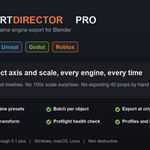
Stop fighting the FBX exporter.
Every game artist knows the routine. Export a mesh, open it in the engine, and it is lying on its side. Or it is one hundred times too big. Or you just spent twenty minutes exporting forty props one at a time, typing every filename by hand.
Export Director Pro fixes all of it. Pick your engine. Pick a folder. Click Export. Done. Meshes land upright and at one to one scale with the axis, scale and format that engine wants on import.
Six Engine Presets
Unity
Unreal
Godot
Roblox
Generic FBX
Generic glTF
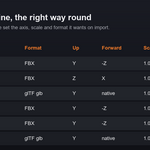
Each preset sets the up axis, forward axis, scale and smoothing that engine expects, so nothing imports flipped or mis scaled.
Batch Export
One file per object for prop libraries, one file per collection, or everything in a single combined file. Export a hundred objects in one click.
Filename Templates
Tokens for object, collection and scene plus a prefix and suffix. Name a whole batch to your engine convention without typing a single name.
Export at Origin
Props scattered across your scene each export centred at the world origin, drop in ready for an engine prop library. Your scene never moves.
Apply Transform
The number one reason a mesh imports at the wrong scale or with broken lighting is an unapplied transform. One toggle freezes rotation and scale into the exported mesh. Fully non destructive.
Preflight Health Check
One click scans your selection for the problems that quietly break engine imports, unapplied scale, negative scale that flips normals, n gons, missing UVs, missing materials and high poly counts, before they ship. Optionally block the export until they are fixed.
Export Profiles
Save your engine, folder, naming and options as a named profile and switch between projects in one click. Saved across files.
Re Export Last
Tweak a mesh then click once. The same objects and settings export again, even if your selection changed.
Multi Format
Need both formats? Write FBX and glTF together in a single click.
Built for real pipelines
Everything is non destructive. Apply modifiers, triangulate, freeze transforms and recentre all happen on temporary copies, so your scene is left exactly as it was. Pure Python, no dependencies, works on Windows, macOS and Linux.
Compatible with Blender 4.2 through 5.1 plus.