Export Each - Automate Your Blender Exports With One Click
 Salman Naseem


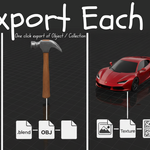
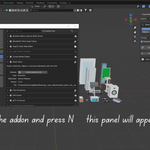
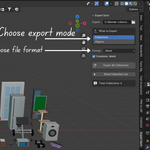
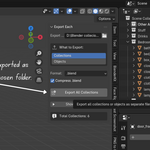
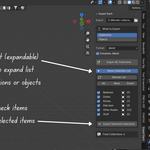
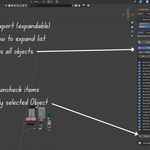

🎯 What is Export Each?
Export Each is a professional Blender addon designed to streamline your asset export workflow. Whether you're building game assets, creating asset libraries, or managing large 3D projects, Export Each eliminates the tedious manual work of exporting items one by one.
With just a few clicks, you can export entire collections or individual objects as separate files in multiple formats, with full control over texture handling and file cleanup.
🌟 Why Export Each?
The Problem
Traditional Blender export workflow is time-consuming:
- Export one object → Save file → Rename → Repeat 50 times
- Manually pack textures for each export
- Clean up orphan data manually
- Keep track of which objects you've already exported
- Risk of human error with repetitive tasks
The Solution
Export Each automates the entire process:
- ✅ One-click batch export of all collections or objects
- ✅ Optional automatic texture packing and embedding
- ✅ Smart orphan data cleanup
- ✅ Selective export with visual checklist
- ✅ Multiple format support
- ✅ Safe filename handling
- ✅ Accurate success/failure reporting on every export
💼 Who Is This For?
Game Developers Export character parts separately for modular systems. Create asset packs for Unity, Unreal, Godot. Organize props and environment pieces. Generate texture atlases.
Asset Creators Build asset libraries for marketplaces. Prepare files for Blender Market, CGTrader, TurboSquid. Create organized asset packs. Export preview renders alongside 3D files.
3D Artists & Studios Manage large scene files with hundreds of objects. Export assets for client delivery. Create backup archives of individual assets. Share specific assets with team members.
Educators & Students Export student projects efficiently. Create teaching material libraries. Organize course asset collections. Share portfolio pieces.
🎨 Core Philosophy
Export Each is built on three principles:
1. Simplicity — No complex settings or confusing options. Choose what to export, select a format, click export. Done.
2. Transparency — You're always told exactly what happened: which exports succeeded and which failed, with details in the System Console. Side effects like texture packing and file resaving are visible toggles, not hidden behavior.
3. Flexibility — Whether you need all collections exported or just 3 specific objects, Export Each adapts to your workflow.
✨ What's New in Version 2.0
- Accurate export reporting: every batch export now tells you precisely how many items succeeded and which ones failed, instead of always reporting success
- Texture packing is now optional: "Pack External Textures Before Export" is a visible toggle, so workflows using shared texture libraries or version control aren't forced into it
-
File resave is now optional: when exporting individual objects as
.blend, "Save File Before Object Export" is a visible toggle explaining exactly why and when your working file gets saved - Selection state preserved: FBX, OBJ, and glTF exports now restore your previously selected objects afterward
-
More robust background
.blendexports: failures are now detected and reported instead of silently producing incomplete files - Confirmed compatible with Blender 5.0 – 5.2
🔧 Technical Highlights
Smart Export Engine
- Background Blender processes for
.blendexports, with real success verification - Automatic orphan data purging
- Dependency tracking for materials and textures
- Safe filename sanitization
Texture Management
- Optional one-click packing of external textures (toggle on/off)
- Embedding in FBX/glTF exports
- Texture-only extraction mode
- Support for packed and external images
Format Support
- .blend – Native Blender with cleanup
- FBX – Industry standard with embedded textures
-
OBJ – Universal format with
.mtlmaterials - glTF/GLB – Modern web and game format
- Textures – Extract images into organized folders
User Experience
- Visual checklist for selective export
- Quick selection tools (All/None/Invert)
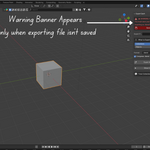
- File-not-saved warning
- Clear, accurate success/failure messages after every export
📊 Use Cases & Examples
Example 1: Character Asset Pack You've created a character with 15 clothing items in separate collections:
- Select "Collections" mode
- Choose FBX format
- Click "Export All Collections"
Result: 15 FBX files, each with embedded textures, ready for Unity/Unreal.
Example 2: Furniture Library You have 50 furniture objects in one file:
- Select "Objects" mode
- Choose
.blendformat - Click "Export All Objects"
Result: 50 clean .blend files, each with only the necessary data.
Example 3: Texture Audit You need to collect all textures from a project:
- Select "Collections" mode
- Choose "Textures Only" format
- Click "Export All Collections"
Result: Organized folders with all texture files, sorted by collection.
Example 4: Selective Client Delivery Client only wants 5 specific props from your 30-object scene:
- Select "Objects" mode
- Click "Show Object List"
- Check only the 5 objects needed
- Choose FBX format
- Click "Export Selected Objects"
Result: Only those 5 objects exported.
🌍 Compatible With
Software Compatibility
Exports work seamlessly in:
- Unity, Unreal Engine, Godot (FBX, glTF)
- Maya, 3ds Max, Cinema 4D (FBX, OBJ)
- Three.js, Babylon.js (glTF/GLB)
- Substance Painter (FBX, OBJ)
- ZBrush (OBJ, FBX)
- Any 3D software supporting standard formats
Blender Versions
- Minimum: Blender 3.2.0
- Tested and confirmed working: Blender 5.0 – 5.2
- Fully compatible with Blender's modern addon/extension system
🎓 Learning Curve
- Beginner Friendly: No prior experience needed
- Setup time: 2 minutes
- Learning time: 5 minutes
- First successful export: 1 minute
The interface is intuitive and self-explanatory. If you can navigate Blender's basic UI, you can use Export Each.
🔒 Privacy & Security
- ✅ No internet connection required — works 100% offline
- ✅ No data collection — your files stay on your computer
- ✅ No telemetry — no usage tracking
- ✅ Open source license — GPL-3.0, you can review the code
- ✅ Clear about file changes — texture packing and file-resave options are visible toggles, not hidden automatic behavior, so you always know what's being modified
💡 Development Story
Export Each was born from real production needs. While working on game asset libraries with hundreds of objects, the manual export process was eating hours of productive time every day. The solution needed to be fast (batch process everything), reliable (clear, accurate feedback on every export), flexible (work with different project structures), and clean (no bloated files with unnecessary data).
Version 2.0 builds directly on that foundation, with a focus on making the addon's behavior fully transparent — every export now tells you exactly what happened, and every file-modifying step is something you choose, not something that happens automatically behind the scenes.
🏆 What Makes It Different?
vs. Built-in Blender Export
- ❌ Built-in: Export one at a time
- ✅ Export Each: Batch export everything, with accurate per-item results
vs. Manual Scripting
- ❌ Scripts: Write code for each project
- ✅ Export Each: User-friendly interface
vs. Other Batch Exporters
- ❌ Others: Limited formats, no texture handling
- ✅ Export Each: 5 formats, configurable texture handling, orphan cleanup
📈 Performance
- Speed: Exports 100 objects in approximately 5 minutes, depending on complexity
- Reliability: Now reports the true outcome of every export — if something fails, you'll know immediately and exactly what to look at
- File Sizes: Optimized with orphan data cleanup
- Memory: Efficient background processing
🤝 Community & Support
Get Help
- 📧 Email: [email protected]
- 🌐 Website: https://BeingAnimator.com
- 📺 YouTube Tutorials: @BeingAnimator
Stay Updated
New features and updates announced via email, tutorial videos on the YouTube channel, and tips and tricks on social media.
Contributing
This is open-source software (GPL-3.0). Contributions, bug reports, and feature suggestions are welcome!
📜 License
Export Each is licensed under GNU General Public License v3.0 or later (GPL-3.0-or-later).
What this means for you:
- ✅ Free to use commercially
- ✅ Free to modify for your needs
- ✅ Source code available
Requirements:
- 📋 Keep license and copyright notices
- 📋 Share modifications under same license
- 📋 Disclose source if you distribute
📞 Contact Information
Author: Salman Naseem Email: [email protected] Website: https://BeingAnimator.com YouTube: https://www.youtube.com/BeingAnimator
For support, feedback, or just to say hi! 👋
Export Each — Making 3D asset management effortless, one export at a time.
Version 2.0.0 | 2026
