Fast Texture Bake
 Azerilo


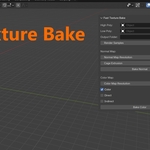
How to Bake a Normal Map
-
Assign the High Poly and Low Poly objects.
-
Set the normal map resolution.
-
Choose the output folder.
-
Click Bake Normal.
-
The addon will:
-
Apply transforms.
-
Create a non-color image.
-
Set up the normal map in the shader.
-
Bake using Cycles.
-
Save the result to
normal.png.
-
How to Bake a Diffuse (Color) Map
-
Assign the High Poly and Low Poly objects.
-
Set the color map resolution.
-
Select baking components: Color, Direct, Indirect.
-
Choose the output folder.
-
Click Bake Color .
-
The addon will:
-
Apply transforms.
-
Create and link a color texture node.
-
Bake the selected components.
-
Save the result to
color.png.
-
Have questions about this product?
Login to message
| Published | over 1 year ago |
| Blender Version | 3.6 - 5.0 |
| Extension Type | N/A |
| Render Engine Used | Cycles |
| License | GPL |
Discover more products like this
simplebake fast bake color map bake color bake normal map baking bake normals normal baking Fast texture-baking fast texture bake easy bake