Find My Addon — Instant N-Panel Add-on Finder & Manager
 Marcos Medel


Will it slow Blender down?
No. FindMyAddon is pure Python UI code that runs only when the pop-up is open—CPU/GPU usage is negligible.
Can I change the shortcut?
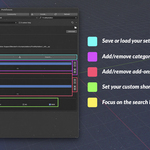
Yes. In Preferences → Add-ons → FindMyAddon you can set any key combo (Ctrl/Alt/Shift options included).
Does it modify my other add-ons?
Only when you actively click the enable/disable checkbox. Otherwise it’s read-only—no files or settings are changed.
Can I share my setup between computers?
Yes. Use the Export button in the preferences to save a .json, then Import it on another machine.
How do I create categories or favorites?
Open Preferences → Add-ons → FindMyAddon. Add categories using the "+" icon, then add your add-ons into them in the lower panel.
What’s the refund policy?
Superhive offers a 30-day refund if the add-on doesn’t work as described and support can’t resolve the issue.
Discover more products like this
blender 3d add-on manager favorites ui n-panel Shortcut enable/disable Workflow categories pop-up productivity quick access Add-on interface search