 PhantomWorks


Update a tutorial for importing Unreal Engine
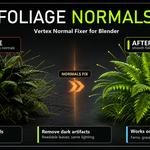
Your trees look like broken glass. Here's why.
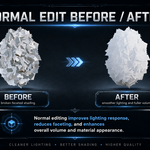
Foliage made of intersecting cards — tree canopies, bushes, grass clumps — shades terribly by default: every card is lit as its own flat plane, so the whole cluster flickers between bright and dark like shattered glass.
The industry fix is well known: rewrite the vertex normals so the whole cluster receives light like one smooth volume. Game studios have done it for years with tools like Normal Thief in 3ds Max. Foliage Normals brings the complete workflow to Blender — and goes further.
Three clicks from noise to smooth
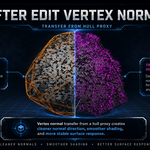
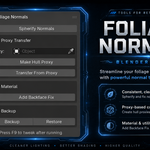
- Make Hull Proxy — builds a smooth convex hull around your foliage (wireframe display, auto-assigned as proxy)
- Transfer From Proxy — samples smooth, barycentric-interpolated normals from the proxy surface onto every vertex
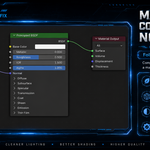
- Add Backface Fix — inserts a backface compensation node group into your materials, so single-sided cards stay lit from both sides
Prefer a simpler approach? Spherify Normals points all normals outward from a center in one click — object origin, bounds center, 3D cursor, selected-vertices median, or any object (drop an Empty where you want the light pivot).
Features
- Spherify — radiate normals from a configurable center, with a Blend slider (spherical interpolation from the original normals)
- Proxy Transfer (Normal Thief) — nearest-surface sampling with smooth interpolated normals from any mesh: sphere, hull, or a custom sculpted shell; proxy modifiers are respected
- One-click hull proxy — convex hull of the whole selection, ready to use
- Backface Fix — one button makes your materials two-sided-aware; chains correctly after existing Normal Map setups, idempotent, and can create a starter material for objects without one
- Lossless Backup / Restore — original normals are stored in a mesh attribute that saves with your .blend; revert anytime
- Production-ready details — edit-mode "only selected vertices", multi-object batches with optional shared center, correct results under non-uniform scale, full undo + F9 redo panel
- Fast — NumPy-vectorized: ~120,000 vertices in under half a second
Non-destructive to your geometry
Foliage Normals only writes custom split normals. Your topology, UVs, weights and shape keys are untouched — and one click restores the original normals from the built-in backup.
Works with your export pipeline
Custom normals export with FBX/glTF as usual. In Unreal or Unity, pair them with a two-sided foliage material (TwoSidedSign correction) — the manual explains exactly how, with a ready-made Blender node reference.
Compatibility
| Blender | Support |
|---|---|
| 4.2+ | Extension package (recommended) |
Verified on Blender 5.2
