Geo Addon Exporter Smart
 Dark3d


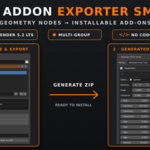
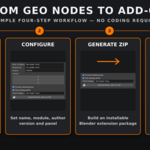
GEO ADDON EXPORTER SMART — DOCUMENTATION
REQUIREMENTS
• Blender 5.2 LTS
• Geometry Nodes groups with exposed interface inputs
• No programming knowledge required
INSTALLATION
Download the Geo Addon Exporter Smart ZIP file.
Open Blender.
Go to Edit → Preferences → Add-ons.
Open the add-on options menu and select Install from Disk.
Select the downloaded ZIP file.
Enable Geo Addon Exporter Smart if it is not enabled automatically.
Do not extract the ZIP before installation.
OPENING THE EXPORTER
Open the 3D Viewport.
Press N to open the sidebar.
Select the Geo Addon Exporter tab.
CREATING AN ADD-ON
Choose an export destination.
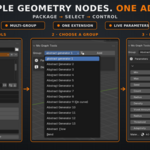
Select a Geometry Nodes group from the Pick Group menu.
Add the group to the export list.
Repeat the process to include multiple Geometry Nodes groups.
Enter the add-on name.
Enter a unique module ID using lowercase letters and underscores.
Enter the author name and version number.
Enable Include Nested Groups when the selected groups use other node groups.
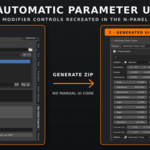
Enable Add Settings Panel to generate an N-panel containing the exposed Geometry Nodes parameters.
Enter the desired panel category name.
Click Generate Multi-Add-on ZIP.
The generated ZIP is ready to install in Blender.
INSTALLING A GENERATED ADD-ON
Open Edit → Preferences → Add-ons.
Select Install from Disk.
Choose the generated ZIP.
Enable the generated add-on if required.
Return to the 3D Viewport and press N.
Open the generated add-on’s panel tab.
USING A GENERATED ADD-ON
Choose a packaged Geometry Nodes group from the Group menu.
Select an object compatible with the node group.
Click Add to create a Geometry Nodes modifier.
Adjust the exposed parameters directly from the generated N-panel.
The controls are connected to the Geometry Nodes modifier and update the result interactively.
MULTI-GROUP SUPPORT
A generated add-on can contain multiple Geometry Nodes groups. Users can select the required group from the generated panel and add it to the active object.
NESTED NODE GROUPS
Enable Include Nested Groups when the main Geometry Nodes group depends on additional node groups. The exporter packages the required dependencies with the generated add-on.
GENERATED PACKAGE
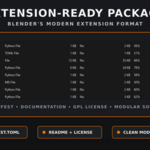
Depending on the selected options, the generated extension includes:
• Blender extension manifest
• Python add-on modules
• Packaged Geometry Nodes assets
• Generated parameter interface
• README documentation
• GPL license
IMPORTANT NOTES
• Save a backup of the original Blender project before distributing generated packages.
• Use unique module IDs for different add-ons.
• Expose the required inputs in the Geometry Nodes group interface before exporting.
• Object, material and collection inputs may require the corresponding data to be available in the user’s Blender project.
• Compatibility has been tested with Blender 5.2 LTS.
LICENSE
Geo Addon Exporter Smart is distributed under the GNU General Public License v3.0.
Have questions about this product?
Login to message
| Blender Extension Compatible | Yes |
| Published | about 2 months ago |
| Blender Version | 5.2 |
| Extension Type | Add-on |
| Render Engine Used | Cycles, Eevee |
| License | GPL |
Discover more products like this
Workflow n-panel addon exporter blender-extension multi group no coding procedural modeling blender tools geometry nodes addon generator Asset Packaging node groups