Do I need Python or add-on development experience?
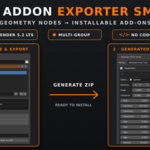
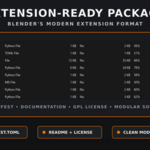
Answer: No. Geo Addon Exporter Smart generates the installable Blender extension, interface and required package structure automatically. You only need to configure the export options and select your Geometry Nodes groups.
Are exposed Geometry Nodes parameters included in the generated interface?
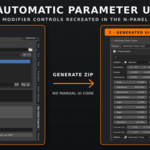
Yes. Enable Add Settings Panel and the exporter will recreate the supported exposed inputs inside the generated N-panel, connected directly to the Geometry Nodes modifier.
Does it include nested node groups?
Yes. Enable Include Nested Groups to package node groups used by the selected main groups. Always test the generated add-on before distributing it.
Which Blender version is supported?
Geo Addon Exporter Smart has been developed and tested with Blender 5.2 LTS. Generated extensions should also be tested in Blender 5.2 LTS before distribution.
Can one generated add-on contain multiple Geometry Nodes groups?
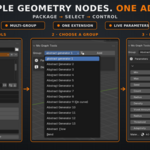
Yes. You can package multiple Geometry Nodes groups into a single add-on. Users can select the required group from the generated panel.
Do I need Python or add-on development experience?
Answer: No. Geo Addon Exporter Smart generates the installable Blender extension, interface and required package structure automatically. You only need to configure the export options and select your Geometry Nodes groups.
Can one generated add-on contain multiple Geometry Nodes groups?
es. You can package multiple Geometry Nodes groups into a single add-on. Users can select the required group from the generated panel.
Are exposed Geometry Nodes parameters included in the generated interface?
Yes. Enable Add Settings Panel and the exporter will recreate the supported exposed inputs inside the generated N-panel, connected directly to the Geometry Nodes modifier.
Does it include nested node groups?
Yes. Enable Include Nested Groups to package node groups used by the selected main groups. Always test the generated add-on before distributing it.
Are exposed Geometry Nodes parameters included in the generated interface?
Yes. Enable Add Settings Panel and the exporter will recreate the supported exposed inputs inside the generated N-panel, connected directly to the Geometry Nodes modifier.
Can one generated add-on contain multiple Geometry Nodes groups?
es. You can package multiple Geometry Nodes groups into a single add-on. Users can select the required group from the generated panel.
Do I need Python or add-on development experience?
Answer: No. Geo Addon Exporter Smart generates the installable Blender extension, interface and required package structure automatically. You only need to configure the export options and select your Geometry Nodes groups.
Do I need Python or add-on development experience?
Answer: No. Geo Addon Exporter Smart generates the installable Blender extension, interface and required package structure automatically. You only need to configure the export options and select your Geometry Nodes groups.
Do I need Python or add-on development experience?
Answer: No. Geo Addon Exporter Smart generates the installable Blender extension, interface and required package structure automatically. You only need to configure the export options and select your Geometry Nodes groups.
Can one generated add-on contain multiple Geometry Nodes groups?
es. You can package multiple Geometry Nodes groups into a single add-on. Users can select the required group from the generated panel.
Can one generated add-on contain multiple Geometry Nodes groups?
es. You can package multiple Geometry Nodes groups into a single add-on. Users can select the required group from the generated panel.
Are exposed Geometry Nodes parameters included in the generated interface?
Yes. Enable Add Settings Panel and the exporter will recreate the supported exposed inputs inside the generated N-panel, connected directly to the Geometry Nodes modifier.
Are exposed Geometry Nodes parameters included in the generated interface?
Yes. Enable Add Settings Panel and the exporter will recreate the supported exposed inputs inside the generated N-panel, connected directly to the Geometry Nodes modifier.
Do I need Python or add-on development experience?
Answer: No. Geo Addon Exporter Smart generates the installable Blender extension, interface and required package structure automatically. You only need to configure the export options and select your Geometry Nodes groups.
Do I need Python or add-on development experience?
Answer: No. Geo Addon Exporter Smart generates the installable Blender extension, interface and required package structure automatically. You only need to configure the export options and select your Geometry Nodes groups.
Can one generated add-on contain multiple Geometry Nodes groups?
es. You can package multiple Geometry Nodes groups into a single add-on. Users can select the required group from the generated panel.
Can one generated add-on contain multiple Geometry Nodes groups?
es. You can package multiple Geometry Nodes groups into a single add-on. Users can select the required group from the generated panel.
Do I need Python or add-on development experience?
Answer: No. Geo Addon Exporter Smart generates the installable Blender extension, interface and required package structure automatically. You only need to configure the export options and select your Geometry Nodes groups.
Do I need Python or add-on development experience?
Answer: No. Geo Addon Exporter Smart generates the installable Blender extension, interface and required package structure automatically. You only need to configure the export options and select your Geometry Nodes groups.
 Dark3d