 Skava
Skava


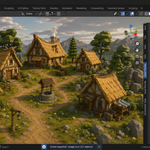
Godot Pipeline — Dedicated Blender → Godot 4 Bridge
Scene export with full glTF tangents, auto .import sidecars, cyrillic-safe naming, lightmap UV2, batch-by-collection and Mobile / Web / Desktop presets.
Why Godot Pipeline
Blender's built-in glTF exporter gets you most of the way to Godot 4. What is left is the set of export flags, the import settings, the file and node names, the collision naming and the materials — Godot Pipeline sets them from one panel.
Godot Pipeline is the dedicated bridge: it sets the glTF flags, writes .import sidecars next to each .glb, transliterates non-ASCII file and node names, and names collision objects with -col / -rigid / -area suffixes.
Features
Safe writing into your project folder
The folder you export into is your Godot project, and the file names come from your object names, so a name can already be taken. Every file — .glb, .tscn, .tres, .import — is written beside its destination and moved into place in one step, so an interrupted write never leaves a truncated file where a good one was. If an export fails partway through, the clean-up removes only the files that run created; anything that was in the folder beforehand is left alone.
Scene export to .tscn + .glb
Node3D hierarchy preserving parenting and naming. Each mesh exported as its own .glb with full Godot 4 glTF arguments: export_tangents (correct normal-map shading), export_extras (custom props → Godot metadata), export_morph, export_skins, export_animations, export_cameras, export_lights.
Auto-generated .import sidecars
Each .glb ships with a Godot 4 .import file: tangents on, LOD generation on, mesh shadow generation on, light baking mode set by the chosen target.
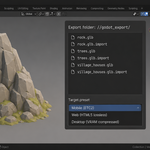
Mobile / Web / Desktop preset
- Mobile and Desktop — static light baking on
- Web (HTML5) — light baking off
- Texture compression is not written into the .import file — Godot uses its own import setting for that
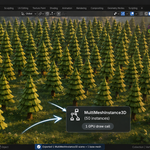
MultiMeshInstance3D folding
Optional. Groups of 3+ linked-duplicate objects sharing the same mesh + material set are written as a _multimesh.tscn with a MultiMeshInstance3D node; its mesh is written next to it as an .obj, and the MultiMesh scene is placed in the main scene. Checked by loading the scene in Godot 4.7.2.
Cyrillic-safe naming
Scene, mesh, node, material and action names used for files and nodes are transliterated to ASCII (а→a, ш→sh, ё→yo, …) instead of being stripped to empty strings. Bone names are not changed.
Hidden-render filtering
hide_render, hide_viewport, and collection-level hide_render are respected at both scene-export and collision-generation time. Invisible geometry doesn't sneak into the build.
Lightmap UV channel 2
Optional Lightmap Pack (Smart UV Project as a fallback) on a second UV layer before export, for meshes that have only one UV layer. A mesh that already has two is left as it is.
Batch export by collection
Each top-level collection that is not hidden from render is exported into its own subfolder: a .tscn, one .glb per mesh and their .import files. Useful for modular asset libraries.
Collision shapes
The collision object is named with the suffix you pick: -col, -colonly, -rigid, -area, -vehicle or -navmesh. What Godot builds from each suffix is decided by Godot's importer.
Material conversion to .tres
StandardMaterial3D with Albedo, Metallic, Roughness, Normal, Emission, Alpha. Texture file references kept relative to the .tres location.
Animation export
Bone tracks (position_3d / rotation_3d / scale_3d) with proper component grouping. NLA strip splitting with overlap-detection warnings.
GridMap MeshLibrary
Auto-centered tiles validated against cell size — drop straight into a Godot GridMap node.
Partial-export cleanup
If an export crashes partway, half-written .glb / .import files are removed. No orphan files in your project.
Compatibility
- Blender: 4.2 LTS and later (tested on 4.2.9 and 5.2.0)
- OS: Windows / macOS / Linux
- Godot: targets Godot 4
What you get
- Godot Pipeline add-on (Python only, no DLL)
- README with full quick-start guide
- Support through marketplace messaging
Install
Edit → Preferences → Add-ons → arrow button in the top right corner → Install from Disk → pick the add-on zip → enable. The Godot sidebar tab appears in the 3D Viewport (press N).
License
GPL-3.0. Standard for Blender add-ons.
v1.0.2 — Export no longer removes files it did not create. The folder you export into is your Godot project, and the filenames come from your object names, so a name can already be taken; if an export failed partway through, its clean-up deleted every path it had written to, including files that had been there beforehand and were merely updated by that run. The clean-up now removes only the files that run created, and every file the add-on writes is put into place in one step, so an interrupted write cannot truncate an existing one. Exported output is unchanged.
v1.0.1 — Animation export in .tres format works again on Blender 4.4 and newer. The exporter read curves through action.fcurves, which 5.x removed, so the whole operation failed with «Animation export failed: 'Action' object has no attribute 'fcurves'» — one of the two advertised export formats did nothing at all. Verified on a rigged, animated character: a .tres resource with 28 tracks. The glTF path was unaffected and is unchanged.