 Raih
Raih



What does Graft actually do?
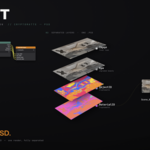
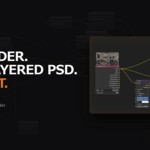
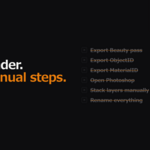
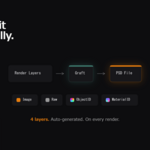
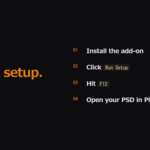
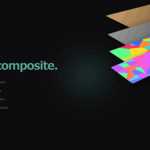
Graft automatically generates a Photoshop-ready, 4-layer PSD (Beauty / Raw / ObjectID / MaterialID) the moment your render finishes. No manual compositing and no exporting passes one by one — hit F12 and the layered PSD is waiting for you.
What are the four layers I get?
Image is your color-graded beauty render. Raw is the ungraded beauty (optional, generated only when you connect the Raw input). ObjectID is a Cryptomatte mask with a unique color per object. MaterialID is a Cryptomatte mask with a unique color per material. The ObjectID and MaterialID layers let you re-select and tweak any object or material in post without re-rendering.
Why do I need ImageMagick, and is it included?
ImageMagick is the free, open-source engine Graft uses to assemble the PSD. It is not bundled, but on Windows you can install it with one click straight from Graft's Preferences panel. On Mac, run brew install imagemagick once.
Does Graft work on Mac?
Yes. Install ImageMagick via Homebrew: brew install imagemagick. Then restart Blender. The one-click installer in the Preferences panel is Windows-only, but Mac works perfectly once ImageMagick is installed.
Is it a one-time purchase? Do I get updates?
Yes. It is a one-time purchase and updates are included. Just download the latest version from your purchase whenever a new release ships.
Can I use it for multiple camera angles or animation?
Yes. Files are named by scene name plus frame number, such as MyScene_0001.psd. For multi-angle presentations, assign each angle to a different frame number and you get one cleanly named PSD per angle.
Does Graft slow down my render?
No. Graft only runs after the render completes, compositing the already-rendered passes into a PSD in a couple of seconds, so your render time is unaffected. Intermediate JPG files are cleaned up automatically.
Will Graft work with my existing color grading?
Yes. If you already have a grading chain in the Compositor (Glare, Color Correction, and so on), Graft detects it automatically and wires the graded result to the Image layer, and optionally the ungraded version to the Raw layer.
Do I need Photoshop to use Graft?
No. Graft outputs a standard .psd file. It opens in Photoshop, but also in Affinity Photo, Krita, GIMP, Photopea, and any app that reads layered PSDs.
Which Blender versions are supported?
Blender 4.0 and later. Verified on 4.2.2 LTS, 4.3.2, 4.5 LTS, 5.0.0, and 5.1 — covering both the 4.x compositor and the new 5.x node-group compositor.
$25$12.50
Have questions about this product?
Login to message

Discover more products like this
compositor psd cryptomatte automation Render photoshop architectural visualization ArchViz pipeline