 Team Blender



Grid Designer — Product Page Description
Draw. Extrude. Cut. Done.
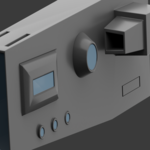
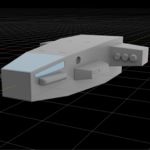
Grid Designer turns any face on your mesh into a live design surface. Select a face, activate the tool, and start sketching shapes directly onto it — rectangles, circles, lines, or freeform polygons — snapped to a grid that automatically fits the face you're working on, even if it's angled or rotated in space.
No more bouncing between Edit Mode and the modifier stack. Draw a shape, pick an operation, and watch it become real geometry — instantly, interactively, and undo-safe.
🎯 Core Workflow
- Draw on any face — flat, angled, rotated, it doesn't matter. The grid snaps to the face's own edges and bounds automatically.
- Five boolean operations per shape: Add (extrude), Cut, Inset, Subtract, Intersect.
- Live interactive dragging — right after finishing a shape's outline, your mouse drives the depth. Press S to drag the outward face's scale (taper it like a pyramid or flare it out), or B to drag a live bevel on that same face's rim — freeze with click/Enter, cancel with right-click/Esc.
- Per-corner bevel — click any corner of your shape (or cycle with V) and round or chamfer just that corner, before it's even extruded.
🛠️ Built-in Modifiers, No Stack Required
- Bevel — whole-shape edge bevel with adjustable width and segments
- Solidify — give thin shapes real thickness
- Array — repeat a shape along X, Y, or Z with custom offset and count
- Mirror — mirror across any combination of X/Y/Z, including diagonal copies, reflected correctly around your object's own origin and rotation
📐 Precision & Feedback
- Live dimension labels show edge lengths and radii while you draw and edit — no guessing.
- Grid auto-fits to the exact size of the face you're working on.
- Snap toggle, adjustable grid size, and a full on-screen HUD showing every active hotkey for your current shape.
⌨️ Fast, Keyboard-Driven — With a Full UI Too
Everything is accessible from the keyboard while you work in the viewport (draw mode, operation, depth, bevel, array, mirror), backed by a clean sidebar panel for anyone who prefers clicking sliders — plus a built-in hotkey cheatsheet, one click away.
✅ Clean, Reliable Commits
Every shape you draw is boolean-unioned or cut into your mesh as one clean operation — no leftover hidden geometry, no fragmented undo history. Commit ten shapes and mirror copies in one go, and a single Ctrl+Z takes it all back.
Requirements: Blender 4.0+
Category: Mesh / Modeling