 HeroShot


1. Introduction
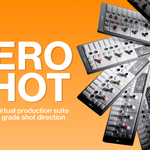
HeroShot is a premium virtual cinematography suite for Blender 5, designed to put agency-grade motion control in your sidebar. While most product renders look like static models, HeroShot ensures your projects move with the heavy, weighted precision of $100k professional motion-control rigs.
This add-on provides 10 mathematically tuned directed shots, a dedicated Sequence Organizer, and intuitive motion controls, allowing you to go from a raw model to a finished commercial without touching the Graph Editor.
2. Getting Started
2.1 Technical Requirements
Blender Version: 5.0 or newer (Native Extension support required).
Operating System: Windows, macOS, or Linux.
Engine Support: Compatible with Cycles, EEVEE, and K-Cycles.
2.2 Installation
HeroShot is a native Blender 5 Extension.
Download the
.zippackage from your account dashboard.In Blender, navigate to Edit > Preferences > Get Extensions.
Click the Arrow Icon in the top right and select Install from Disk.
Locate the
heroshot.zipfile and confirm.The tool will appear in your 3D Viewport N-Panel under the tab labeled HeroShot.
3. The Interface
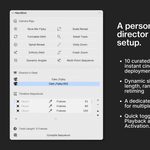
The entire workflow is housed within a non-intrusive N-panel interface to keep you focused on your viewport.
Shot Library: 10 curated buttons for instant cinematic deployment.
Motion Controls: Dynamic sliders for focal length, range, and retiming.
Sequence Organizer: A dedicated management block for multi-cam coordination.
Utility Bar: Quick toggles for Live Playback and Camera Activation.
4. Key Features
4.1 10 Production-Grade Directed Shots
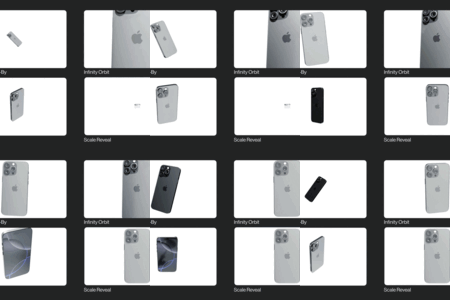
Through my client work I've amassed plenty of setups and rigs that started repeating themselves, both in tech, fashion, and fragrance commercials. These are the 10 moves distilled from the projects.
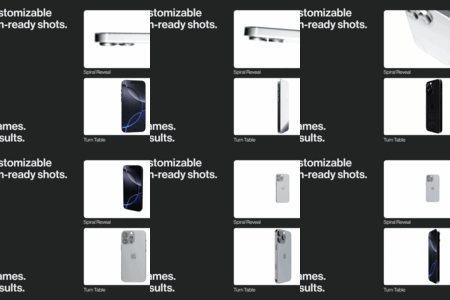
Scale Reveal: Cinematic top-down profile drop.
Turntable Orbit: Energy-focused 360 circling.
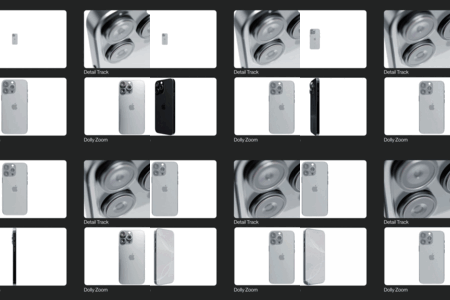
Detail Track: Macro shot focused tracking shot.
Spiral Reveal: Spiraling orbit motion with stationary ending.
Dolly Zoom: A classic cinematic camera motion.
Infinity Orbit: Graceful orbit for suspended objects.
Slow-Mo FlyBy: Low-angle rim-light catcher.
Crash Zoom: Intense zoom in for dramatic effects.
Dynamic Angles: Fast switching between angles for optimal product showcase.
Multi-Point Bolt Came: Multi point bolt camera rig with focus and hold functions.
4.2 Intuitive Easing Paradigm
HeroShot replaces the complex Graph Editor with a preset-based Easing Selection. Choose between various motion profiles to instantly give your camera the physical weight of a real jib or crane.
4.3 Complex Shot Sequencing
The Director's Desk acts as your virtual editor.
Add to Sequence: Pins any directed shot to the timeline.
Edit Order: Move shots up or down to change the visual narrative.
Auto-Markers: The tool automatically handles camera binding and timeline markers for seamless rendering.
4.4 ReTime Controls
Shift time with a single slider. Add slow-motion drama to luxury reveals (0.25x) or high-speed energy to tech hooks (2.0x) without manually scaling keyframes.
4.5 Live Playback & Active Camera
-
Live Playback: An optimized viewport engine allows you to view your cinema at full 24fps before you hit render.
Make Camera Active: Switch between your 10 rigs instantly with one button. No more hunting in the Outliner or Scene properties.
- No Fuss Rig Removal: Easily remove rigs and keep a tidy outliner.
5. Typical Workflow
Place: Place your product at the world origin (0,0,0).
Setup: Click a shot from the library (e.g., Shot 01: Macro Reveal).
Fine-Tune: Adjust the Range and Focal Length sliders in the N-panel.
Direct: Click Add to Sequence. Repeat for 3–4 more shots.
Render: Hit Render Animation. HeroShot handles all camera switching automatically.
Have questions about this product?
Login to message
| Sales | 10+ |
| Published | 6 months ago |
| Blender Version | 5.0 |
| Extension Type | N/A |
| Render Engine Used | Cycles, Eevee, Octane |
| License | Mit |

Discover more products like this
3d-camera add camera rig motion animation advanced motion control