Horizontal Tabs
 Trestle Trotter


Why does my addon have some differences or missing features in Horizontal Tabs?
While we do our best to ensure addons are mirrored as close as possible to its original implementation, we can't guarantee that all third party addons will work 100% perfectly in the custom headers due to differences in how other developers handle their features.
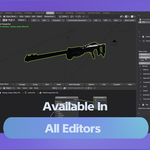
Does Horizontal Tabs work in other editors besides the 3D Viewport?
Yes! The add-on is fully compatible with most major editors in Blender, including the Shader Editor, Geometry Node Editor, and Image Editor. Your sidebar tabs will appear in the header of whichever editor you are currently working in as long as there are sidebar panels available for that editor.
Some of my add-on panels look cut off or too narrow. How do I fix this?
Some complex add-ons require more horizontal space than the default setting allows. Solution: Open the Horizontal Tabs preferences, find the specific add-on in the list, and click the small arrow to expand its settings. Uncheck "Use Default Panel Width" and increase the pixel width slider until the UI fits comfortably.
My header is too cluttered. Can I hide specific tabs without uninstalling the add-ons?
Yes! You can tweak the appearance of the tabs very easily. Please find the updated documentation for 2.0 in the documentation section to learn how to customize your panels.
-
$11.40 $19
The full flow editor edition upgrade. Free for users that have Smart Pie Menus 2 and Horizontal Tabs. This edition provides additional features: - Docks and Actions editor. - Enables combined workflows between docks and pie menus.
-
$5.40 $9
Have questions about this product?
Login to message

Discover more products like this
3d workspace manager Blender node editor tabs n-panel workspace panels