Instance Wrangler
 Precise Tools















What is Instance Wrangler and what does it do?
Instance Wrangler is a complete toolkit for Blender designed to manage instanced objects and transforms. It provides tools to precisely move, rotate, and scale multiple objects, manage data links, sync modifiers, and rapidly cycle through assets.
Where can I find the Instance Wrangler tools after installing?
Once installed, all tools are located in the Sidebar ("N" panel) of the 3D Viewport under the "Precise" tab.
What is the difference between "Standard" and "Active Leads" in Multi Transform?
Standard mode applies changes (absolute or relative) to each selected object individually. Active Leads mode is a powerful feature that treats your active object as a "fake parent," allowing you to transform the entire selection as a single cohesive group relative to that leader.
Can I apply transforms (Location/Rotation/Scale) to instances without breaking them?
Yes. A core feature of Instance Wrangler is the Apply Transforms operator, which solves a native Blender limitation. It allows you to apply transforms to instanced objects while preserving their data links.
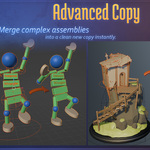
How does the "Merged Copy" tool work? Merged Copy
takes a diverse selection of objects, converts them to meshes, and joins them into a single clean mesh. It offers advanced controls for setting the final pivot point (origin) and parenting hierarchy automatically.
What does the "Data Cycler" do?
The Data Cycler allows you to rapidly audition different assets in-place. You can use the "Next" and "Prev" buttons to cycle through available data-blocks, or "Randomize" to pick one arbitrarily. You can also use the Filter field to narrow down the list of assets being cycled.
Can I copy modifiers from one object to all its instances?
es, the Modifier Sync tool allows you to sync the modifier stack from a leader object to its instances. You can choose to apply this globally to all instances of that mesh, or limit the sync only to the objects you currently have selected.
How do I install the addon?
Go to Edit > Preferences > Add-ons.
Click the arrow in the top right and select "Install from Disk".
Select the Instance_Wrangler.zip file you downloaded.
Enable the addon in the list.
I bought this addon, but the license says GPL. What does that mean?
The Python code of the addon is licensed under the GNU General Public License (GPL), meaning you are free to modify and redistribute the code. However, the product is sold as a commercial package, where your purchase grants you exclusive access to official support and updates from the
$12
Have questions about this product?
Login to message
| Published | 8 months ago |
| Blender Version | 4.3 - 5.0 |
| Extension Type | N/A |
| Render Engine Used | Cycles, Eevee |
| License | GPL |
Discover more products like this
instances Apply Transform apply modifiers precise select-linked transform repeater wrangler modifiers batch link-selected instance