GeoSketch
 Jarek Dudziński


Can I input exact dimensions while drawing?
Yes. Type any number during the Draw tool to lock the current line's length — the input supports Blender's unit system (1.5m, 12cm, 4ft 6in, etc.) and respects your scene unit settings. Combine it with direction lock (Shift) or angle snap (A) to draw lines at exact length and angle.
What happens when I draw across existing geometry?
GeoSketch automatically handles intersections and overlaps. New edges that cross existing edges create vertices at the intersection points; edges drawn on top of existing geometry are merged. Closed loops automatically generate faces (this can be turned off). Existing faces are preserved when split — including intentional holes like window openings.
How is GeoSketch different from Blender's built-in snapping?
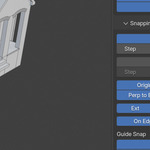
Blender's snapping works on existing geometry only and is mostly transform-oriented. GeoSketch adds a complete drawing-time snapping system: direction snapping (axis, extension, perpendicular), angle and distance snapping, mathematical guides (lines and circles with exact intersections), and combined snaps like "perpendicular from this edge at 250mm". All snap types are independently toggleable and visible during drawing.

Discover more products like this
architectural modeling drawing mesh editing cad 3d printing 3d-cursor measurement edge tools Geometry precision modeling sketch snapping