Kiln — Bake Procedural Materials For Godot (Glb/Gltf)
 Adriflex


How to Use Kiln
Basic Workflow
-
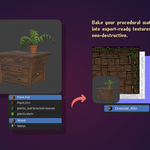
Organise your objects
- Put all objects you want to bake into a single collection
- Select that collection in the Outliner -
Choose your maps
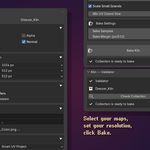
- In the Kiln panel (View3D > Sidebar > Kiln tab)
- Open the "Maps" section
- Check the maps you need (Color, Roughness, Metallic, Normal, Alpha) -
Set resolutions
- Open the "Resolution" section
- Each map has its own resolution (128px to 4096px) -
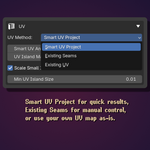
Pick a UV method
- Smart UV Project — automatic, good for most cases
- Existing Seams — uses seams you've already marked
- Existing UV — uses a UV map already on your objects (specify the name) -
Click "Bake Kiln"
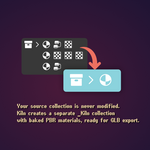
- Kiln creates a[YourCollection]_Kilncollection (pink in the Outliner)
- All objects get baked PBR materials with proper textures -
Export
- Select the_Kilncollection
- File > Export > glTF 2.0 (.glb)
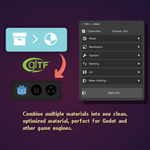
- Your asset is ready for Godot, Unity, or any GLB-compatible engine
Using the Validator
Before baking, use the Validator panel (Kiln > Validator tab) to check for common issues:
- Unapplied transforms — fix with Ctrl+A > All Transforms
- Non-Principled materials — these will be skipped during bake
- Missing materials — objects without any material assigned
The validator tells you if your collection is ready to bake. Fix any warnings before proceeding.
Re-Baking
Just click "Bake Kiln" again. Kiln clears and repopulates the _Kiln collection automatically. Any export settings you've configured on the _Kiln collection (like GLB export presets) are preserved.
Tips
- Start with 1 sample for test bakes — increase to 64-128 for final quality
- Use "Apply Modifiers" to bake the final look (including Geometry Nodes)
- "Scale Small Islands" prevents tiny UV islands from causing bake artifacts — leave it on
- Linked materials from external libraries are handled automatically (Kiln makes local copies)
Addon Preferences
Go to Edit > Preferences > Add-ons > Kiln to customise:
-
Object prefix — prefix added to baked objects (default:
mesh_) - Map names — rename "Color" to "Albedo", "Roughness" to "Rough", etc.
- Bake samples — Cycles samples for baking (default: 128)
- Bake margin — texture margin to prevent seam bleeding
- UV settings — Smart UV angle, island margin, minimum island size
$12
Have questions about this product?
Login to message
Discover more products like this
blender addon uv mapping material optimization material-baking principled bsdf game assets godot texture-baking gltf-export export tools texture atlas Workflow