 Yatima


What exactly does Lazy Lighter do?
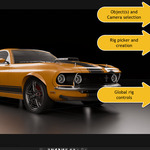
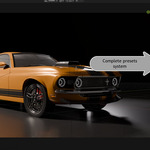
Lazy Lighter creates professional lighting rigs for your 3D scenes with a single click. Instead of manually placing and configuring multiple lights, you choose from 50 cinematic presets (like 3-Point Studio, Film Noir, Rembrandt Portrait, etc.) and the addon automatically positions and configures all the lights relative to your camera and object. You can then fine-tune everything with intuitive controls.
Do I need to know anything about cinematography or lighting theory to use this?
Nope! That's the whole point. The rigs are based on professional cinematography techniques, so you get pro results even if you don't know what "key light ratio" means. Of course, if you DO know lighting theory, you'll appreciate how the rigs follow real-world standards and give you precise control.
The rig appeared but the lights seem way too close/far from my object. What's wrong?
Nothing's wrong! Just adjust the "Distance Scale" slider in the Global Controls. This is the most important control and has the biggest impact on your lighting. Start there, then fine-tune the other settings. Every object size is different, so Distance Scale lets you adapt the rig to your scene.
I changed my camera angle and now the lighting looks wrong. Do I need to recreate the rig?
Yes, and that's intentional! Lazy Lighter uses camera-relative positioning, which matches professional film workflow. In real cinematography, you re-light for every camera setup because lighting is camera-dependent. Just click "Create Rig" again with your new camera angle. It takes one second.
Can I light multiple objects at once?
Absolutely! Select all the objects you want to light, then create the rig. Lazy Lighter calculates the bounding box taking in consideration all the objects selected. Super useful for lighting multiple characters or product arrays.
What's the difference between Global Controls and Override Controls?
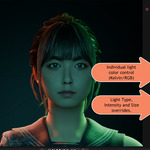
Global Controls adjust the entire rig at once (great for fast iteration). Override Controls lock specific lights to exact values (perfect when you need precise control over individual lights). When you enable an override on a light, that light ignores the corresponding global control. Think of it as: Global = speed, Override = precision.
The Creative Randomizer sounds cool but chaotic. When should I use it?
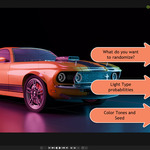
Use it when you're stuck creatively or want happy accidents! It's perfect for: exploring unexpected color combinations, breaking out of your usual lighting habits, creating variations of a setup quickly, or just experimenting. You can randomize everything or just specific parameters (like only colors or only intensities). Pro tip: Use the Seed value to reproduce a random result you liked.
What are those percentage numbers next to the Light Type weights in the randomizer?
Those show you the actual probability of each light type appearing. The weights are relative values, so if you set Area to 80 and Point to 20, you'll see "Area (80%) Point (20%)". It automatically calculates the percentages as you adjust the sliders. Each light in the rig gets randomized independently based on these probabilities.
I used Light Type Override to change a light to Point/Spot/Sun, but now the Size Override is grayed out. Is this a bug?
Not a bug.It's intentional! Size Override only works with Area lights because they're the only light type with adjustable size. Point lights use shadow softness, Spot lights use cone angle, and Sun lights use angular diameter. The UI grays out Size Override when it doesn't apply to prevent confusion.
Can I save my customized lighting setups and reuse them in other projects?
Yes! That's what the Preset System is for. Once you've tweaked a rig to perfection, enter a name in the Preset section and click "Save Preset". Your preset includes everything: rig type, all global settings, and all individual light overrides (colors, intensities, sizes, types, visibility). Load it anytime in any project with one click.
Where are my presets stored? Can I share them with others?
Presets are stored as simple JSON files in your Blender user scripts directory under "lazy_lighter_presets/". You can absolutely share them! Just copy the .json file and send it to someone else. They drop it in their lazy_lighter_presets folder and boom - your lighting setup appears in their preset list.
My object's origin point is at the bottom/side, but the rig seems to center on the actual geometry. Why?
Lazy Lighter positions rigs at the geometric center of your object's bounding box, not at the origin point. This ensures consistent lighting regardless of where the origin was placed during modeling. So if you have a character with the origin at the feet, the rig will center on the torso/head height where the actual geometry is. You don't need to fix origins before creating rigs!
Should I use Cycles or Eevee with Lazy Lighter?
Both work perfectly! Here's the pro workflow: create and adjust your rigs in Eevee for real-time feedback and fast iteration, then switch to Cycles for your final render to get physically accurate light falloff and better soft shadows. Best of both worlds.
I want to create my own custom rig from scratch. Can I do that?
Lazy Lighter is focused on providing curated, professional presets rather than a custom rig builder. However, you can absolutely customize any existing rig heavily using overrides, then save it as a preset. Change light types, colors, positions (by rotating/moving the rig empty), intensities, visibility. Make it completely your own, then save it. That becomes your custom preset.
Lazy Lighter is it really worth it compared to lighting manually?
Try timing yourself manually creating and positioning a proper 3-point setup with correct ratios and camera-relative angles. Now do it 20 times for 20 different shots in a project. Lazy Lighter does that in one click every time. It's not about complexity, it's about speed, consistency, and having professional lighting foundations to build from. Even pros who know lighting theory inside-out appreciate not having to rebuild the same setups from scratch constantly.
$15
Have questions about this product?
Login to message
| Sales | 10+ |
| Dev Fund Contributor | |
| Published | 8 months ago |
| Blender Version | 4.0 - 5.2 |
| Extension Type | N/A |
| Render Engine Used | Cycles, Eevee |
| License | GPL |
Discover more products like this
Studio Lighting preset library professional lighting cinematic-lighting film lighting one click lighting Render light-rigs addon product-visualization Light Management Lighting