 Marcø
Marcø


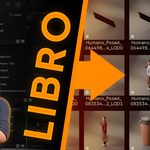
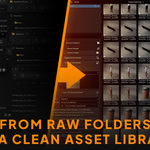
Turn scattered .blend files into a clean Blender Asset Browser library.
LIBRO is an Asset Library Studio for Blender designed to help you collect existing .blend files, organize them into a structured Asset Browser library, generate consistent previews, keep catalogs under control, and maintain the result over time.
Point LIBRO to your existing folders, collect your reusable Blender files, build a clean Asset Browser library, and keep it synchronized as your source folders evolve.
No cloud platform.
No content subscription.
No bloated file explorer.
Your own Blender assets, finally turned into a real drag-and-drop library.
What LIBRO helps you do
- Collect reusable .blend files from one or multiple source folders.
- Organize them into a cleaner managed library workflow.
- Build a Blender Asset Browser library from a dedicated interface.
- Generate consistent previews so assets are easier to recognize and reuse.
- Synchronize changes with Smart Incremental behavior and opt-in Watcher modes.
- Maintain the library with audits, repair tools, reports and logs.
LIBRO does not replace Blender’s Asset Browser.
It prepares, structures, updates and maintains the library used by the Asset Browser.
From raw folders to a clean Blender asset library
Most Blender artists already have valuable assets hidden across old projects, kitbash folders, client files and personal experiments. The problem is not the lack of assets. The problem is that they are hard to find, hard to preview and hard to reuse.
You probably already own a valuable Blender asset library.
It is just buried inside old projects, messy folders and forgotten experiments.
Your old folders stay your source material.
LIBRO helps turn them into a cleaner production-ready library workflow.
Collected, organized, previewed and ready to use.

A focused workflow inside Blender
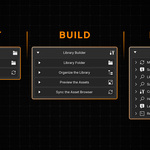
LIBRO is organized around three clear areas:
- Source Collector: collect .blend files from multiple source folders into a cleaner managed destination.
- Library Builder: build and update the actual Blender Asset Browser library.
- Library Manager: diagnose, resync, repair, rebuild previews, refresh catalogs and export reports over time.
Instead of scattering the workflow across Blender preferences, manual file copies, Asset Browser settings and catalog maintenance steps, LIBRO gives you a focused studio-like interface for building and maintaining your asset library.
Collect. Build. Manage.
All from a workflow designed specifically for Blender asset libraries.

Why this matters
A manual Asset Browser setup can work for small libraries. But once assets are spread across multiple folders, old projects, client archives and kitbash packs, the workflow becomes harder to maintain.
LIBRO is built for the moment when a folder full of useful .blend files needs to become something better: a browsable, organized and maintainable Blender library.
- No more guessing where a reusable asset is stored.
- No more random thumbnails or empty previews making assets hard to identify.
- No more manually rebuilding everything when only a few files changed.
- No more abandoned folder system that becomes outdated after the first cleanup.
LIBRO is not just about creating a library once.
It is about keeping that library alive as your work evolves.
Collect assets from multiple sources
Your assets are rarely stored in one perfect folder. They are often spread across old projects, client archives, kitbash packs, experiments and personal libraries.
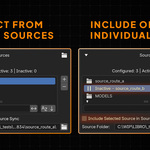
With the Source Collector, LIBRO can collect .blend files from one or multiple source folders, scan enabled sources recursively, and bring them together into a cleaner destination used by the Library Builder.
You can also include or exclude sources individually, so your collection pipeline stays flexible as your folders evolve. When Watcher mode is enabled, activating or deactivating sources can automatically update the destination folder to keep it aligned with the current source list.
Multiple sources. Recursive scans. Selective inclusion.
One cleaner library pipeline.

Pack external dependencies before collection
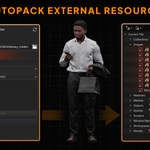
Some .blend files depend on external textures, linked data or additional reachable resources. Moving those files manually can easily break references and create missing asset issues later.
LIBRO’s Autopack workflow can inspect each collected .blend file and pack reachable external resources when unpacked dependencies are found before the file is collected into the destination used by the Library Builder.
Autopack does not turn loose texture folders into materials. It is designed to make collected .blend files safer when they already rely on external resources.
Collect cleaner .blend files while preserving the resources they need.

Control processing intensity for large libraries
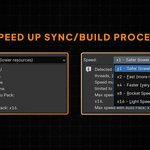
LIBRO includes separate Speed Multiplier controls for Source Collector and Library Builder operations, with levels such as x1, x2, x4, x8 and x16.
Use lower values when you want LIBRO to work more quietly while you continue using Blender. Use higher values when synchronization speed matters more than comfort.
LIBRO can also monitor available resources and cap the effective speed when the requested multiplier is too high for the current machine state.
Go slower when you need comfort.
Go faster when you need the library updated now.

Keep working while LIBRO handles heavy operations
Large libraries can take time to collect, synchronize, preview and rebuild. LIBRO is designed so that Source Collector and Library Builder operations do not freeze Blender’s interface.
You can keep working while LIBRO runs heavy operations in the background, instead of waiting for Blender to become responsive again.
When cancellation is available, LIBRO cancels active operations at the next safe checkpoint rather than interrupting work in a way that could damage the current process.
Your library can be processed without interrupting your creative flow.
Avoid full rebuilds with Smart Incremental sync
LIBRO is designed to avoid rebuilding everything every time a small change happens.
The Smart Incremental behavior compares what changed and processes only what needs to be updated. In the Source Collector, this is the default collection behavior. In the Library Builder, it is also the default Asset Browser Refresh Mode.
When you explicitly want to rebuild the entire LIBRO-managed Asset Browser library, you can still use Force Full Refresh.
Most of the time, LIBRO updates what changed instead of wasting time rebuilding everything.
Build the Asset Browser library from one dedicated UI
Preparing a Blender asset library manually often means jumping between file paths, Blender preferences, Asset Browser settings and catalog files.
LIBRO’s Library Builder brings the core library-building workflow into one dedicated interface. It creates and updates the library used by Blender’s Asset Browser, marks supported assets, refreshes catalogs, rebuilds previews and keeps the supported workflow inside LIBRO’s own UI.
Catalog strategies include:
- By Asset Type: organize objects, collections and materials by type.
- Mirror Source: follow the structure of your source folders.
- Root + Source: place the source hierarchy under a manual root catalog.
- Single Root: place everything under one clean root catalog.
No preference hunting.
No manual catalog maintenance.
No workflow guesswork.
Your library structure stays under control.

Choose how assets are imported
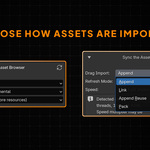
Different production workflows need different import behaviors. LIBRO’s Drag Import settings let you define how assets are made available through the Asset Browser.
- Append: import copied data from the LIBRO library into the current file.
- Link: import linked data-blocks from the LIBRO library.
- Append Reuse: reuse existing nested local data when importing from the LIBRO library.
- Pack: import linked data and pack it into the current file.
With Link, you can build scenes or environments using assets that remain connected to their library files, while LIBRO keeps the managed library updated.
Choose the import behavior that matches your production workflow.

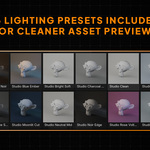
Generate consistent Studio previews
A library is only useful if you can understand it at a glance. Random thumbnails, empty previews and inconsistent screenshots make assets feel unfinished, even when the files themselves are valuable.
LIBRO includes a Preview Studio workflow to generate coherent previews with controlled lighting and framing, so your library feels clean, premium and easy to browse.
Preview modes include:
- Auto: keep preview submission issues as log-only diagnostics.
- Strict: surface preview submission issues as run warnings.
Better previews mean faster decisions, better navigation and higher perceived value.

Keep your library synchronized with Watcher modes
A library is not a one-time export. Files move. Folders change. Sources evolve. LIBRO can monitor your library workflow with opt-in Watcher modes designed for different levels of control.
- Signal Only warns you when files are added, modified, removed or become orphaned in the synchronized destination. This gives you visibility without forcing automatic changes.
- Strict Mirror is designed to keep the library destination aligned with the source logic used by LIBRO, while preserving the integrity of your original sources.
Watcher mode also helps keep the destination folder aligned when sources are activated or deactivated in the Source Collector, so the collected destination can follow the source list you actually want to use.
Choose passive warnings or strict synchronization depending on your pipeline needs.
Maintain and repair your library over time
Even a clean library can become outdated. Files can be moved, renamed, deleted or changed after the library has been built.
LIBRO’s Library Manager gives you dedicated maintenance tools to inspect the state of your library, refresh catalogs, rebuild previews, audit health and repair common issues.
Maintenance tools include:
- Manual Sync: synchronize sources, synchronize the library, refresh catalogs and rebuild previews.
- Route Validation: inspect source routes and identify setup issues.
- Catalog Maintenance: refresh catalog structure according to your selected strategy.
- Preview Maintenance: rebuild previews for the selected library scope.
- Health & Repair: audit the target library and repair missing, outdated or orphaned assets.
Build once.
Inspect, resync and repair whenever your library evolves.

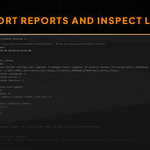
Export reports and inspect logs
When working with many files, you need more than a vague success message. You need to know what happened, what changed and what may require attention.
LIBRO includes Last Activity, Reports & Log and clean report export tools so you can inspect recent operations and keep a trace of synchronization or maintenance results.
This is especially useful when dealing with larger libraries, studio workflows or troubleshooting after a source folder has changed.
Reports can help review processed files, skipped files, marked assets, warnings, failures, preview issues, catalog issues and packaging actions.
Clear diagnostics.
Exportable reports.
Less guesswork.

A focused V1 built for reliability
LIBRO V1 is intentionally focused on .blend-based asset libraries. This keeps the first release clear, stable and useful for the core workflow: turning your existing Blender files into a clean Asset Browser library.
Supported in V1:
- .blend files
- Objects
- Collections
- Materials
- Multiple source folders
- Individual source include and exclude controls
- Recursive folder scan for enabled sources
- Batch processing
- Non-blocking Source Collector and Library Builder operations
- Smart Incremental synchronization
- Force Full Refresh
- Speed Multiplier controls
- Resource-governed effective speed cap
- Autopack for external dependencies
- Studio preview generation
- Preview modes: Auto and Strict
- Automatic catalog creation and refresh
- Catalog strategies: By Asset Type, Mirror Source, Root + Source and Single Root
- Drag Import modes: Append, Link, Append Reuse and Pack
- Opt-in Watcher modes
- Delete policies: Signal Only and Strict Mirror
- Automatic destination updates when sources are enabled or disabled with Watcher mode active
- Diagnostics, repair tools, reports and logs
Not included in V1:
- Cloud asset hosting
- Subscription-based content library
- Automated FBX/OBJ import
- Automatic texture-folder to material conversion
- Asset packs or ready-made content libraries
LIBRO V1 is focused on doing one workflow well: collecting existing .blend files, building a clean Asset Browser library, generating previews, organizing catalogs and maintaining the result over time.
LIBRO is for you if...
- You have accumulated years of .blend files and reusable assets.
- Your folders contain valuable content, but they are hard to browse.
- You want clean, consistent previews instead of random thumbnails.
- You want to collect assets from multiple sources into a cleaner workflow.
- You want to build and update an Asset Browser library without manual preference setup.
- You want a maintainable Blender library, not another abandoned folder system.
- You work alone, freelance, or inside a small team that needs a more repeatable asset workflow.
LIBRO is not for you if...
- You are looking for a cloud asset hosting platform.
- You want a subscription library of ready-made content.
- You mainly need automated FBX/OBJ import in V1.
- You need automatic texture-folder to material conversion in V1.
- You only want a generic file explorer outside the Blender Asset Browser workflow.
- You do not currently use .blend files as reusable asset sources.
Typical use cases
Cleaning years of old Blender projects
Add folders containing older .blend files, let LIBRO scan enabled sources and subfolders, collect them into a managed destination, build the Asset Browser library, generate previews and browse the result inside Blender.
Building a personal kitbash library
Collect kitbash assets from multiple folders, organize catalogs by type or source structure, generate consistent previews and make assets easier to drag into new scenes.
Preparing a small studio library
Use a shared asset organization strategy, choose consistent catalog rules, use Link or Append depending on production needs, and export reports for larger synchronization operations.
Keeping a library alive over time
Use Source Watcher, Library Watcher, Smart Incremental sync, Library Manager audits, preview rebuilding, catalog refresh and report exports to keep the library maintainable as your source folders evolve.
What happens after purchase?
After purchase, download the LIBRO add-on from your Superhive account, install it from Blender Preferences, open an Asset Browser area, and access LIBRO from the left panel.
You do not need to reorganize your entire library on day one. You can start with one source folder, build a first test library, generate previews, then expand the workflow as you gain confidence.
Start small.
Validate the workflow.
Then turn more of your old .blend files into a maintainable Blender Asset Browser library.
License options
Solo
For individual Blender artists, freelancers and solo creators who want to turn their own .blend files into a cleaner, reusable Asset Browser library.
- LIBRO add-on
- Commercial use for one user
- Standard support
- Access to updates according to the product update policy
- Launch price: $29
Tiny Studio - 5 Seats
For small teams and studios that want to standardize their Blender asset workflow across multiple users.
- Up to 5 users
- Commercial studio use
- Priority support
- Workflow guidance for small teams
- Designed for shared, repeatable Blender asset workflows
Medium Studio - 10 Seats
For larger teams that need more seats, faster support and setup guidance for shared production libraries.
- Up to 10 users
- Commercial studio use
- Priority support
- Setup guidance for team workflows
- Designed for teams maintaining larger Blender asset libraries over time
Large Studio - 15+ Seats
For larger teams, schools or companies that need a custom license, more seats or dedicated workflow discussion. Please contact me for a custom license.
Supporting the Blender ecosystem
LIBRO exists because Blender exists: an open creative tool built, improved and maintained by a global community of developers, artists, contributors and supporters.
By purchasing LIBRO, you also help support the Blender Development Fund.
A small share of my creator earnings goes back to the Blender ecosystem that makes this tool possible..

Public changelog
LIBRO is built specifically for Blender workflows and maintained for current Blender LTS usage.
This changelog will be updated publicly as LIBRO receives fixes, compatibility updates, workflow improvements and new features.
Version 1.0.0 - Initial release
- Initial release of LIBRO for Blender.
- Added Source Collector for collecting .blend files from one or multiple source folders.
- Added recursive scanning for enabled source folders.
- Added individual source include and exclude controls.
- Added managed Destination Library Folder workflow.
- Added Library Builder for creating and updating the Blender Asset Browser library.
- Added supported asset types: Objects, Collections and Materials.
- Added automatic catalog creation and refresh.
- Added catalog strategies: By Asset Type, Mirror Source, Root + Source and Single Root.
- Added Studio preview generation with Auto and Strict preview modes.
- Added Drag Import modes: Append, Link, Append Reuse and Pack.
- Added Smart Incremental synchronization.
- Added Force Full Refresh for complete Asset Browser rebuilds.
- Added Source Watcher and Library Watcher workflows.
- Added delete policies: Signal Only and Strict Mirror.
- Added Autopack workflow for reachable external dependencies.
- Added Speed Multiplier controls and resource-governed effective speed cap.
- Added non-blocking Source Collector and Library Builder operations.
- Added Library Manager tools for manual sync, route validation, catalog maintenance, preview maintenance, health audit and repair.
- Added Last Activity, Reports & Log and exportable run reports.