Is LIBRO an asset manager?
LIBRO is not designed as a generic file explorer or a simple asset manager. It is an Asset Library Studio for building, previewing, organizing and maintaining a clean Blender Asset Browser library from your existing .blend files.
Is LIBRO only useful for large asset libraries?
No. LIBRO is especially valuable for large or messy libraries, but it can also help smaller collections become cleaner, easier to browse and easier to maintain from the start.
Is LIBRO useful if my library is already organized?
Yes, if you want to improve maintainability, preview consistency, catalog structure or Asset Browser integration. LIBRO is especially useful when you want your existing organization to become a cleaner, more usable Blender library.
Can LIBRO export logs or reports?
Yes. LIBRO includes reporting and log tools so you can inspect recent operations and export reports when needed. This is useful for troubleshooting, larger libraries and studio workflows.
Can LIBRO rebuild previews later?
Yes. LIBRO includes preview maintenance tools so previews can be rebuilt when needed, either after changes or as part of library maintenance.
When should I use Link instead of Append?
Use Link when you want assets to stay connected to their original .blend files. This can be useful for synchronized production workflows where assets remain editable from their source files while being used across scenes.
What are Drag Import modes?
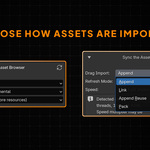
Drag Import controls how assets are brought into your scene from the Asset Browser. Depending on your workflow, LIBRO can support import behavior such as Append, Link or Pack.
How does LIBRO organize catalogs?
LIBRO can create and refresh catalogs according to different strategies, including organization by asset type, mirroring the source folder structure, or using a custom root structure.
What is Autopack used for?
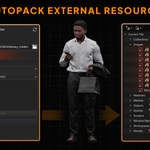
Autopack helps prepare .blend files that depend on external resources, such as textures or linked data. When needed, LIBRO can pack external dependencies before collecting the file into the managed destination used by the Library Builder.
Does LIBRO monitor system resources?
Yes. LIBRO monitors available resources during heavy operations to avoid unnecessary overload and reduce the risk of instability.
What does the Speed Multiplier do?
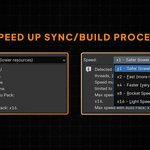
The Speed Multiplier lets you control how aggressively LIBRO processes collection or synchronization tasks, with values such as x1, x2, x4, x8 and x16. Lower values can favor comfort while working; higher values can help when you need faster synchronization.
Does LIBRO freeze Blender during large operations?
No. Source Collector and Library Builder operations are designed to avoid blocking Blender’s interface, so you can keep working while LIBRO handles heavier collection, synchronization or rebuild tasks.
Can I force a complete rebuild if needed?
Yes. In the Library Builder, you can use Force Full Refresh when you explicitly want to rebuild the entire LIBRO-managed Asset Browser library.
Can LIBRO avoid rebuilding everything every time?
Yes. LIBRO uses Smart Incremental behavior to update only what changed whenever possible. This helps avoid unnecessary full rebuilds and keeps synchronization faster and more comfortable.
What are Watcher modes?
Watcher modes let LIBRO monitor changes in your workflow.
Signal Only gives warnings when files are added, changed, removed or become orphaned.
Strict Mirror is designed to keep the managed destination aligned with the selected source logic, while preserving the integrity of the original sources.
What happens when I enable or disable a source?
If Watcher mode is enabled, LIBRO can update the destination folder when sources are activated or deactivated, helping the collected library stay aligned with the sources you actually want to use.
Can I include or exclude specific sources?
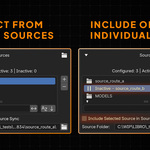
Yes. Sources added to the Source Collector can be individually included or excluded, so you can decide which folders should feed the current library workflow.
Can I use multiple source folders?
Yes. LIBRO’s Source Collector can work with one or multiple source folders and scan them recursively. This is useful if your assets are spread across old projects, kitbash folders, client archives or personal libraries.
Does LIBRO modify my original source folders?
No. LIBRO is designed around source integrity. Your source folders remain the reference material, while LIBRO collects, synchronizes and builds a managed library destination from them.
Does LIBRO replace Blender’s Asset Browser?
No. LIBRO works with Blender’s Asset Browser workflow. Its role is to help you build, structure, preview and maintain the library that the Asset Browser will use.
What file formats are supported in V1?
LIBRO V1 focuses on .blend files. It detects and processes objects, collections and materials.
Does LIBRO import FBX or OBJ files?
Not in V1. Automated FBX/OBJ import is not part of the first release. LIBRO V1 is focused on reliable .blend library creation.
Does LIBRO convert texture folders into materials?
Not in V1. Texture-folder material conversion is not included in the first release.
Does LIBRO include assets or content?
No. LIBRO does not sell a content library. It helps you organize and transform your own existing Blender assets into a clean library.
Does LIBRO use cloud sync?
No. LIBRO V1 does not include cloud sync or collaborative network libraries.
Does LIBRO use AI tagging?
No.
Can LIBRO generate previews automatically?
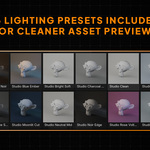
Yes. LIBRO includes automated preview generation with a Studio preset designed to create more consistent thumbnails.
Can I keep my library updated if my folders change?
Yes. LIBRO includes maintenance tools, diagnostics and an opt-in Watcher mode to help detect source changes and keep your library synchronized.
Is LIBRO made for teams?
LIBRO is primarily designed for solo artists, freelancers and small studios. Studio licenses are available for teams that need multiple seats.
Which Blender version is supported?
LIBRO is maintained for the current supported Blender LTS target at launch. The exact supported Blender versions are listed in the product details and documentation.
 Marcø
Marcø