Light Linker — Light Linking Made Easy
 Oculis Studio





What does Light Linker actually do?
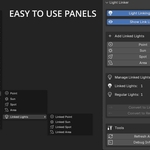
Light Linker automates Blender’s light linking workflow. Instead of manually setting up collections and links, you select an object, add a linked light, and the addon handles the linking so that light affects only what you chose.
Is this using Blender’s real light linking system?
Yes. Light Linker works directly with Blender’s native light linking. Nothing hacky, nothing fake — just faster control over the system that’s already built into Blender.
Will it mess up my existing scene?
No. It’s non-destructive. It only affects lights you create or convert through the addon. Your existing lighting setup stays untouched unless you choose to change it.
Do I need technical knowledge to use it?
No. That’s the point. The addon removes the technical overhead so you can focus on lighting creatively instead of managing links.
Can I still edit the links manually after?
Yes. Everything remains editable using Blender’s native tools. Light Linker just gets you there faster.
Is it good for large scenes?
That’s where it shines. The more objects and lights you have, the more time it saves and the more control you gain.
$4.99
 Included
Includes 12 months of
- Support from Oculis Studio
- Product updates
Extend this product’s Support Period +12 months: 50% of product price
Have questions before purchasing?
Login to message
| Blender Extension Compatible | Yes |
| Published | 8 months ago |
| Blender Version | 4.2 - 5.0 |
| Extension Type | Add-on |
| Render Engine Used | Cycles, Eevee |
| License | GPL |
Discover more products like this
cinematography efficiency scene organization Workflow Automation lighting setup studio-workflows light-linking Time-saving lookdev production tools rendering Lighting