Lk Project Locker
 Lewiskratos


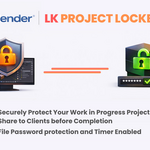
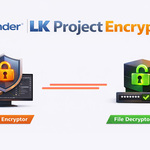
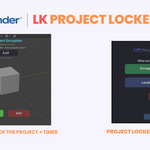
📖 LK Project Encryption - Documentation
Complete Guide for Creators & Customers
📋 Contents
• Installation
• How to Encrypt (For Creators)
• What Gets Generated
• How to Decrypt (For Customers)
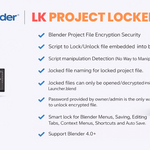
• Security Features
• Troubleshooting
⬇️ Installation
Method 1: Drag & Drop (Easy)
Simply drag LK_Project_Encryption_Addon_v1.1.0.zip into Blender window
Method 2: Traditional
1. Go to Edit → Preferences → Add-ons
2. Click "Install..." button
3. Select the ZIP file
4. Enable the addon by checking the box
✅ Look for [🔒 LK Encrypt] button in the 3D Viewport header
🔐 How to Encrypt (For Creators)
Step 1: Launch Encryptor
Click [🔒 LK Encrypt] in the 3D Viewport header
Step 2: Choose File
• Encrypt Current Blend File (if saved)
• Or Locate Other .blend File to browse
Step 3: Configure Settings
• Set Password (min 4 characters)
• Set Time Limit (1-1440 minutes)
• Rename output file (optional)
Step 4: Click START
Wait for encryption to complete!
📁 What Gets Generated
After encryption, a new folder is created containing:
| YourProject.locked | Encrypted file (give to customer) |
| Launcher_BlenderX.X.blend | Auto-selected for your Blender version! |
| YourProject_PASSWORD.txt | Password reference (keep secure!) |
✅ Just zip the folder and send to your customer!
🔓 How to Decrypt (For Customers)
Step 1: Open Launcher
Open Launcher_BlenderX.X.blend in Blender
Step 2: Browse for File
Click BROWSE and select the .locked file
Step 3: Enter Password
Type the password provided by the creator
Step 4: View Content
Content loads with time limit - enjoy!
✅ Can: View, rotate, zoom, render (F12)
❌ Cannot: Save, export, edit mesh, access scripts
🛡️ Security Features
| 🔒 SHA-256 Encryption | ⏱️ Time-Limited Access |
| 📝 Read-Only Mode | 🚫 Edit Blocking |
🛡️ LK Active Defense System v1.0
Supported Blender Versions
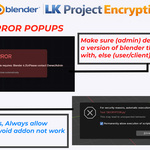
⚠️ Troubleshooting
"Version Mismatch" Error
Use Blender version matching or newer than the Launcher file
"Invalid Password"
Check for typos - passwords are case-sensitive
Button Not Showing
Make sure you're in a 3D Viewport and the addon is enabled
Need Help?
Contact: linktr.ee/lewiskratos
LK Project Encryption v1.1.0
Copyright © 2026 Lewis Kratos. All Rights Reserved.
Have questions about this product?
Login to message
| Blender Extension Compatible | Yes |
| Published | 8 months ago |
| Blender Version | 4.0 - 5.0 |
| Extension Type | Add-on |
| Render Engine Used | Cycles, Eevee |
| License | GPL |

Discover more products like this
asset encrypt addon blend encryption assetmanagement character projects 2026