A bridge from Blender to Marmoset Toolbag for baking and look-dev. Tag your high- and low-poly meshes, and the bridge exports the FBX, writes a version-tolerant bake script and opens a ready baking scene in Toolbag — with the baker already configured. It reuses a running Toolbag (and launches the exact version you pick), and can pull the finished maps back onto your Blender mesh as a Principled material. Nothing needs installing on the Marmoset side.
Requirements - please read before buying
-
Windows only. The add-on detects and launches Marmoset Toolbag through Windows paths and processes. macOS and Linux are not supported.
-
Blender 3.3 - 5.2 - Extension on 4.2+, classic add-on on 3.3-4.1.
-
Marmoset Toolbag is required and sold separately. You need your own licensed copy from Marmoset. No Marmoset Toolbag licence is included with this product - it is the Blender-side bridge only, and is not affiliated with, endorsed by, or a reseller of Marmoset.
-
skipped rather than failing the bake.
-
Network: none. Blender and Marmoset Toolbag exchange files on your own machine - the add-on opens no network connection.
Installation
Blender 4.2+ (Extension): Edit ▸ Preferences ▸ Add-ons ▸ drop-down ▸ *Install from Disk…* → pick universal_bridge_marmoset-x.x.x-blender4.2-5.2.zip, then enable it. Blender 3.3–4.1: Edit ▸ Preferences ▸ Add-ons ▸ *Install…* → pick universal_bridge_marmoset-x.x.x-blender3.3-4.1.zip.
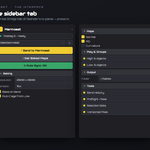
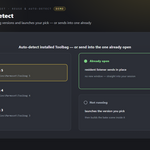
The panel is in the 3D Viewport sidebar (press N) under the Universal Bridge tab, in the Marmoset section. Open the add-on preferences and check the Toolbag version dropdown — it lists the installs found on this machine; pick one, or set toolbag.exe by hand for a custom location.
Getting started
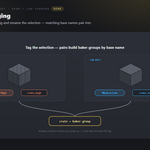
- Select your low-poly and click Mark as Low; select the high-poly and click
Mark as High. Matching base names pair into one baker group.
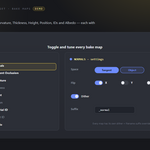
- In the Maps group, tick the maps you want and set the resolution / format
in Output.
- Click Create Bake Scene in Marmoset. The FBX, bake script and (if you turn
on Bake Immediately) the baked maps land in the bake folder.
- Back in Blender, select the low-poly and click Import Baked Maps to build a
material from the results.
Poly roles (High / Low)
-
Mark as High / Mark as Low — tag the selected meshes and rename them
with _high / _low. The header and the Poly group show the current count.
-
Untagged meshes are matched by suffix too (
_high/_hi/_h, _low/_lo/_l), so an
already-named set bakes without tagging.
-
Clear Role — remove the bake role from the selection.
-
Baker groups are formed by base name (suffix stripped), so
crate_high and
crate_low bake together.
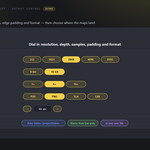
Output
-
Res — 512, 1024, 2048, 4096 or 8192.
-
Bits — 8-bit or 16-bit output.
-
Samples — 1×, 4× or 16× anti-aliasing.
-
Padding — edge padding in pixels (0–64).
-
Format — PSD, PNG, TGA or EXR.
-
Bake Folder — Browse to a folder, or leave blank for a
bakes folder next
to the saved .blend (a temp folder while the file is unsaved). Default restores the blank setting; the folder icon opens it. A relative // path can follow the project when it moves.
-
Bake Name — base name for the FBX, script and maps (e.g.
T_Bucket →
T_Bucket_normals.png). Blank uses the .blend name. Name From Low-poly fills it from the low-poly mesh with its suffix trimmed.
-
Save File — a full path that overrides the folder and name above; the
Format is used when no extension is typed.
Bake Maps
Each map has an on/off toggle and its own options; enabled maps are written into the Toolbag baker:
| Map |
Options |
| Normals (tangent) |
Flip X / Y / Z |
| Normals (Object) |
Flip X / Y / Z |
| Ambient Occlusion |
Rays, Floor occlusion, Ignore Groups |
| Curvature |
Strength |
| Thickness |
Rays |
| Height |
Inner / Outer distance |
| Position |
— |
| Material ID |
— |
| Object ID |
— |
| Albedo |
— |
Every map also has Dither and a Suffix override (blank = Marmoset's default filename suffix).
Modifiers
-
Apply (High / Low) — bake modifiers such as subdivision or bevel into each
role on export. Turn a side off to keep, for example, the low-poly cage exactly as modeled.
-
When Apply is on, a per-modifier picker lists the active mesh's modifiers with a
checkbox each — only ticked modifiers are baked; All / None set them at once.
Create Bake Scene
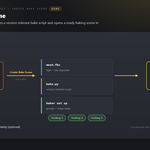
Create Bake Scene in Marmoset exports the tagged meshes to FBX, writes a bake script and opens a ready baking scene in Toolbag:
-
The script is compatible with Toolbag 3, 4 and 5 — settings a build doesn't
support are skipped instead of failing.
-
If Toolbag is already running, the meshes are sent into it with no new window
(via a resident listener registered on Toolbag's periodic-update callback); otherwise the bridge launches the version you picked and keeps it open for reuse.
-
Fresh Scene in Marmoset starts a new Toolbag scene rather than adding to the
current one. Bake Immediately runs the bake as soon as the scene is built.
Send Objects
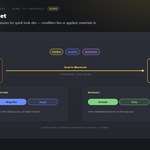
For quick look-dev without a bake, the Send Objects panel imports the selected meshes, empties and armatures into Toolbag (import only):
-
Apply Modifiers — bake modifiers into the mesh, or keep them live.
-
Send Materials — include materials and embed textures, or strip them.
-
Save File — export the sent objects to a specific FBX, or use a temp file.
Import Baked Maps
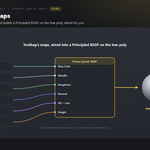
Import Baked Maps looks in the bake folder (or the Save File's folder) for the maps Toolbag wrote and builds a Principled BSDF material on the active low-poly mesh — base colour, metalness, roughness, normal (through a Normal Map node), height (through Displacement), emission, alpha and AO (multiplied into base colour). Files are matched by filename suffix.
Preferences
-
Toolbag — the version dropdown, a Detect Toolbag rescan, the active
install, and a manual Toolbag Executable path for a custom location.
-
Bake Output Folder — the same folder setting as the panel.
-
Show Marmoset Toolbag Panel — hide the section from the tab if you don't need it.
Shared Universal Bridge tools
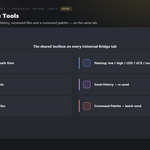
Registered once and shared with every other bridge you own, on the same tab: Preflight (scale/rotation, UVs, materials, n-gons, non-manifold) with safe fixes (apply transforms, Smart UV Project), a Naming convention helper (low / high / LOD / UCX / socket), Selection Sets, Send History with re-send, Versioned Files, and a Command Palette with Send Each Collection for batch sends.
Troubleshooting
-
Toolbag not found → set or detect the executable in the add-on preferences;
the bridge scans Program Files\Marmoset.
-
No high/low meshes → use Mark as High / Mark as Low first, or name
meshes with _high / _low.
-
Marmoset needs a low-poly to bake onto → tag at least one low-poly mesh.
-
No baked maps found → check the bake folder shown under the Output group, and
that the bake actually ran (turn on Bake Immediately or bake in Toolbag).
-
Two versions installed → pick the one you want in the Toolbag dropdown; the
bridge launches exactly that build.
Button icons
The buttons in the bridge panels use a drawn icon set rather than Blender glyphs borrowed from elsewhere. Preferences ▸ Button Icons controls it:
-
Brand Colours (default) — each bridge in its own colour.
-
Mono — every icon in one accent colour you pick.
-
Blender Built-ins — no custom icons at all, exactly as before.
Colour-code Status keeps the link and modifier icons green / amber / red, where the colour is the message; turn it off and they take your accent too. Blender's own glyphs are kept wherever they are already the familiar thing — the trash can, the folder, the warning triangle — so the panels still look like Blender.
Support
Join the Discord: https://discord.gg/SuSqbZMDk5 — include your Blender and Toolbag versions.
Part of the Universal Bridge line. Works on its own, and the free Universal Bridge Manager hub add-on is included with your purchase.
 Tachyon Studio