Matshelf
 Haseeb Ahmed



Does the search work in real time?
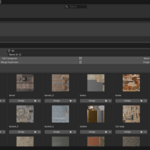
The search field uses TEXTEDIT_UPDATE so the gallery filters instantly as you type — no need to press Enter.
Can I hide the Merge & Purge buttons if I don't need them?
Yes. In the addon Preferences, uncheck "Show Merge & Purge Tools" for a cleaner, minimalist UI.
Will "Merge Duplicates" break my materials?
No. It uses Blender's built-in user_remap() function to safely redirect all users of the duplicate (e.g. Wood.001) to the original (Wood)
What happens when I click "Assign" in Edit Mode?
It assigns the material only to the faces you have selected. If the material isn't already in the object's material slots, it gets added automatically.
Does it work with linked materials from other files?
Yes. All materials loaded in the scene local or linked will appear in the gallery. The Purge Unused tool also has a separate option for linked data-blocks.
Can I use this in the Shader Editor instead of the 3D Viewport?
Yes. Go to the addon Preferences and change the Panel Location to "Shader Editor". The panel will move to the Shader Editor sidebar.
Will my categories be saved when I close Blender?
Yes. Categories are stored inside your .blend file, so they persist across sessions as long as you save your file.
Does this addon come with materials?
No. MatShelf is a management tool — it displays and organizes the materials that already exist in your scene. It works with any materials you create or import.
$10
Have questions about this product?
Login to message
| Blender Extension Compatible | Yes |
| Published | 3 months ago |
| Blender Version | 4.2 - 5.2 |
| Extension Type | Add-on |
| Render Engine Used | Cycles, Eevee |
| License | GPL |
