 3Z Axis

Measure Distance Pro
Easily measure distances between vertices, edges, or faces in Blender. Works within a single object or across multiple objects in the 3D viewport.
Perfect for precision modeling and accurate measurements in architectural, technical, and organic designs.

New Features:
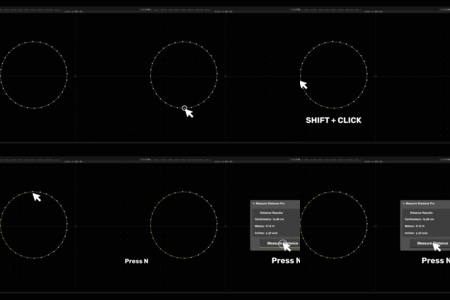
Unlimited Vertex Selection – Select any number of vertices (3, 5, 100+) for accurate path measurement.
Curve Measurement Support – Measure curved paths like cables, pipes, and organic shapes.
Smart Path Calculation – Optimizes measurement routes automatically with endpoint detection.
Multi-Object Measurement – Seamlessly measure distances across multiple objects.
Bézier Curve Measurement: Accurately measure the length of Bézier Curves — ideal for cables, pipes, and organic shapes. (Bézier only; NURBS Path and Path Curve not supported.)
Bézier Curve Measurement: Accurately measure the length of Bézier Curves — ideal for cables, pipes, and organic shapes. (Bézier only; NURBS Path and Path Curve not supported.)
Features
Measure distances in Edit Mode between vertices, edges, and faces.
Supports multiple mesh objects for total distance calculation across objects.
Units available in Centimeters, Meters, and Inches, with live updates in the panel.
Simple and intuitive interface within Blender’s UI for easy access and results.
Smart error handling with notifications if no mesh is selected or if you're not in Edit Mode.
Supports multiple mesh objects for total distance calculation across objects.
Units available in Centimeters, Meters, and Inches, with live updates in the panel.
Simple and intuitive interface within Blender’s UI for easy access and results.
Smart error handling with notifications if no mesh is selected or if you're not in Edit Mode.
Perfect For:
- Precise architectural modeling
- Organic and technical modeling
- Measuring cables and wire lengths
- Organic and technical modeling
- Measuring cables and wire lengths
- Multi-part distance checks
