 3Z Axis

What is Measure Distance Pro for Blender?
Measure Distance Pro is an advanced addon for Blender that allows users to easily measure distances between selected elements (vertices, edges, or faces) within one or more mesh objects in the 3D viewport. It is designed to provide both simple and complex distance measurements with precision and ease.
How do I install Measure Distance Pro in Blender?
To install Measure Distance Pro, simply download the addon file and go to Edit > Preferences > Add-ons in Blender. Click on the Install button, select the downloaded file, and activate the addon by checking the box next to its name.
What Blender versions are compatible with Measure Distance Pro?
Measure Distance Pro is compatible with Blender 2.8 and above.
Can I measure distances across multiple mesh objects?
Yes! Measure Distance Pro allows you to measure distances across multiple mesh objects in your scene, making it perfect for complex models or large scenes.
Does Measure Distance Pro support measuring along curves?
Yes! The addon supports measuring along curved paths, such as cables, pipes, and organic shapes, making it ideal for both technical and organic modeling.
Can I select multiple vertices to measure distances?
Absolutely! Measure Distance Pro removes the limitation of selecting only two vertices. You can now select multiple vertices (3, 5, 10, or more) and measure the distances between them with accuracy.
What units of measurement does Measure Distance Pro support?
Measure Distance Pro supports multiple units, including Centimeters, Meters, and Inches. You can easily switch between them, and the results are updated dynamically in the Blender panel.
Does Measure Distance Pro work on macOS or Linux?
Yes! Measure Distance Pro works on Windows, macOS (requires pngpaste), and Linux (requires xclip or wl-paste).
How do I measure the distance between two vertices?
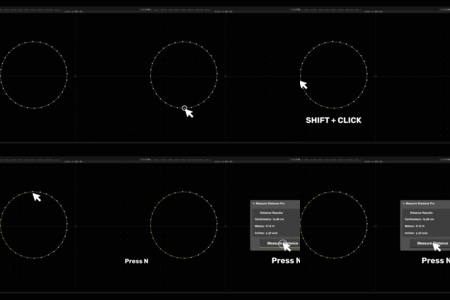
To measure the distance between two vertices, enter Edit Mode in Blender, select the vertices, and activate the Measure Distance Pro tool. The distance will be displayed in the panel within Blender.
Is there any error handling in Measure Distance Pro?
Yes, Measure Distance Pro includes error handling. If no mesh object is selected or if you're not in Edit Mode, the addon will notify you and prompt you to correct the issue.
Is Measure Distance Pro suitable for architectural and product design?
Yes, Measure Distance Pro is perfect for architectural visualizations, product design, technical modeling, and other industries requiring accurate measurements.
Can I use Measure Distance Pro for organic modeling?
Yes, Measure Distance Pro is ideal for both technical and organic modeling. It allows you to measure along complex, curved surfaces, making it suitable for organic shapes and designs.
How do I contact support if I need help?
For any questions or support inquiries, you can contact us through our support page. We offer ongoing updates and assistance to ensure a smooth experience with Measure Distance Pro.
$2
Have questions about this product?
Login to message

Discover more products like this
distance cm ruler Measure Distance measure m measurement inch